21
DVD Menu OptionsDVD Menu Options
DVD Menu OptionsDVD Menu Options
DVD Menu Options
Caution: The content of this chart is for reference only. If something has changed,Caution: The content of this chart is for reference only. If something has changed,
Caution: The content of this chart is for reference only. If something has changed,Caution: The content of this chart is for reference only. If something has changed,
Caution: The content of this chart is for reference only. If something has changed,
please take the actual display for standard. please take the actual display for standard.
please take the actual display for standard. please take the actual display for standard.
please take the actual display for standard.
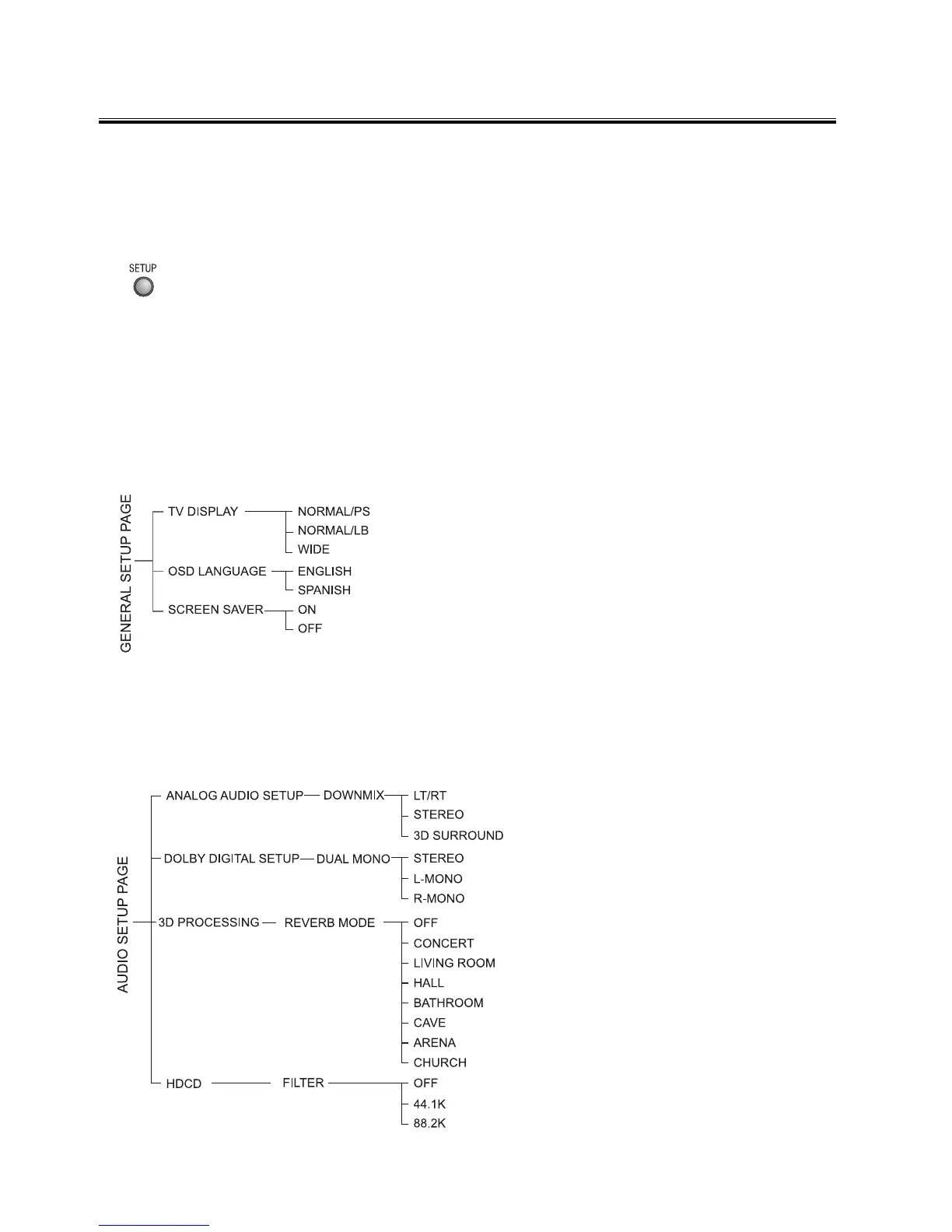
Menu function setupMenu function setup
Menu function setupMenu function setup
Menu function setup
If you want to setup the function of this unit, please press the function setting button
(
SETUPSETUP
SETUPSETUP
SETUP) to display the DVD setup menu, then use the S,T,W,X buttons and
OKOK
OKOK
OK button. Press the function setting button (
SETUPSETUP
SETUPSETUP
SETUP) again to exit the function
setting main menu.
Note:Note:
Note:Note:
Note: If the item displays in gray, that means that it can’t be setup and there isn’t
this function in the disc.
General Setup PageGeneral Setup Page
General Setup PageGeneral Setup Page
General Setup Page
TV DisplayTV Display
TV DisplayTV Display
TV Display
This menu allows the user to select the aspect ratio
of the TV to be connected.
OSD LanguageOSD Language
OSD LanguageOSD Language
OSD Language
This menu allows the user to select the language
for the on-screen display.
Screen SaverScreen Saver
Screen SaverScreen Saver
Screen Saver
Set the screen saver to on/off.
Audio Setup PageAudio Setup Page
Audio Setup PageAudio Setup Page
Audio Setup Page
Analog Audio SetupAnalog Audio Setup
Analog Audio SetupAnalog Audio Setup
Analog Audio Setup
When the disc has Dolby Pro Logic
stereo, you can choose LT/RT (Left/
Right audio) or Stereo or 3D Surround
(Virtual Surround Sound) mode to play
this disc.
Dolby Digital SetupDolby Digital Setup
Dolby Digital SetupDolby Digital Setup
Dolby Digital Setup
Stereo......Left channel is output from
the left speaker, and right channel is
output from the right speaker.
L-MONO..Left channel is output from
the front left and right speakers.
R-MONO..Right channel is output from
the front left and right speakers.
3D Processing3D Processing
3D Processing3D Processing
3D Processing
This setting provides following sound


 To Next Page