23
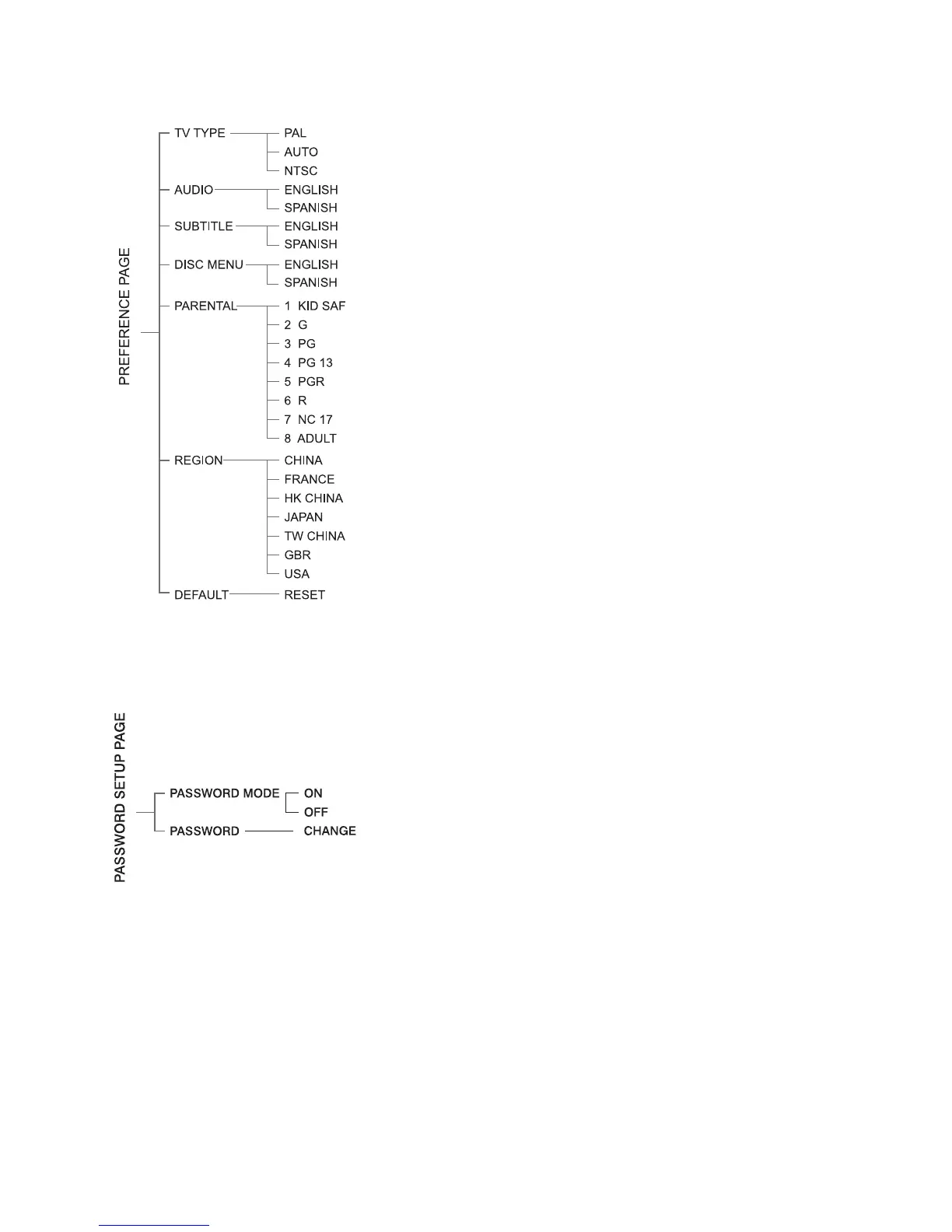
Preference PagePreference Page
Preference PagePreference Page
Preference Page
TV TTV T
TV TTV T
TV T
ypeype
ypeype
ype
This menu allows the user to select the colour
system.
Audio, Subtitle, Disc MenuAudio, Subtitle, Disc Menu
Audio, Subtitle, Disc MenuAudio, Subtitle, Disc Menu
Audio, Subtitle, Disc Menu
This menu allows the user to select the
language.
ParentalParental
ParentalParental
Parental
Setup this system when playing disc which
had age control.
RegionRegion
RegionRegion
Region
This menu allows the user to select the
region.
DefaultDefault
DefaultDefault
Default
Restore to factory setting.
Note:Note:
Note:Note:
Note: Preference features can be selected only
during “NO DISC” condition or full STOP mode.
Password Setup PagePassword Setup Page
Password Setup PagePassword Setup Page
Password Setup Page
Password ModePassword Mode
Password ModePassword Mode
Password Mode
Select this item to set new password for this
unit, follow the screen’s indication and enter
a password.
PasswordPassword
PasswordPassword
Password
The original password is 1234.


 To Next Page