5
ConnectionConnection
ConnectionConnection
Connection
Caution:Caution:
Caution:Caution:
Caution: Please turn off all the equipment power before connecting.
Connecting the TVConnecting the TV
Connecting the TVConnecting the TV
Connecting the TV
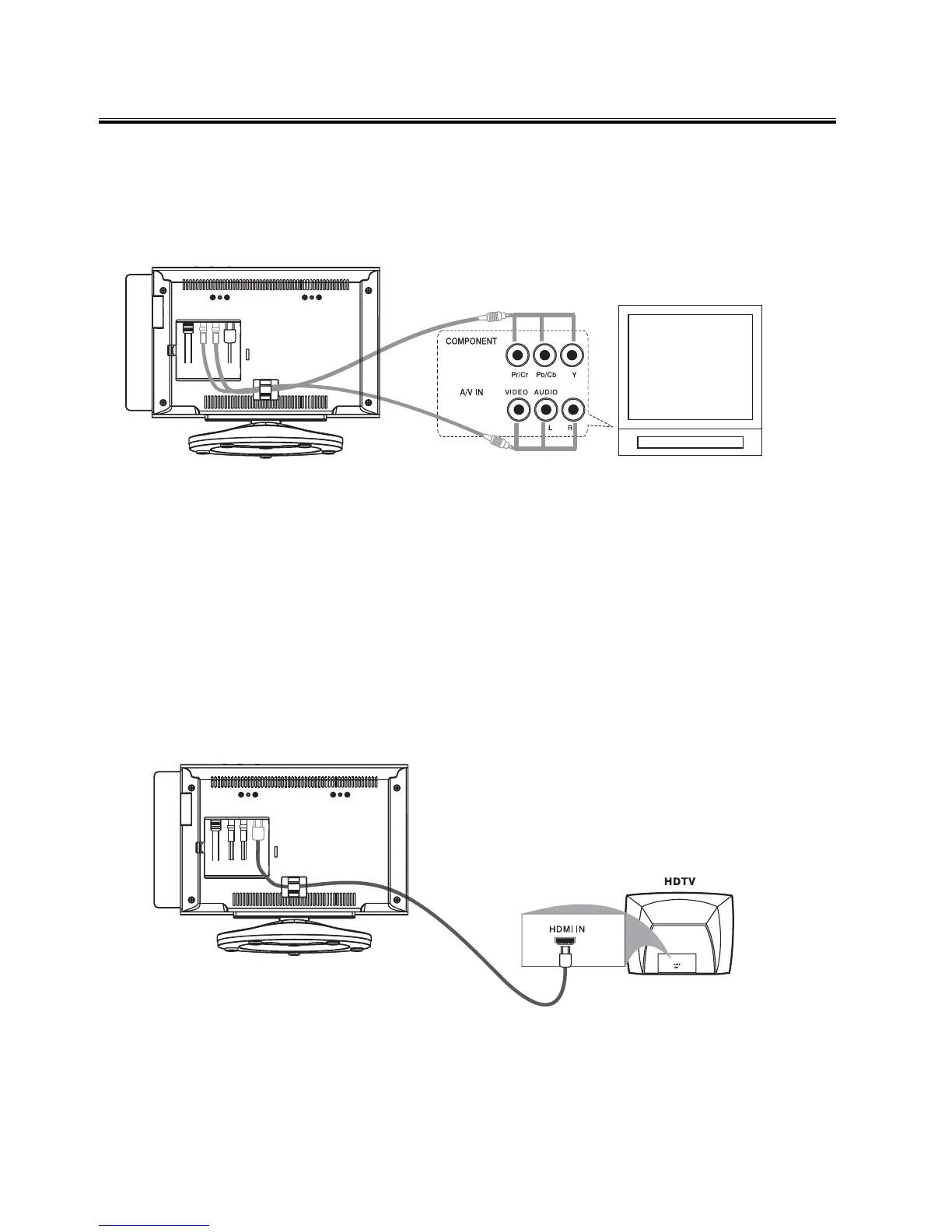
1. This DVD player has video output mode, you can choose it to connect with the TV terminal.
2. If your TV has component input terminal, then you can use the signal connecting cable to
connect with the DVD player’s component output terminal. By doing so, the picture will be
more clear.
3. To avoid affecting the picture output, do not connect video, component, HDMI at the same
time.
Connecting to a TV with HDMI jackConnecting to a TV with HDMI jack
Connecting to a TV with HDMI jackConnecting to a TV with HDMI jack
Connecting to a TV with HDMI jack
Use a HDMI cable to connect the HDMI jack on the DVD Player to HDMI IN on a HDMI
compatible device (e.g.: TV, Projector, Adaptor).
Note:Note:
Note:Note:
Note: If you use the HDMI, make sure that “HDMI SETUP” is set to “ON”. Please see “HDMI
SETUP” for further details.
Terminal board for the DVD player
Terminal board for the DVD player
TV


 To Next Page