12
Remote Control
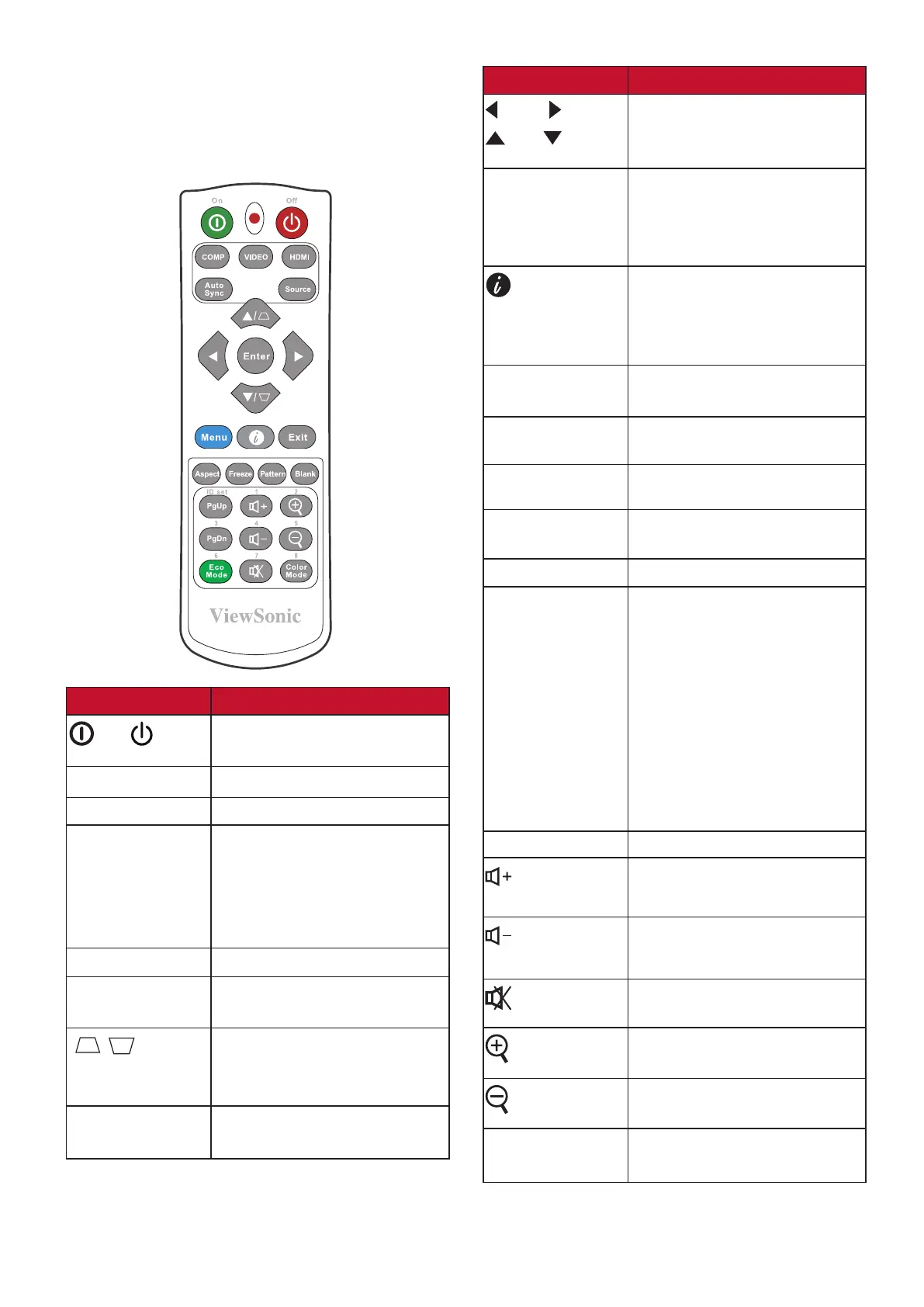
Controls and Functions
Button
Description
On/ Off
Toggles between standby
mode and Power On.
COMP
No function.
VIDEO
No function.
HDMI
Selects the source from the
HDMI port(s) for display.
Press this button again to
switch between the two (2)
ports if available.
Auto Sync
No function.
Source
Displays the source
selection bar.
[ / ]
Keystone Keys
Manually corrects distorted
images resulting from an
angled projection.
Enter
Enacts the selected OSD
Menu item.
Button
Description
Left/ Right
Up/ Down
Selects the desired
menu items and makes
adjustments.
Menu
Turns on/off the On-Screen
Display (OSD) Menu or
goes back to previous OSD
Menu.
(INFORMATION)
Displays the INFORMATION
menu. Displays the HELP
menu by a long press for 3
seconds.
Exit
Exits and saves menu
settings.
Aspect
Displays the aspect ratio
selection bar.
Freeze
Freezes the projected
image.
Pattern
Displays embedded test
pattern.
Blank
Hides the screen picture.
PgUp (Page
Up)/
PgDn (Page
Down)
Operates your display
software program
(on a connected PC) which
responds to
page up/down commands
(like Microsoft
PowerPoint).
NOTE: Only available
when a PC input
signal is selected.
Eco Mode
Selects the Eco mode.
(Volume
Up)
Increases the volume level.
(Volume
Down)
Decreases the volume level.
(Mute)
Toggles audio between on
and off.
Magnifies the projected
picture size.
Reduces the projected
picture size.
Color Mode
Displays the color mode
selection bar.







 To Next Page