51
C
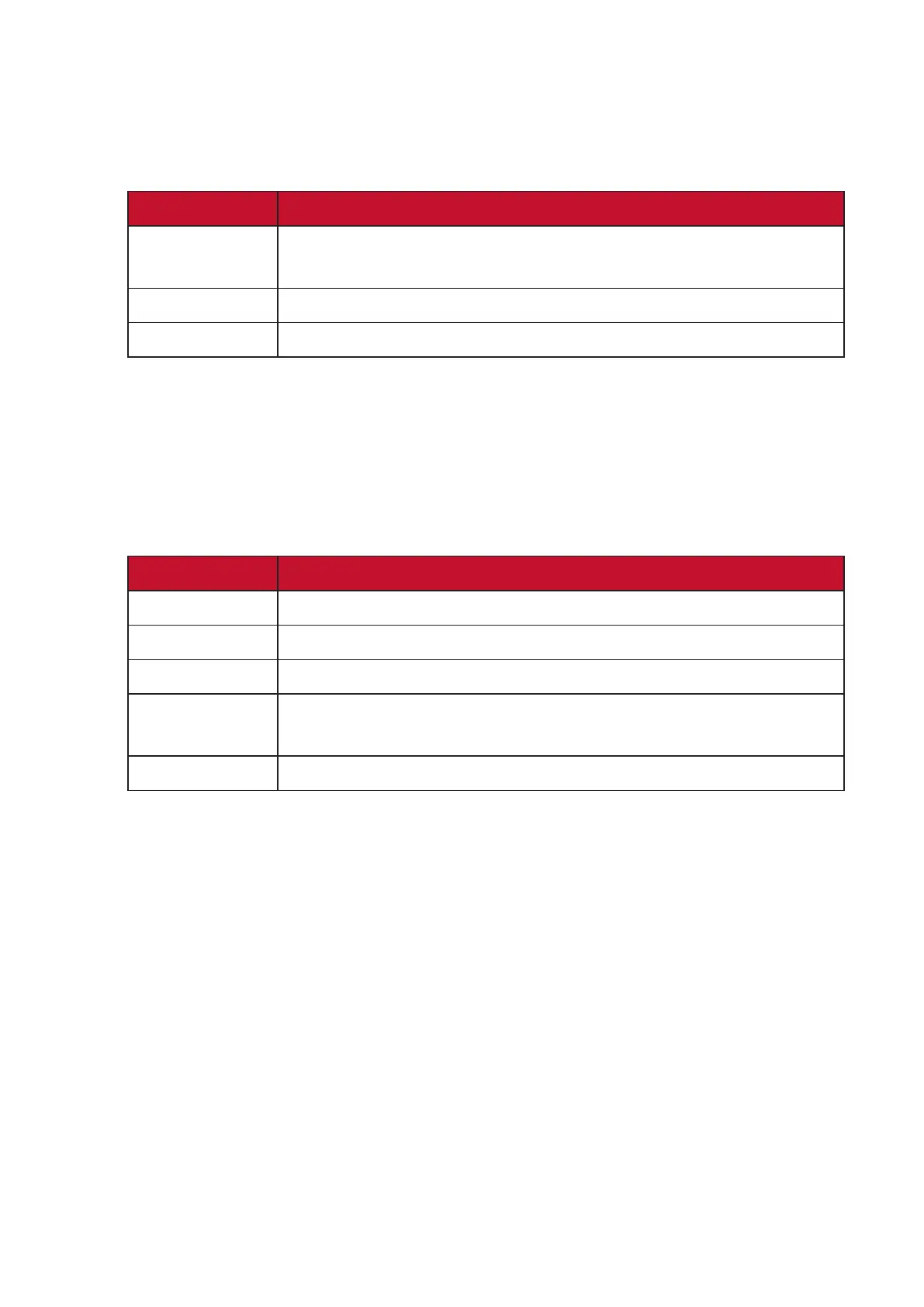
Color Range
Themonitorcandetecttheinputsignalcolorrangeautomacally.Youcan
manuallychangethecolorrangeoponstotthecorrectcolorrangeifthe
colors are not displayed correctly.
Opons Descripon
Auto
Themonitorautomacallyrecognizesthecolorformat
and black and white levels.
Full Range The color range of black and white levels are full.
Limited Range The color range of black and white levels are limited.
Color Space
Allows users to choose which color space they would like to use for monitor
color output (RGB, YUV).
Color Temperature
Allowsuserstoselectspeciccolortemperaturesengstofurther
customize their viewing experience.
Panel Default Panel original status
sRGB Precise color gamut and gamma of the sRGB standard.
Bluish Set the color temperature to 9300K.
Cool Set the color temperature to 7500K.
Nave
Naveisadefaultcolortemperature.
Recommend for general graphic design and regular use.
Warm Set the color temperature to 5000K.
Contrast
Adjuststhedierencebetweentheimagebackground(blacklevel)andthe
foreground (white level).
F
Fine Tune
Improve distorted images caused by an analog signal.







 To Next Page