22
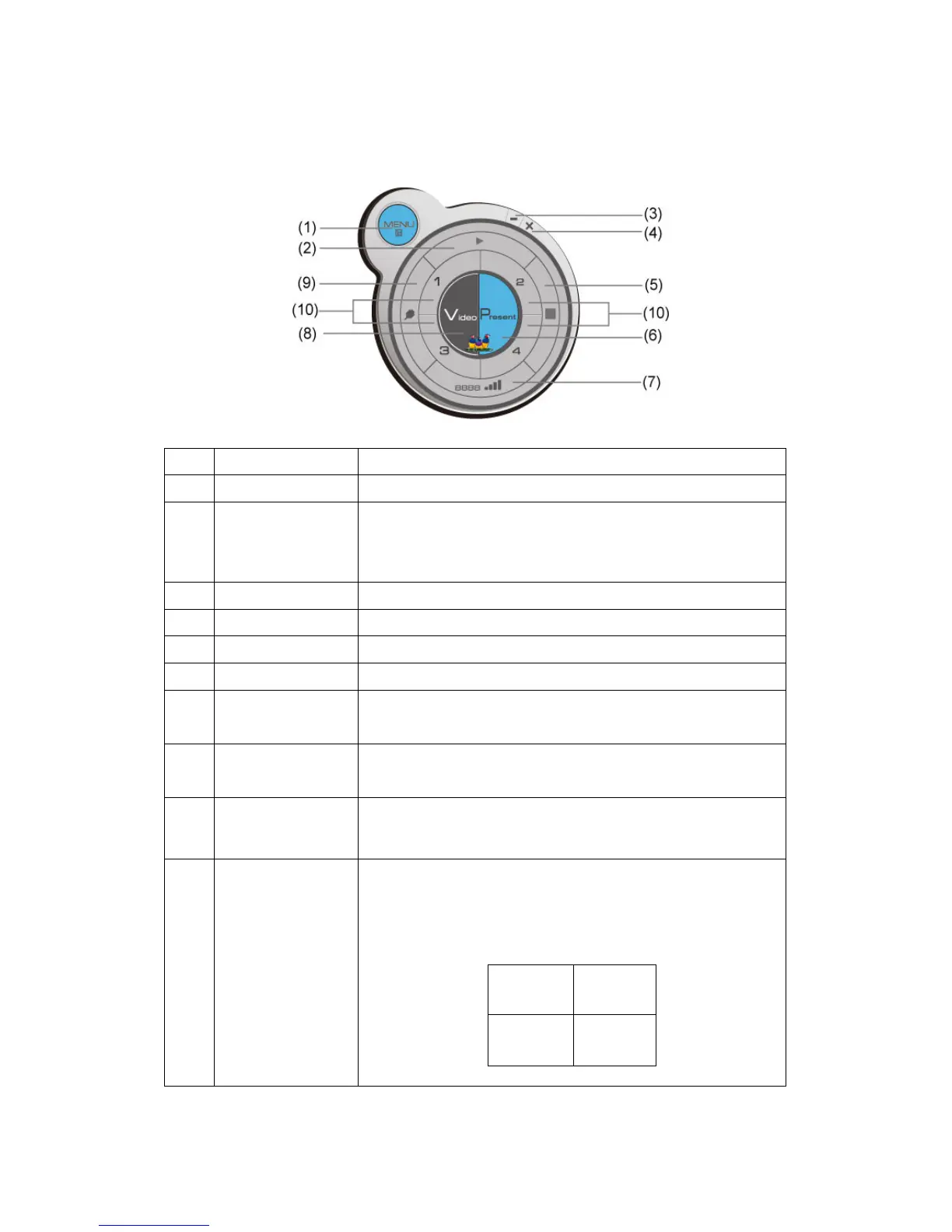
3-2-1 Use icon on application software
No. Name Function Description
1 Menu Access menu list.
2 Play / Pause Start / pause presentation. When pausing a
progressing presentation, the displaying image will
freeze; press play button again to resume
3 Minimize Minimizes Application Software window
4 Close Closes Application Software window
5 Stop Stop a progressing presentation
6 Present Switches to present mode
7 Login code /
Signal
Displays login code (4-digit number)
and wireless signal strength
8 Video playback Starts video playback mode
9 VGA switch Switch display source (display the image from your
computer’s display or from ‘VGA IN’ connector)
10
‘1’ to ‘4’ Quarter split display control. Click number 1 to 4 to
start / stop presentation of corresponding quarter
split display area.
1 2
3 4
WPG-350ViewSonic



 To Next Page