8
Remote Control
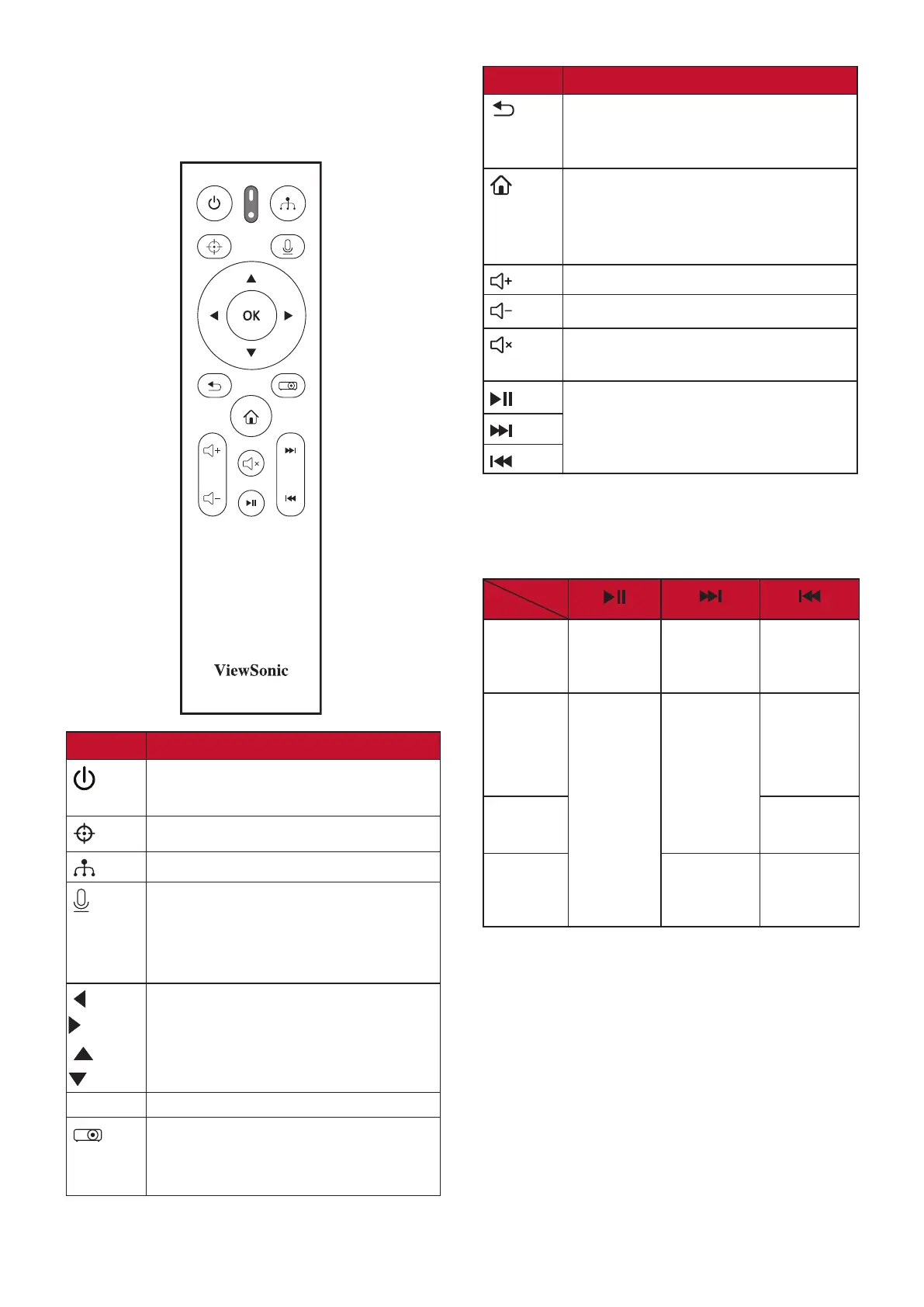
Controls and Functions
Button Description
Power
Toggles between standby mode
and Power On.
Not available.
Displays the source selection bar.
Activates the voice function. This
function is only available after
the bluetooth remote control was
paired.
Left/
Right
Up/
Down
Selects the desired menu items
and makes adjustments.
OK
Confirms the selected menu item.
Turns on/off the On-Screen
Display (OSD) Menu or goes back
to previous OSD menu.
Button Description
Returns to the previous menu,
main settings menu or exit the
app.
• Goes to the homepage of the
SMART SYSTEM.
• Changes to the SMART SYSTEM
source.
Increases the projector volume.
Decreases the projector volume.
Mutes or unmutes the projector
volume.
Only available under the SMART
SYSTEM.*
*These buttons behave differently when
using different streaming applications as
shown in the table below.
Button
App
Netflix
Plays or
pauses
the video.
Advances
the video
by 10 sec.
Rewinds
the video
by 10 sec.
Youtube
Pauses
the video.
Goes to
the next
video.
Goes
to the
previous
video
Disney+
No
response.
Prime
Video
Fast
forwards
the video.
Rewinds
the video.







 To Next Page