67
Control Panels
1. Press “Display On” or “Activate Controls” pad
2. Verify unit is not in Sabbath Mode
If in Sabbath Mode:
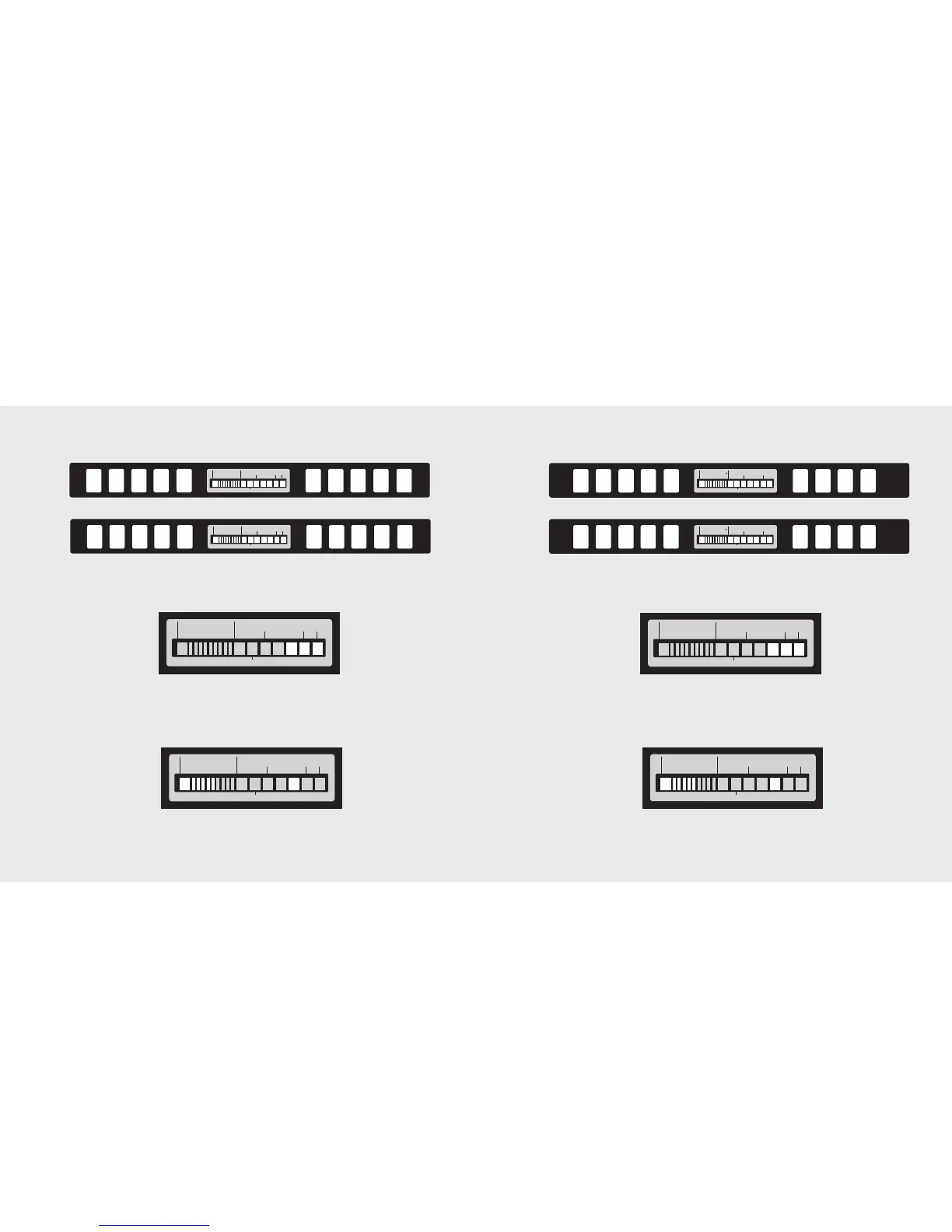
A. The Sabbath Mode will disable the interior lights, display (except 3 blue squares) and alarm. (See
picture below for visual indication of Sabbath Mode)
To exit the Sabbath Mode:
B. Press & Hold “Display On” or “Activate Controls” and then “Display Off” for 3 seconds. (The
control will beep 3 times to alert the user the Sabbath Mode has been exited)
3. Verify unit is not in Showroom Mode
If in Showroom Mode:
A. The Showroom Mode will disable the refrigerator system but all other functions are normal. These
include lights and control. (See picture below for visual indication of Showroom Mode)
To exit Showroom Mode:
B. Press & Hold “Display On” or “Activate Controls”; while holding, press and hold “Higher Temp”
and “Alarm Off” together. (The control will beep 3 times to alert the user that Showroom Mode
has been exited)
4. Press “Max Frz” & “Display Off” at the same time and hold until beeps (force start compressor).
5. All models need to be set at the 5th bar for Refrigerator & Freezer - factory setting.
Verify Operations
68
Verify Operations
Control Panels
1. Press “Display On” or “Activate Controls” pad
2. Verify unit is not in Sabbath Mode
If in Sabbath Mode:
A. The Sabbath Mode will disable the interior lights, display (except 3 blue squares) and alarm. (See
picture below for visual indication of Sabbath Mode)
To exit the Sabbath Mode:
B. Press & Hold “Display On” or “Activate Controls” and then “Display Off” for 3 seconds. (The
control will beep 3 times to alert the user the Sabbath Mode has been exited)
3. Verify unit is not in Showroom Mode
If in Showroom Mode:
A. The Showroom Mode will disable the refrigerator system but all other functions are normal. These
include lights and control. (See picture below for visual indication of Showroom Mode)
To exit Showroom Mode:
B. Press & Hold “Display On” or “Activate Controls”; while holding, press and hold “Higher Temp”
and “Alarm Off” together. (The control will beep 3 times to alert the user that Showroom Mode
has been exited)
4. Press “Max Frz” & “Display Off” at the same time and hold until beeps (force start compressor).
5. All models need to be set at the 5th bar for Refrigerator & Freezer - factory setting.




 To Next Page