-/--
CC
VOL-LVO -
VOL+VOL+
SLOW
CH+CH-
EPG
SETUP
SUB
10+
ZOOM
SLEEP
LANG
STANDBY DISPLAY
MUTE
TV/AV
LCD MENU
GOTO
REPEAT
A-B
PROG
8
Remote Control
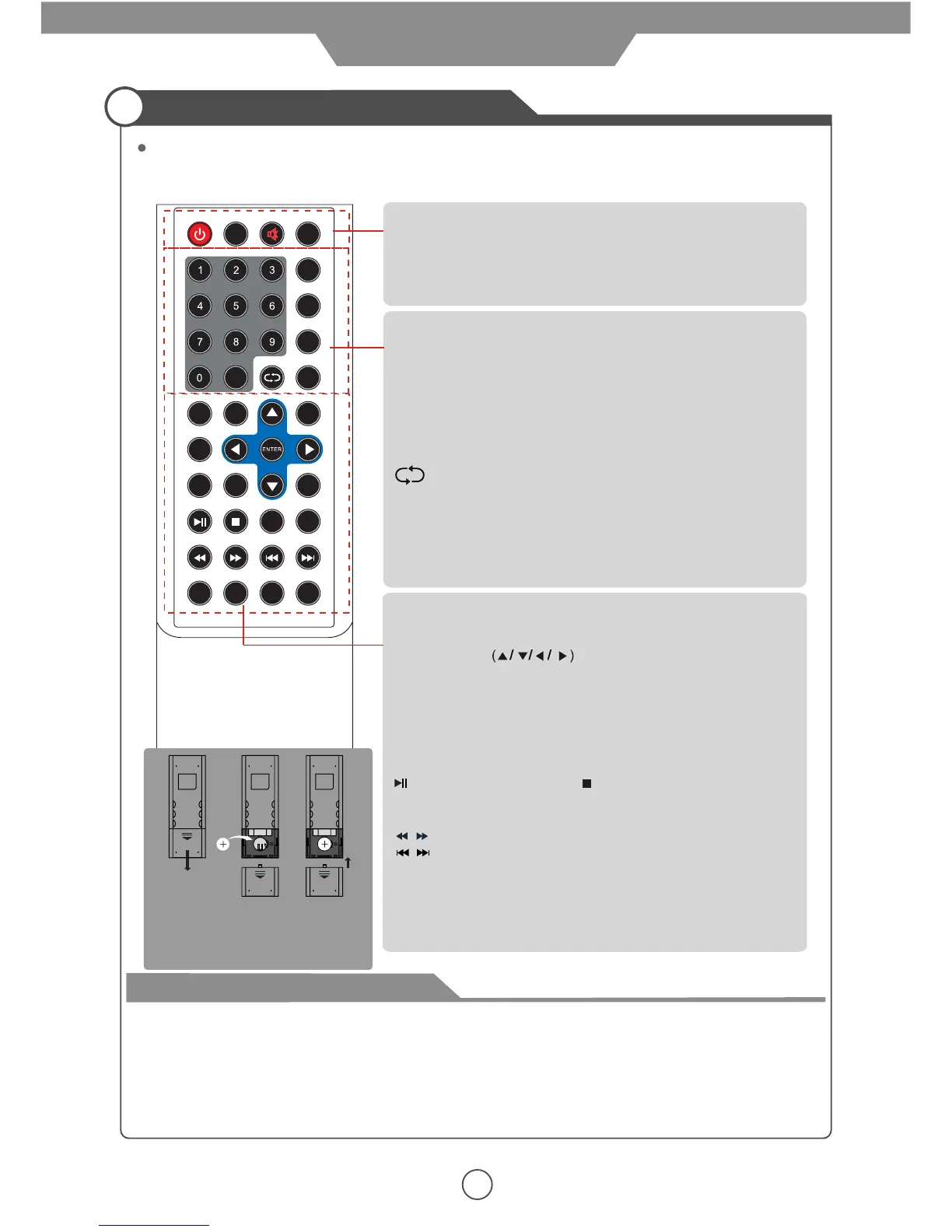
Function of remote control buttons
The remote control uses infra-Red(IR). Point it towards the front of the LCD TV. The remote control
may not work correctly if it is operated out of range or out of angle.
STANDBY : Press to turn the TV on/standby.
DISPLAY: Press to display the current program information.
TV/AV: Press to display the input source menu.
MUTE: Press to mute the TV, press again or press VOL+/-
button to unmute.
VOL+/-: Volume up/down.
CH+/-: Channel/program up/down.
Buttons for Media operation
SLEEP : Timer.
SUB: Press to turn on/off the subtitle display.
SLOW: Slow the playing speed.
SETUP: Press to display the SETUP menu.
PROG: Edit the program and play.
A-B: Select and play the preferable paragraph of program
by pressing this key twice at the beginning and end of it.
REPEAT: Repeat playing the title or chapter.
GOTO: Play your favorite title/chapter/track.
EPG: To show the Electronic Program Guide during no-menu
state only(see page 16).
LANG: Press to display the language select menu.
CC: Closed caption(see page 16).
ZOOM: Press to change the screen display mode.
NUMBER buttons and -/-- button:
Choose channel directly.
Press -/-- buttons to select “-”, and press a number button to
select the channel;
Press -/-- buttons to select “- -”, and press two number buttons
to select the channel;
Press -/-- buttons to select “- - -”, and press three number
buttons to select the channel;
:Return to the previous channel viewed.
LCD-MENU: Press to display OSD menu.
on-screen menus and adjust the system settings to your
preference.
ENTER : Confirm for source menu.
THUMBSTICK
: Allows you to navigate the
How to use the remote control
- Check the polarity(+,-) of the batteries in the remote control.
- Check that the batteries have power.
- Check that the LCD TV is powered and that it is properly plugged in.
- Check if any three-wavelength lamp, special fluorescent or neon sign is turned on near the LCD TV.
- The remote control should be operated within 30 feet (7m) and 30° to the left and the right of the
IR receiver at the front of the LCD TV.
- Used batteries should be disposed properly.
User Guidance Information
: Play/pause. : Stop
: Fast reverse/forword.
: Previous chapter/next chapter.
Step3
Insert a batteries.
Ensure that the polarities(+ and -)
of the batteries are aligned correctly.
Step1 Step2


 To Next Page