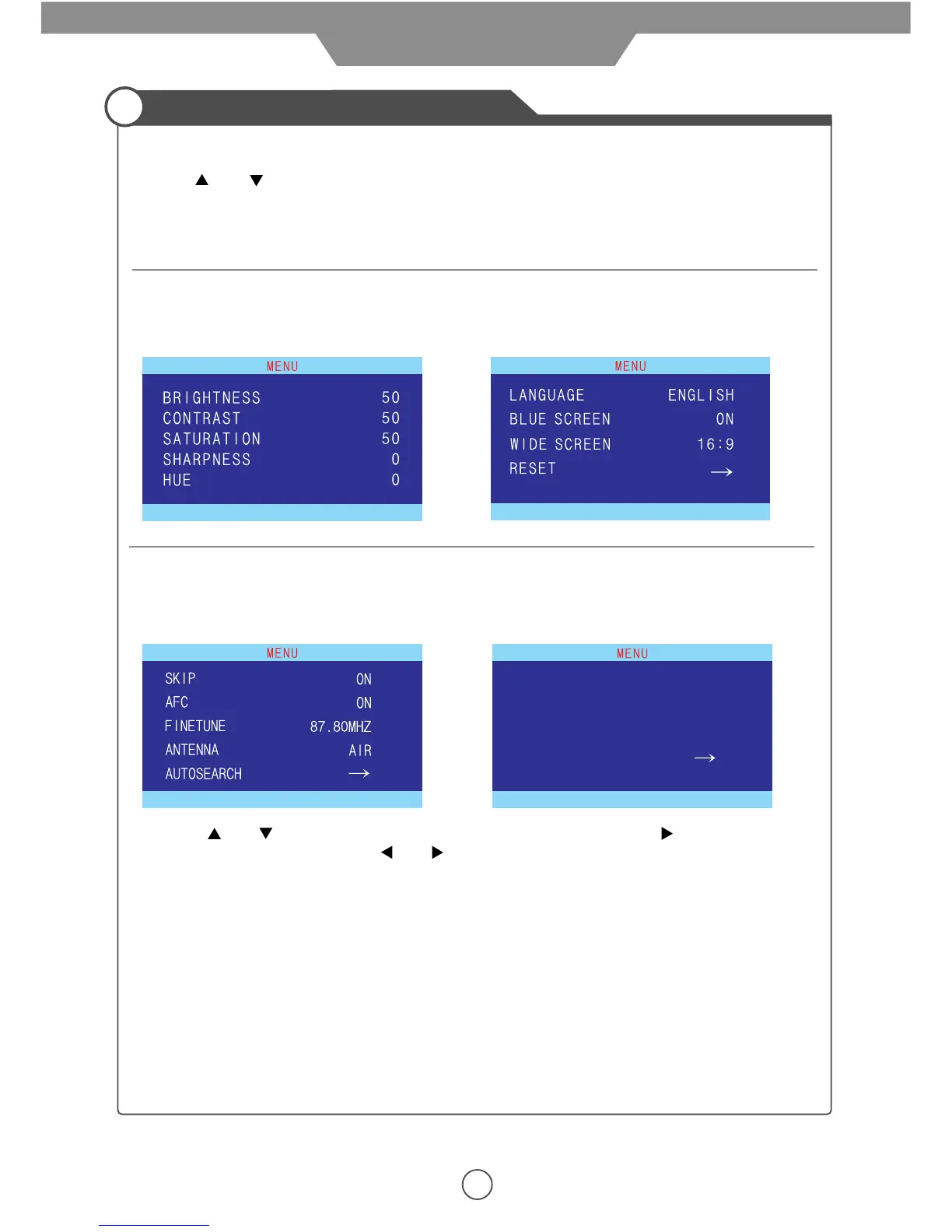
4. Use the and buttons to select an option of the sub-menu, and press the button.
While in adjustment mode, use the and buttons to change the value of the item.
5. Press the LCD-MENU button to exit the menu.
Note:
Only when you input the suitable signal, the relevant items can be activated.
1. Press STANDBY button to turn the LCD TV on.
2. Press LCD-MENU button on the remote control; the on-screen menu will appear on the screen.
3. Use and buttons to select your main menu option.
12
Operating the menu
1. TV / DTV menu
Allows you to make adjustments to your
picture settings.
(Select TV/DTV source for example)
3. TV menu
Allows you to setup a variety of setup options.
(Select TV source for example)
3. DTV menu
Allows you to search channels and setup a variety
of channel options.
Allows you to search channels and setup a variety
of channel options.
(Select DTV source for example)
2. TV / DTV menu
(Select TV/DTV source for example)
4. If you do not have a remote, use the following buttons to select an option from the sub-menu:
LCD-Menu = menu or exit
CH+/- = Scroll up and down
Vol. + = Select
Application
TIMEZONE
DAYLIGHT SAVE
ANTENNA
AUTOSEARCH
SAMOA
OFF
AIR


 To Next Page