12
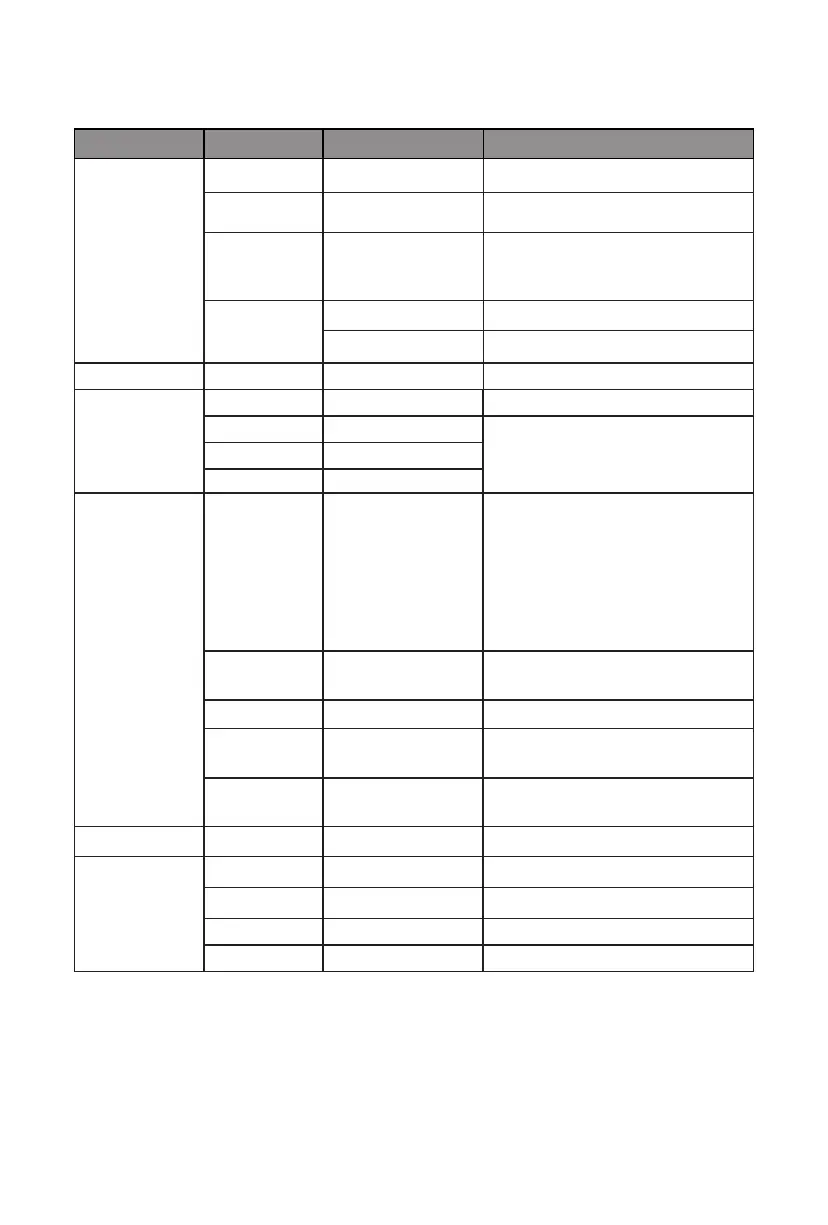
9.1 – OSD Menu Functions
Main Menu Sub-Menu Options Description
BRIGHTNESS Brightness 0~100 Adjust display brightness
Contrast 0~100 Adjust display contrast
ECO Standard, Game,
RTS, FPS, Movie,
Tex t
Set visual mode
DCR On Turn on DCR function
Off Turn off DCR function
IMAGE Aspect Wide, Auto, 4:3 Set aspect ratio
COLOR TEMP. Color temp. Warm, User, Cool, Adjust color temperature
Red 0~50 Customize RGB components
Green 0~50
Blue 0~50
OSD SETTING Language
English, Español,
Русский, Français,
한국, Português,
Deutsch, Türkçe,
简体中文,
Polski, Italiano,
Nederlands
Set OSD language
OSD H. POS. 0-100 Adjust the OSD horizontal
position
OSD V.POS. 0-100 Adjust the OSD vertical position
OSD Timer 0~60 Set how long the OSD remains
open after non-use
Transparency 0-100 Set the OSD overall
transparency
RESET Reset N/A Reset monitor confi gurations
MISC Signal source HDMI, VGA Display the input signal
Low blue ray 0-100 Set blue light fi ltering level
Mute On, Off Turn mute function on/off
Volume 0-100 Adjust audio volume


 To Next Page
 Loading...