11:ogromming.5ys.tem£eatures_
_____________
_
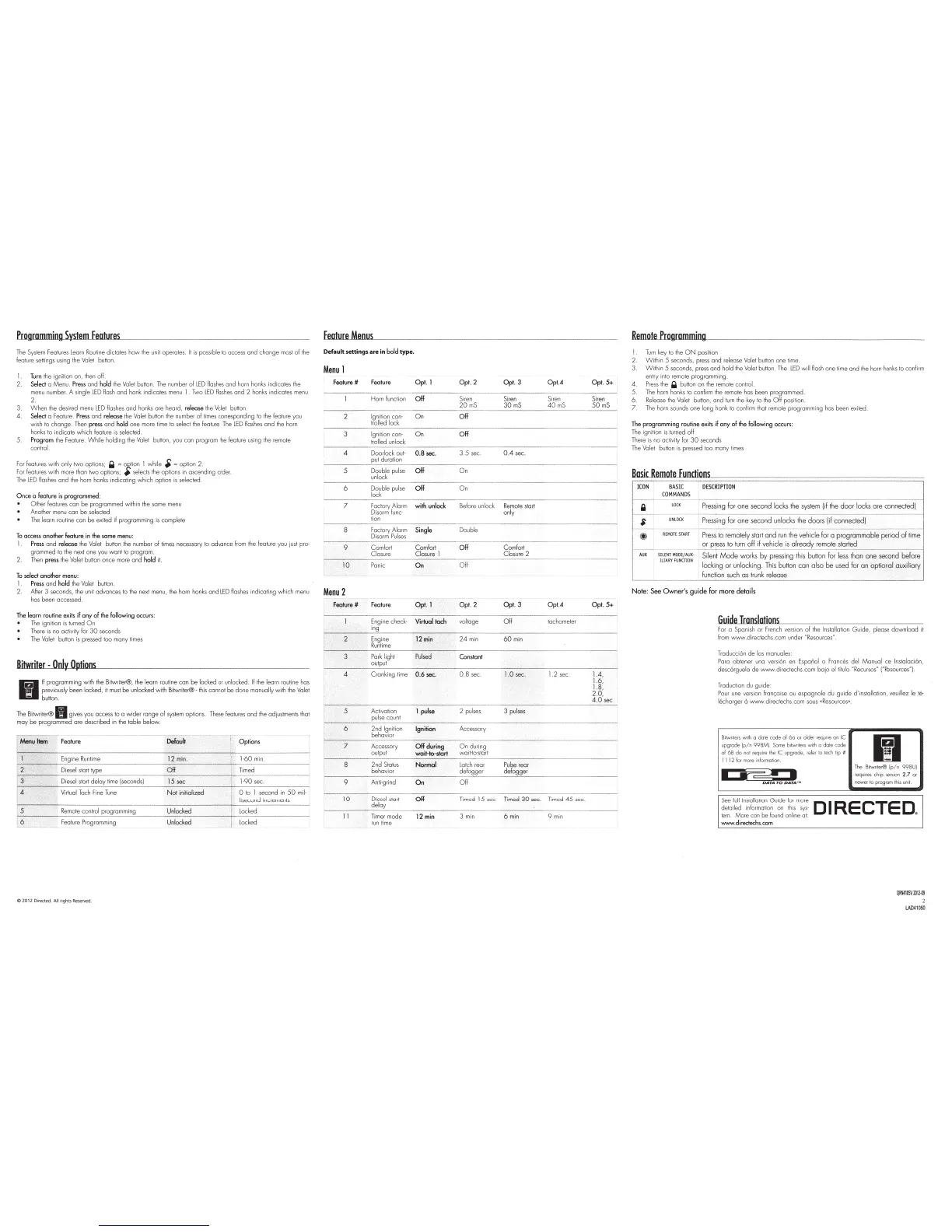
The System Features
learn
Routine dictates
how
the unit
ope
rates. It
is
fXJssible
to access
and
change
most of the
feature settings
us
ing the Valet button.
1
Turn
the
igni
ti
on
on,
then
o
ff
.
2.
Select
a Menu.
Pre
ss and hold t
he
Valet
button.
The
number
of
LED
flmhes
and
horn
honks
ind
i
cates
t
he
menu
number_
A
single
LED
flash
and
honk
indicates
menu
1
Two
LED
flashes
and
2
honks
ind
i
cates
menu
2.
3.
When t
he
desired
menu
LED
fl
ashes
and
honks
are
heard
,
release
the
Va
l
et
button
4.
Select
a
Feature.
Press
and release
the
Valet
button
the
numbe
r
of
limes co
rr
esponding
to
the
feature
you
wish
to change.
Then
press
and
hold
one
more
time
to
select
the
feature.
The
LED
fl
ashes
and
the
horn
honks
to
indicate which feature
is
se
lected.
5.
Program
the
Feature_
While
holding the
Va
let button, you con program
the
feature using
the
remote
control
Fo
r features with only
two
options;
~
=
o~
t
ion
1
while
•
=option
2.
For features w
it
h more than
two
options;
#J
se
lects
the
options in ascending
order_
The
LED
flashes
and
the horn honks indicating
which
option
is
selected
Once
o feature
is
programmed:
O ther features can
be
programmed within
the
some menu
Another menu con
be
selected
The
learn routine can
be
exited if programming
is
complete
To
access another feature in
the
some
menu
:
1
Pre
ss
and
release the Valet button the number
of
times necessary to advance from
the
feature you
just
pro-
grammed to the next one you
wont
to program
Then press
the
Valet button once more
and
hold
it.
To
select
another
menu
:
1
Press
and
hoJd the Valet button.
2.
After 3 seconds,
the
un
it
advances to the next menu, the horn honks and LED flashes indicating which menu
has been accessed.
The learn routine exits
if
any
of
the
follow
ing
occurs:
The
ignition is turned
On
There
is
no
activity f
or
30 seconds
The
Valet button
is
pressed too many times
Bitwriler
-
Onlv
Ootions
11
11 programming with the Bitwriter®,
the
learn routine con
be
locked o r unlocked.
If
the
learn
_rou
tine has
previously been locked, it
must
be
unlock
ed
wi
th
Bi
twriler®-
this
cannot
be
done
manually w1
th
the
Valet
button.
The
Bitwriter®
II
gives you access to a
wi
der range of system options. These features
and
the
adjustments that
may
be
programmed are described in
the
t
able
below.
~
~
~
Options
ow
. .
....
~
'
Die.::_l
start
d~y
lime (seconds)
N
ot
in
it
ialized
~
? to I second
in
50 mil-
- .
-.
l1second increments
t:s
Remote
control
programming
Unlocked
__
J
~:1':~
~
----·
--j
Featu
re
Pr~gr?mmi~g
-
Unlocked
~
locked •
0
2012D
irected.AIIrightsR
eserved.
Eeature_Menus_
Default settings
are
in
bold
type
.
Menu
1
Feature # Feature Opt. 1 Opt. 2 Opt. 3 Opt.A Opt. 5+
----
-
----------
Horn function Si
ren
Siren Siren Siren
20
mS
30
mS
40
mS
50
mS
--
-
-
-
---
----------
-
~--
-
~~-
-
-
~
-------
Off
Ignition con-
On
tr
olled
lock
Ignition con- O n
Off
trolled unlock
4 Doorlock out· 0.8
sec.
3.5 sec. 0.4 sec.
~~~?~~
-
----
---------
--
-------------
6
Double
pulse
Off
On
unlock
Double pulse
lock
On
7 Factory Alarm
with
unlock
Di
sarm
func-
Be
fore unlock
Remo
te start
only
9
tion
Factory Alarm
Disarm
Pu
l
ses
Comfort
Comfo
rt
Closure Closure
1
Double
Off
-
------·-----------·
10
Pan
ic
On
Off
Menu
2
-"-or·--~··=--~----~
Feature
# Feature
------------
- -
Comfort
Closure
2
Opt.3
Opt. A
Engine check-
Virtual
tach voltage
Off
tachometer
ing
Engine
i2o1
i
~
-
24 min
Run
time
60mi
n
Pork
light
P
ulsed
·'
Constant
output
Opt.5+
4 Cranking ti
me
0.6 sec. 0.8 sec.
1.
0 sec.
1.2
sec. 1
.4,
1.6,
1.8,
2.0,
4.0
sec
2 pul
ses
3 pulses
Accessory
7 Accessory
Off
during
On
during
------~~~~~-
~
---
wai~~~~2
--
-
-
----
--
----~
----
-
-~--
--
-
---
--
8
2nd
Stall.ls
Normal
Latch
rear
Pulse
rear
r----
- -
behav
ior
defog~er
defogge
r
--
-
~--
-
---------
9
Anti-grind
On
Off
10
1t
start
Timer mode
run
time
12min
Timed
15
sec 30 sec. Timed 45 sec.
3 min
6min
9 min
Remo.teJlr.ogromUJJmtJUingH--
~~-
1
Turn
key
to
the
ON
position
2.
Within
5 seconds, press
and
release Valet button one time.
3.
Within
5 seconds, pr
ess
and hold the
Va
let button.
The
LED
w i
ll
flash one time
an
d
the
horn honks
to
confi
rm
entry into remote programming
4.
Press
the ~ button
on
the
remote control
5 The horn honks to confirm
the
remote has been programmed.
6.
Re
lease the Valet button, and
turn
the
key
to
the
Off
position
7.
The horn sounds one long honk
to
confirm that remote
prog
ramming has been ex
it
ed
The
programming routine
ex
i
ts
if
any
of
the
following occurs:
The ignition
is
turned
off
There
is
no
ac
ti
vity for
30
seconds
The Valet button is pressed too many
li
m
es
furncle~runc~tio~n~s
______________
__
______________
__
__
r
ICON
~~
~
1
ro;-D
E
SC
RIPT
loN
_________
--------------------
- -
1
r
-
a-
e·--
~;~
-
--
p~;,;
i
-;;-gf;;;;-
n
e
s.;;,ondl~k;lh;;;~(ii~h~d~r
~~~~0-;;;~~-;;~-;~;;;d)
J
!-
----,--
______
_
_____
,_
__
_________ _
___
___
_____
_
____
_
____
_
_________
_
________
,
~
$ U
NL
OCK
Press
i
ng
for
one
second
unlocks
the
doo
rs
lif
connec
t
ed!
i
I -@
--
;;;;;;;
·
;;.~,
-..;..
p;;,;t~--;~;-ct;;iy;lc;;i
-
~;;d,~-;;-~-:,~hid~fo;-;;~;~;,;;cl,T,;f,e
r
iod--;-,f~
~
~;
-···
~t
~
~j,~i~~
-'
*l!'~~;~:~:
i
f~~;,~~~t;t~~~~~;{l~t:
dan
-
~;;"~-;~;;;db;f~;;;
j
I
locking
or
unlock
i
ng.
This
buHon
con
also
be
used
for
an
option
al
auxiliary
1
L-
.
--
-
---
~
unc
t
.
i~
such
as
l~nk
relea.::_
___
_j
Note
:
See
Owner's
guide
for
more
details
G.uide
Translations
For a Spanish or French
vers
ion of
the
Installation
Guide,
please
download
it
from www.directechs.com under "Resources".
Troducci6n
de
los manuales·
Para obtener uno
versiOn
en Esponol o Frances del
Manual
de
lnstal
ac
i6n,
desc6rguela
de
www.directechs.com
ba
jo el
Htulo
"Recursos" ("Resources")
Traducti
on
du gui
de
Pou
r une
vers
ion fron<;aise
ou
espognole du guide
d'
insta
ll
ation,
veu
illez
le
te-
l
echa
rger 0 www.directechs.com
sous
«
Resou
rces•.
Bi
tvvr
iters with o
do
te
code
of 6o 01 older requi
re
on tC
upgrade
lp/
n
998M
).
Some
bitwri
te
rs w i
th
a dole code
of
6B
do
no
t require
th
e
tC
upgrade, refer
to
tech
ti
p #
1 1 l 2 f
or
mo
re
informa
ti
on
I
I
p=-~
I
OATA
TO
DA
TA
''"
1~1
The
Bitwriter®
lp/
n 998U)
r
equires
ch
ip
version 2.7 or
n
ewer
to pr
ogram
this unit
See
fu
l
llnstallatio~
Guide
fo~.
more D I RE
CTE
D
detailed rnformalr
on
on
th
1s sys·
e>
t
ern.
/1/ot::Jre
con
be
found on
li
ne
at:
lf.llloiiN
.directechs.com
QIIN4tosvmt1-00
2
L.A041
050



 To Next Page