7
© 2011 Directed Electronics. All rights reserved.
Using your System
Commands and Confirmations
Commands, Basic or Advanced, are used to activate system features
and are performed by pressing one of the Command buttons. Basic
commands control the most often used security and remote start fea-
tures while Advanced commands control more specialized features
and request reports.
Confirmations for Basic or Advanced commands are indicated
first by siren chirps and parking light flashes, and then by illuminated
Ghost LED’s and beeps or tones on the remote control. A description
of each feature confirmation is found in the following Basic command
and Advanced command sections.
Performing Commands
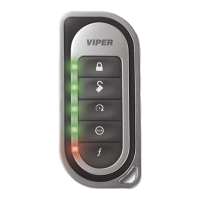
Perform Basic commands by pressing a Command button (Ghost LED’s
are off).
Perform Advanced Commands by first accessing Levels 1-4 using the
button and then by pressing a Command button while within a
Level (Levels are indicated by illuminated ghost LED’s after pressing
button).
Advanced command example: Silent Arm
1. Press the
button once to access Function Level 1, the
LED turns on.
2. Press the
button while the LED is still on to perform the
Silent Arm command.
3. The Arm LED will illuminate to confirm when the Silent Arm mes-
sage from the system is received.


 To Next Page