V3.3.3 9
CALL FORWARDING
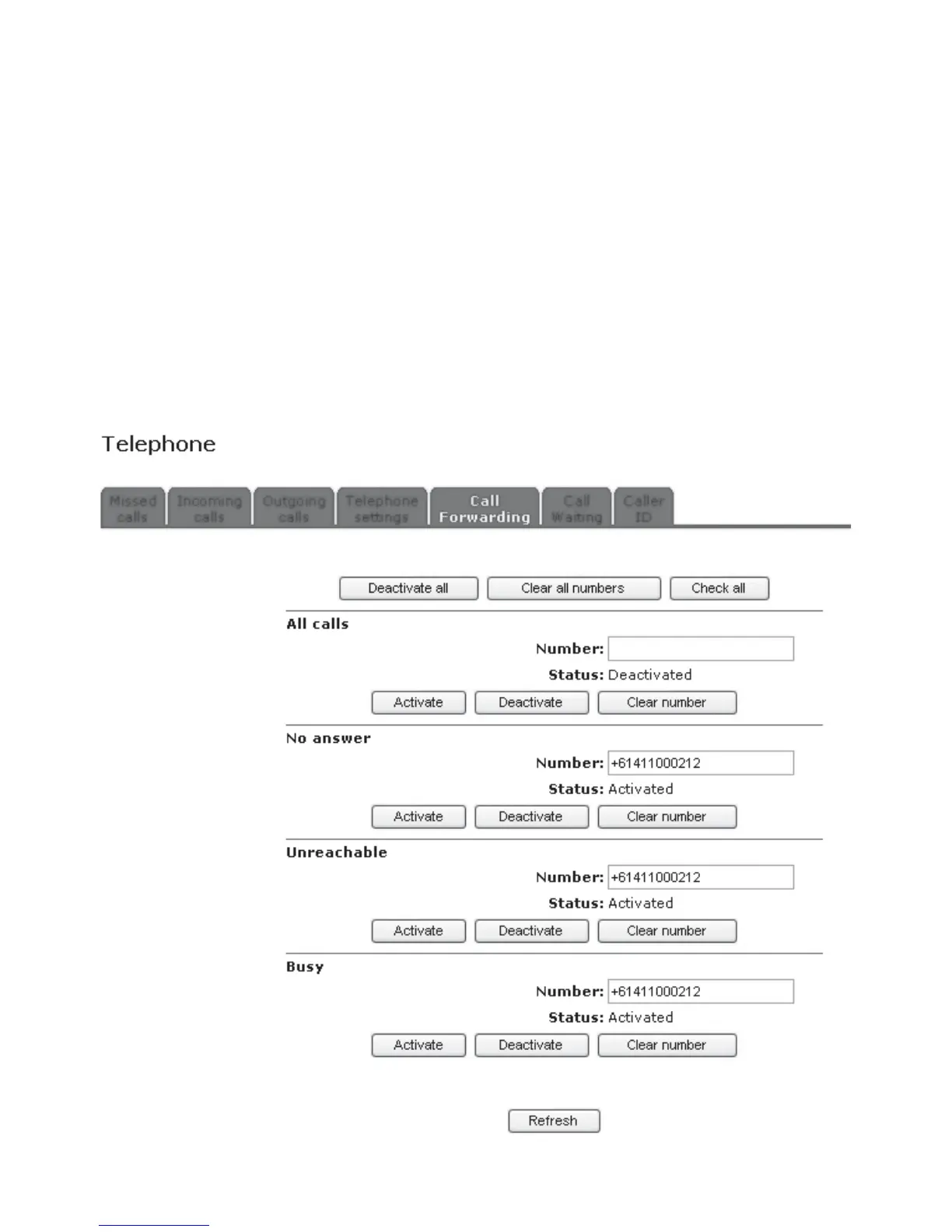
This area is where you control where your calls go to when you are on the phone, busy or don’t answer.
• All calls - Diverts ALL CALLS to the specifi ed number.
• No answer - Diverts calls to the specifi ed number when there is no answer.
• Unreachable - Diverts calls to the specifi ed number when your phone is unreachable.
• Busy - Diverts calls to the specifi ed number when your phone is busy.
The functions at the top of this page include:
• Deactivate all will deactivate all diversions
• Clear all numbers will deactivate all diversions and clear all numbers from the fi elds
• Check all will query the network for the current settings
• Refresh will tell the modem to make sure it is displaying the most current information
Each individual type of diversion is used as follows:
• To activate a diversion, enter the number you wish to forward calls to, then click Activate.
• To deactivate a diversion, click Deactivate.
• If you wish to remove the number from the modem, click Clear Number.
• The Refresh button will tell the modem to make sure it is displaying the most current information
regarding call forwarding.



 To Next Page