PACKAGE CONTENTS
Your package should contain the following items:
• Broadband at Home modem
• Modem stand
• Power cable
• Ethernet cable
• User Guide
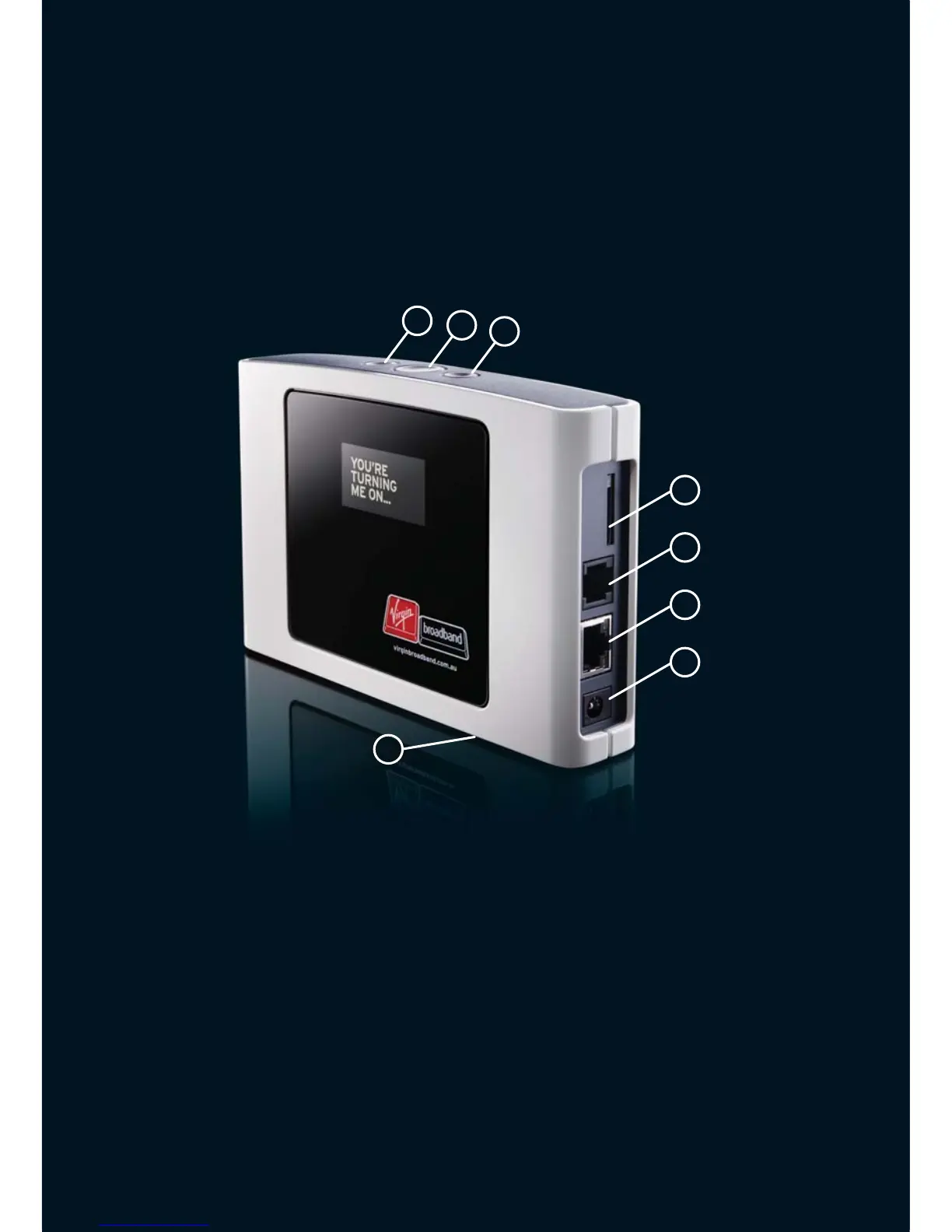
GETTING TO KNOW YOUR MODEM
1
3
2
4
5
6
7
1. DISPLAY BUTTON
Toggle between displays (wake from Screensaver, view Missed Calls).
2. POWER BUTTON
3. CONNECTION BUTTON
Press to connect or disconnect from the Internet.
4. YOUR SIM CARD INSIDE THE SIM CARD SLOT
Please do not remove this or your service will not work!
5. TELEPHONE PORT
Plug your home telephone into this.
6. ETHERNET PORT (LAN)
This connects your computer to the Modem.
7. POWER ADAPTER
Please only use the supplied power pack!
8. FACTORY RESET BUTTON
This is hidden underneath the Modem. This may be required when
the admin password has been lost, or for troubleshooting.
8



 To Next Page