V3.3.3 12
CONFIGURING YOUR ETHERNET NETWORK ADAPTOR
This step should only be done IF you cannot access the Management Console (http://192.168.1.1)
otherwise please proceed to Quick Setup Wizard on page 17.
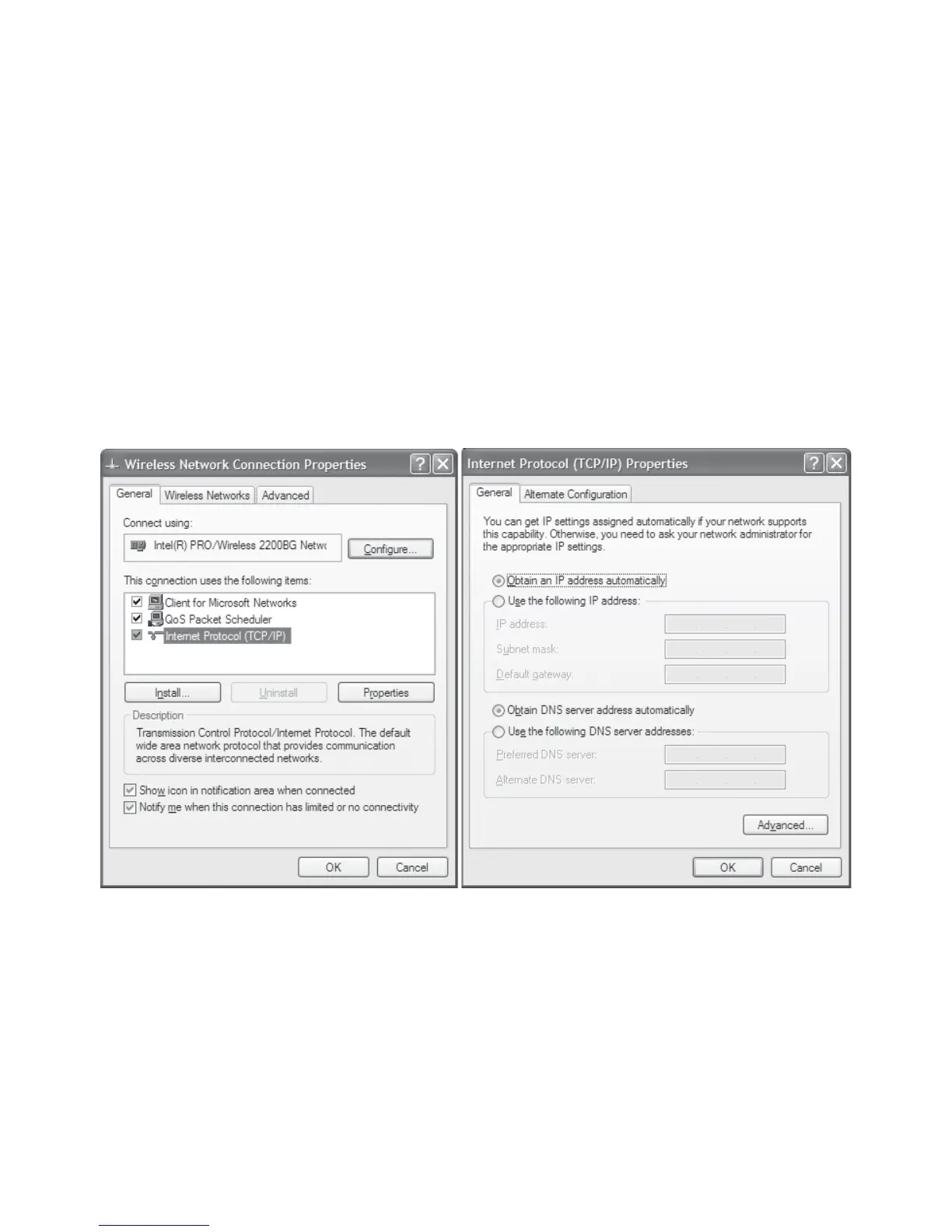
WINDOWS XP - Go to Control Panel and choose Network Connections.
1. If you do not see an icon with just the name Network Connections, then click Switch to Classic
View on the left of the Control Panel screen.
2. Right click on your Local Area Network Adaptor and choose Properties from the menu that
appears
3. Select the item Internet Protocol and click on the Properties button.
4. Make sure the following are selected:
a. Obtain an IP address automatically
b. Obtain a DNS server automatically
5. Click on OK to close the Internet Properties
6. Click on OK to close the Local Area Network Connection Properties



 To Next Page