9
CS-1900P_manual_en.doc
BLUETOOTH INPUT
DEFAULT PIN: 0000
If “Bluetooth Priority” is on speakers automatically switch to Bluetooth source when device is
paired.
CHANGE BLUETOOTH DEVICE NAME AND PIN
1. INSTALL BLUESUITE SOFTWARE
Download from https://visionaudiovisual.com/cs-1900p/
(windows only)
2. PAIR PHONE TO SPEAKERS
3. PRESS AND HOLD SW2 BUTTON Release when Blue LED turns off.
4. CONNECT PC TO SPEAKERS WITH USB CABLE (NOT INCLUDED).
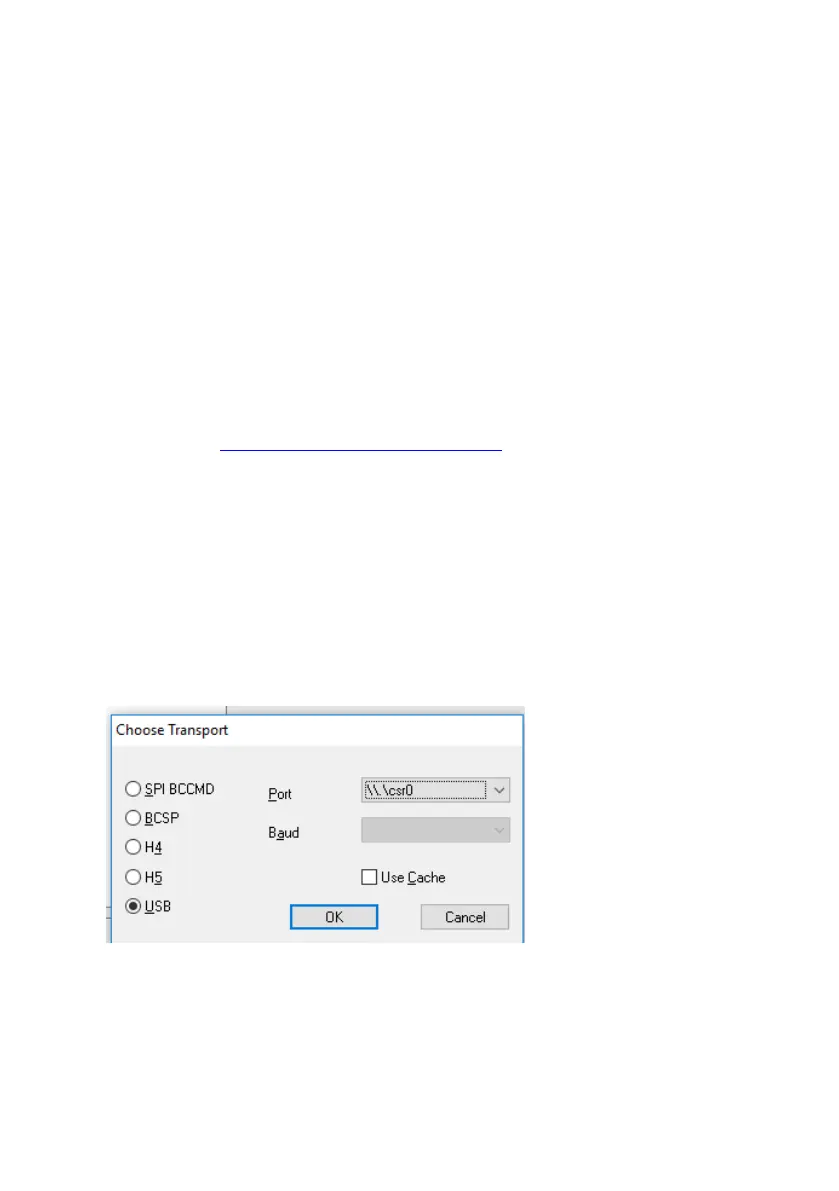
5. RUN PSTool. Select TRANSPORT and select USB\csr0 port
NOTE: if port not showing load drivers manually from
C:\Program Files (x86)\CSR\BlueSuite 2.6.4\drivers


 To Next Page