D-303169 KP-160 PG2 Installation Instructions 13
3.5 Controlling Home Automation Devices
To configure the PGM and X-10 output functions, see the corresponding sections of the
control panel’s Installer Guide (“OUTPUTS” menu) and User Guide (“SCHEDULER” menu).
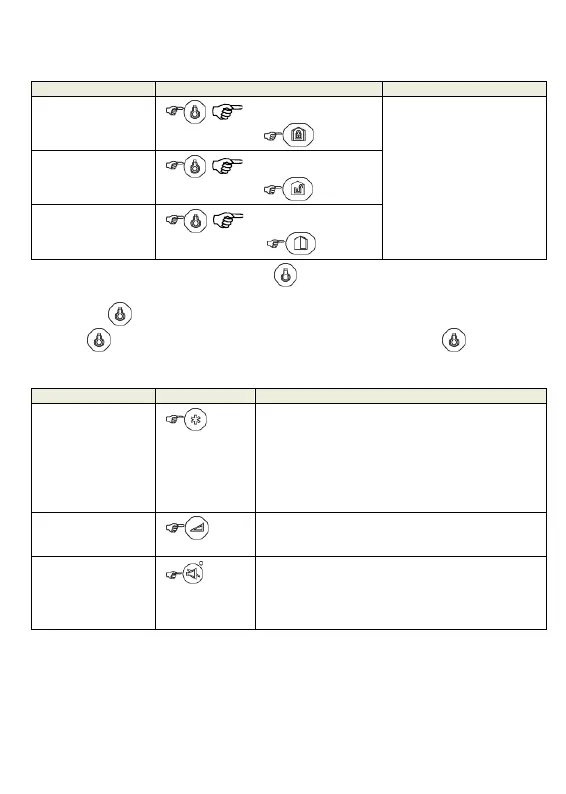
Output Function Actions Response
X-10 or PGM
device ON
[PGM P0 to P9] or
[X-10 01 to 99]
The keyprox's LED blinks
red once to indicate
transmission of the
command to the control
panel. The LED and the
buzzer then indicate the
control panel's response –
see “System Status and
Indications” in section
3.3.
X-10 or PGM
device OFF
[PGM P0 to P9] or
[X-10 01 to 99]
X-10 or PGM
device TOGGLE
[PGM P0 to P9] or
[X-10 01 to 99]
Note: Long press (more than 2 sec.) of the button initiates the X-10 function and the
PGM/X-10 display (marked "4" in the "Icon and Key Indications" Figure) will read "01". Short
press of the button initiates the PGM function and the PGM/X-10 display will read "P0"
with the key. This number is incremented by 1 upon each press of the key.
3.6 Other Functions
Output Function Actions Response
AUX Function
Enrollment: Long key press (more than 5 sec.)
until green LED lights and then release key.
Back to Factory: Long key press (more than 7
sec.) to reset the KP-160 PG2 device to factory
default settings.
Cancels current operation: Short key press
Volume control
Changes the volume level upon each key press.
Volume level alternates between 1, 2, 3, 0
Mute exit beeps
Mutes the exit beeps; small circle key will appear
above the key. Press button again to cancel mute.
Note: Operates only per Exit Delay duration. Upon
next Exit Delay, the exit beeps will not be muted.


 To Next Page