EasyManua.ls Logo

Vivitar 35ES - Viewfinder Information

Vivitar 35ES
54 pages
Print Icon
To Next Page IconTo Next Page
To Previous Page IconTo Previous Page
Loading...
Speed
Ririg
at
the
red,
125
setting
i
ri,
For
stopprng
fast
actron
subjects rike
sporting
events,
select
the fastest
possible
shutter
speed
lighting
conditions
allow
i
{
,
\
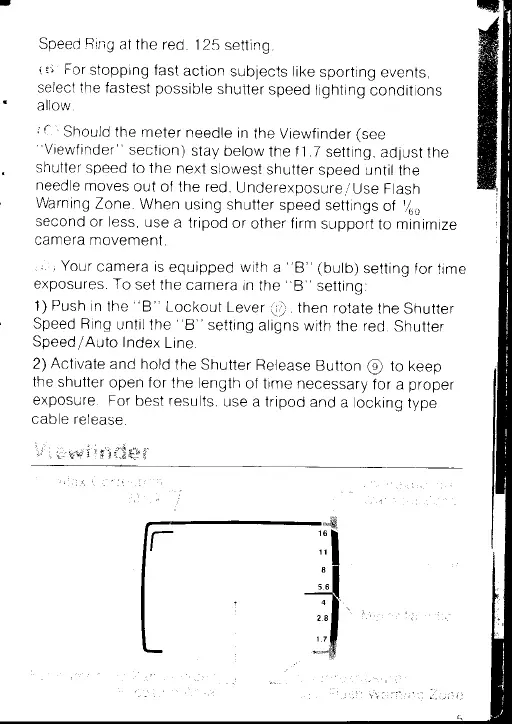
Should
the meter
needle
in
the Viewf
inder
(see
"Viewfinder"
section)
stay
below
the
f 1 7
setting,
adjust
the
shutter
speed
to
the
next
slowest
shutter
speed
until
the
needle
moves
out
of the red,
Underexposure/
Use Flash
Warning
Zone
When
using
shutter
speed
settings
of
/uo
second
or less,
use
a
tripod
or
other firm
support
to minimize
camera movement
,r'i
"Your
camera
is
equipped
with
a
"8"
(bulb)
setting
for
time
exposures
To
set
the
camera
in
the
"
8
"
setting:
1)
Push
in
the
"8"
Lockout
Lever
@,
then rotate
the
shutter
Speed Ring
until
the
"B"
setting
aligns
with
the red,
Shutter
Speed/Auto
Index
Line
2)
Activate
and
hold
the
shutter
Release
Button
@
to
keep
the shutter
open
for
the length
of
time
necessary
for
a
proper
exposure
For
best
results,
use
a
tripod
and
a locking
type
cable
release.
\i
i
*.r
u"-s
g'i
ll"t
s:;$
e*
$"

Related product manuals