NOTE:
While the device is charging it cannot be used to capture images.
When the camcorder is on, connecting it to a computer will not charge the device. Make sure
the camcorder is powered off to recharge.
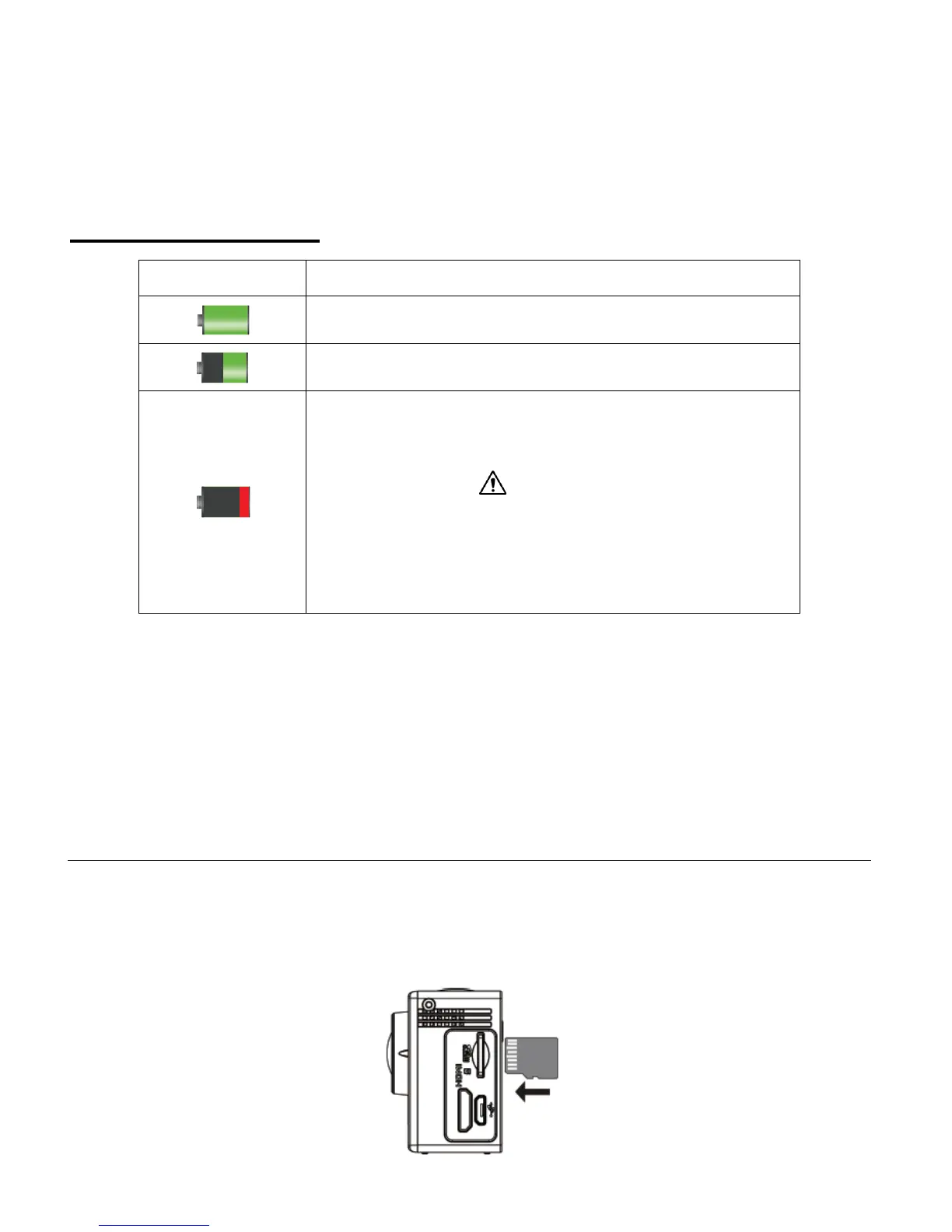
BATTERY INDICATOR:
The battery level is full.
The battery level is half.
The battery level is low, indicating to prepare for
recharging the built-in lithium battery.
Once ‘Low Battery’ appears on the LCD, this
indicates that the battery level is completely exhausted
and the camcorder automatically turns off after a few
seconds. Please fully recharge the battery.
NOTE: When the battery capacity drops to a low level, the battery icon will flash on the display,
indicating that the camcorder requires to be recharged. Please charge the battery. When the
battery icon flickers, the camcorder will shut down automatically.
INSTALLING THE MICRO SD MEMORY CARD
Make sure a High Speed Class 6 or higher Micro SD Memory card has been properly inserted
into your camcorder. A Micro SD Card must be inserted before use.
Micro SD Memory card not included.


 To Next Page