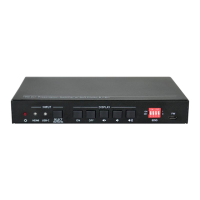
18G 2x1 Presentation Switcher with Soft Codec and CEC
5
3. Panel Description
3.1 Front Panel
① Power LED: The LED illuminates red when the device is power on.
② INPUT:
A. HDMI: The LED illuminates green when the HDMI input is selected in AUTO
mode, or illuminates orange when the HDMI input is selected in manual mode.
B. USB-C: The LED illuminates green when the USB-C input is selected in AUTO
mode, or illuminates orange when the USB-C input is selected in manual mode.
C. SELECT AUTO/3s: Press the button to select the next input source, or press
and hold the button at least 3 seconds to enable auto switching mode. Note that
the factory default switching mode is AUTO.
③ DISPLAY:
D. Press ON to turn on the display.
E. Press OFF to turn off the display.
F. Press to mute/unmute display audio.
G. Press to decrease the audio volume gradually, or press and hold it to
decrease the audio volume constantly.
H. Press to increase the audio volume gradually, or press and hold it to
increase the audio volume constantly.
④ EDID: 4-pin DIP switch for EDID setting.
⑤ FW: Micro-USB port for firmware upgrade.


 To Next Page
 Loading...