VIVOTEK
52 - User's Manual
Stream settings
This Network Camera supports multiple streams with frame sizes ranging from
176 x 144 to 1920 x1080.
The denition of multiple streams:
■ Stream 1: The default frame size for Stream 1 is set to the 1920 x 1080 at 30fps.
■ Stream 2: The default frame size for Stream 2 is set to the 640 x 360 at 15fps.
■ Stream 3: The default frame size for Stream 3 is set to the 1920 x 1080 at 15fps.
Media > Video
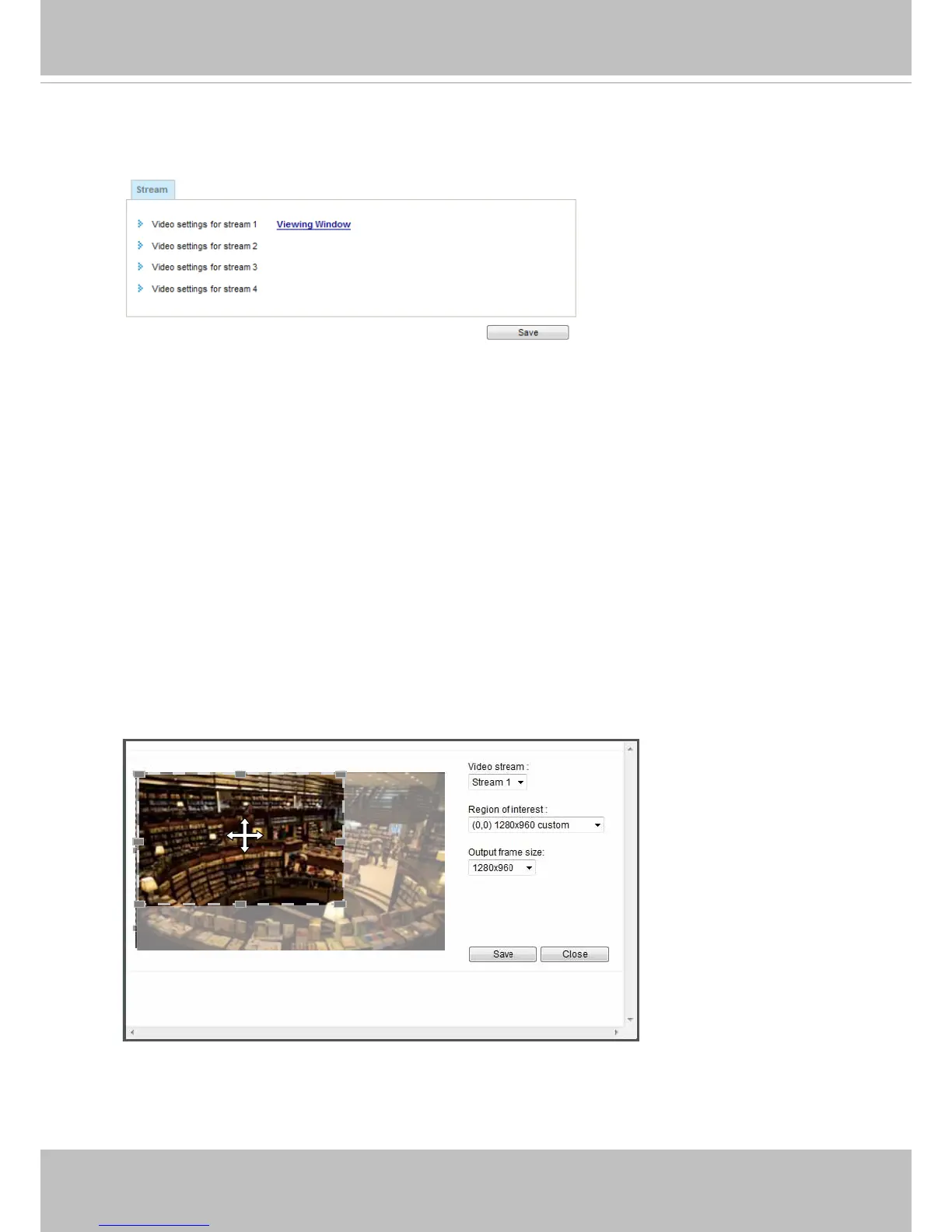
Please follow the steps below to set up those settings for a viewing window:
1. Select a stream for which you want to set up the viewing region.
2. Select a Region of Interest from the drop-down list. The floating frame, the same as the
one in the Gloabl View window on the home page, will resize accordingly. If you want to set
up a customized viewing region, you can also resize and drag the oating frame to a desired
position with your mouse.
3. Choose a proper Output Frame Size from the drop-down list according to the screen size of
your monitoring device.



 To Next Page