VIVOTEK
User's Manual - 27
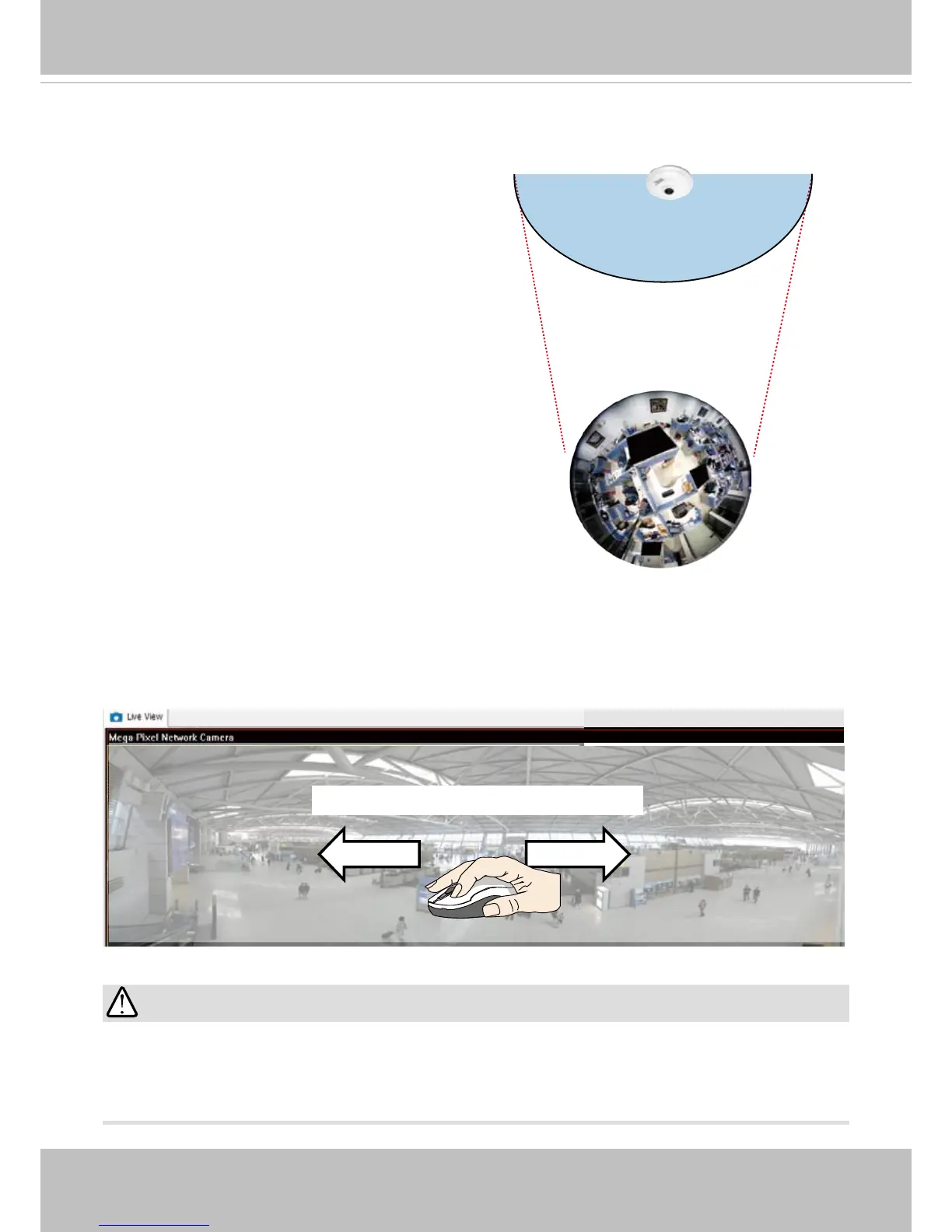
1O (Original) Display mode:
When mounted on a ceiling, the sheye camera can
cover an approximately 50 m² of surveillance area (hung
at a height of approximately 3 meters), while still keeping
details in videos with recognizable facial features of
people trafcking through the area.
The 1O view is especially adequate for taking an over-
view glimpse of surveillance area with a ceiling mount
camera.
1O View (Original View)
180° Hemispheric
Swipe to scroll horizontally
1P (Single Panoramic) Display mode:
With image correction rmware algorithms, the hemispheric image is transformed into a rectilinear stripe
in the 1P display mode. Viewers can use the PTZ panel or simply use mouse control to quickly move
through the 360º panoramic view. (Mouse control on the Panoramic view is available with the Ceiling
mount type.)
Note that the 1P view is apt for an overview, the Zoom in/out function does not apply in this mode.
IMPORTANT:
If the Local dewarp mode is selected for a video stream, the mouse control on the screen will be
disabled. For example, if stream #1 is congured into the 1R mode (see description on the next
page), its view angle will not be congurable using the mouse control.



 To Next Page