VIVOTEK
User's Manual - 7
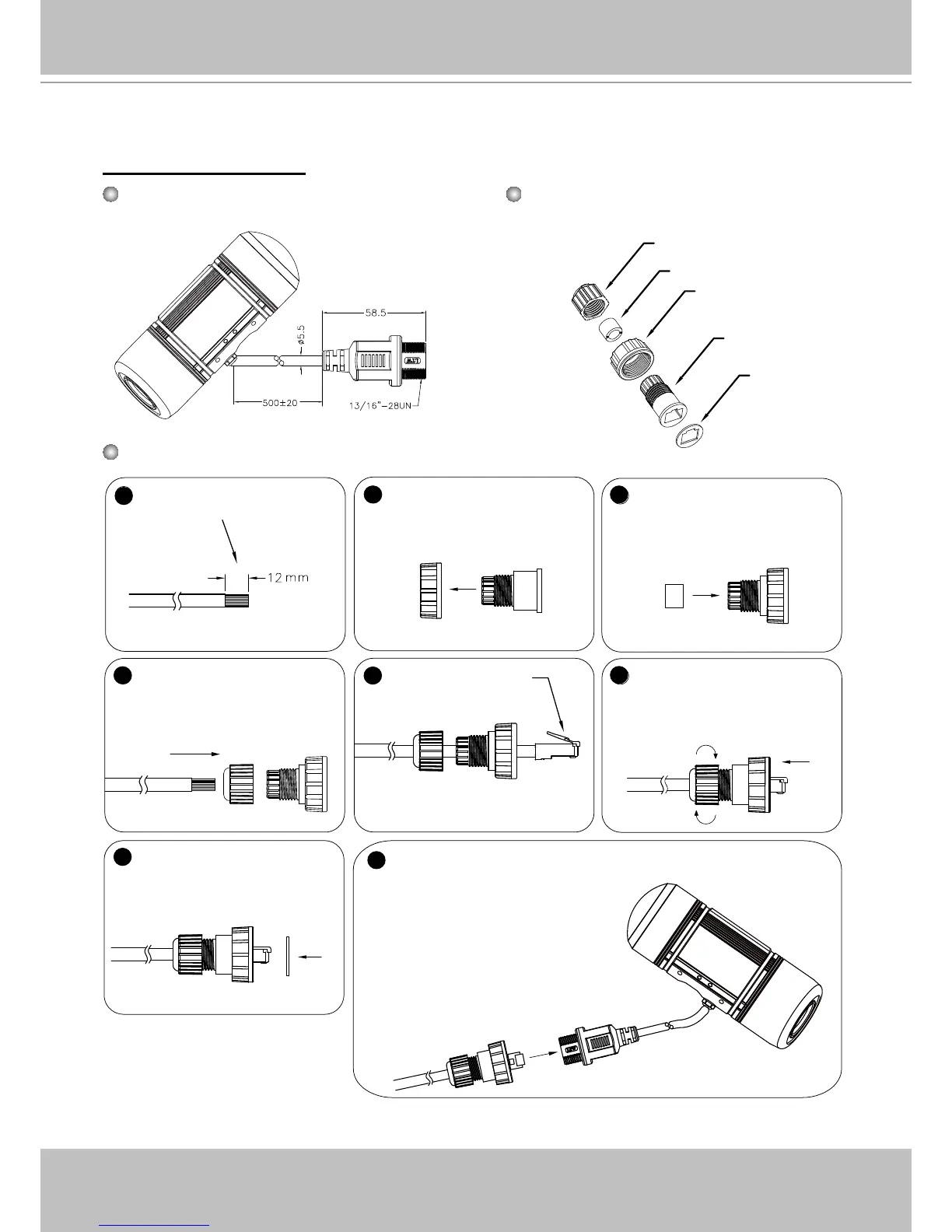
Cabling Assembly
1
2
3
4
5
6
7
8
(D)
(B)
(C)
(A)
(E)
Components of the Waterproof
Connector
Screw Nut (C)
Housing (D)
Gasket (E)
Seal (B)
Sealing Nut (A)
RJ45 Cable Dimension (unit: mm)
Prepare an Ethernet cable
and strip part of the sheath�
Insert the housing into the
screw nut�
Insert the seal into the housing�
Insert the stripped Ethernet
cable through the sealing
nut and the housing�
Clamp the cable with
an RJ45 plug.
Push the RJ45 plug into the
housing, then secure the
sealing nut tightly�
Attach the gasket to the front
of the housing�
Assembling Steps
Recommended cable gauge: 24AWG
(0�51 mm)
Connect the Ethernet cable to the RJ45 cable and secure the
connectors tightly�
RJ45 Cable Connector



 To Next Page