VIVOTEK
88 - User's Manual
■ Transparent HTTP Tunnel: HTTP tunnel is useful when exerting commands over the Internet�
Response time can be significantly reduced� You can use UART commands to build a Transparent
HTTP Tunnel� The UART commands will be sent through HTTP tunnel established between the RS-
485 device and the linked camera. For detailed application notes, please refer to URL Commands on
page 118 or http://www.vivotek.com/downloadles/faq/videoserver/UART_HTTP_Tunnel.pdf.
Preset positions
If you select DynaDome/SmartDOME, Lilin PIH-7x00, or Pelco D, Pelco P protocol, or Samsung scc643
protocol as the PTZ driver and click the Save button, the Preset Position
button will be enabled� Click
Preset Position to open the settings page� (The Preset Position button is available when a driver is
selected)� You can also select preset positions for the camera to patrol� A total of 20 preset positions can
be congured.
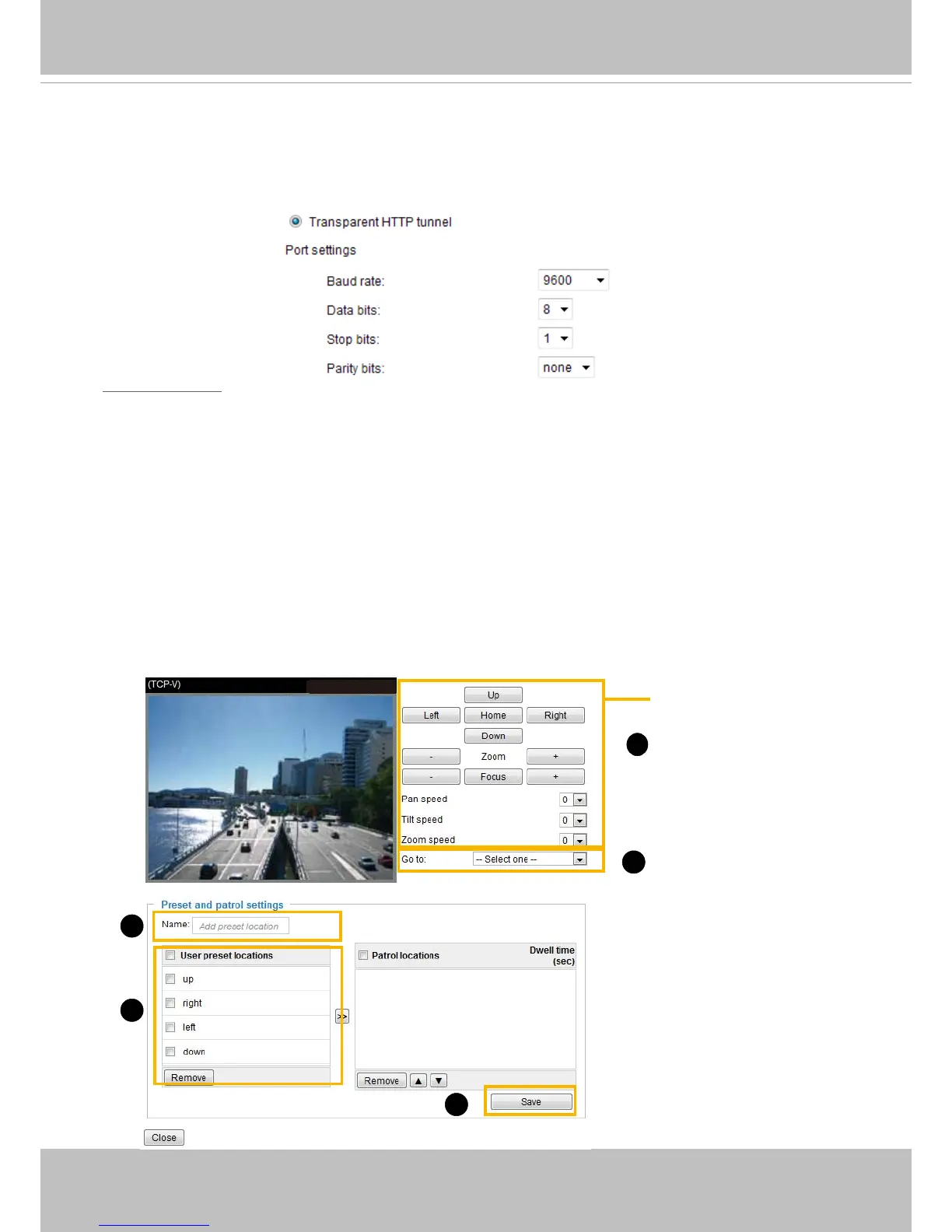
Please follow the steps below to preset a position:
1� Adjust the shooting area to the desired position using the PTZ buttons on the upper right of the
window� The default Home position is set as the center position�
2� Enter a name for the preset position, which is up to forty characters in length� Click Add to enable the
settings� The preset positions will be displayed under the User preset locations panel�
3� To add additional preset positions, please repeat steps 1~2�
4� Select multiple preset positions each by a click on its checkbox and click Save to enable the settings�
5� The positions saved will appear in the Go to drop down list on the Home page�
6� To remove a preset position from the list, select it and click Remove�
2011/03/10 17:08:56
2011/03/13 17:08:56
Functions are the same
as the Control Panel on
the home page
1
4
6
2
5



 To Next Page