VIVOTEK
User's Manual - 87
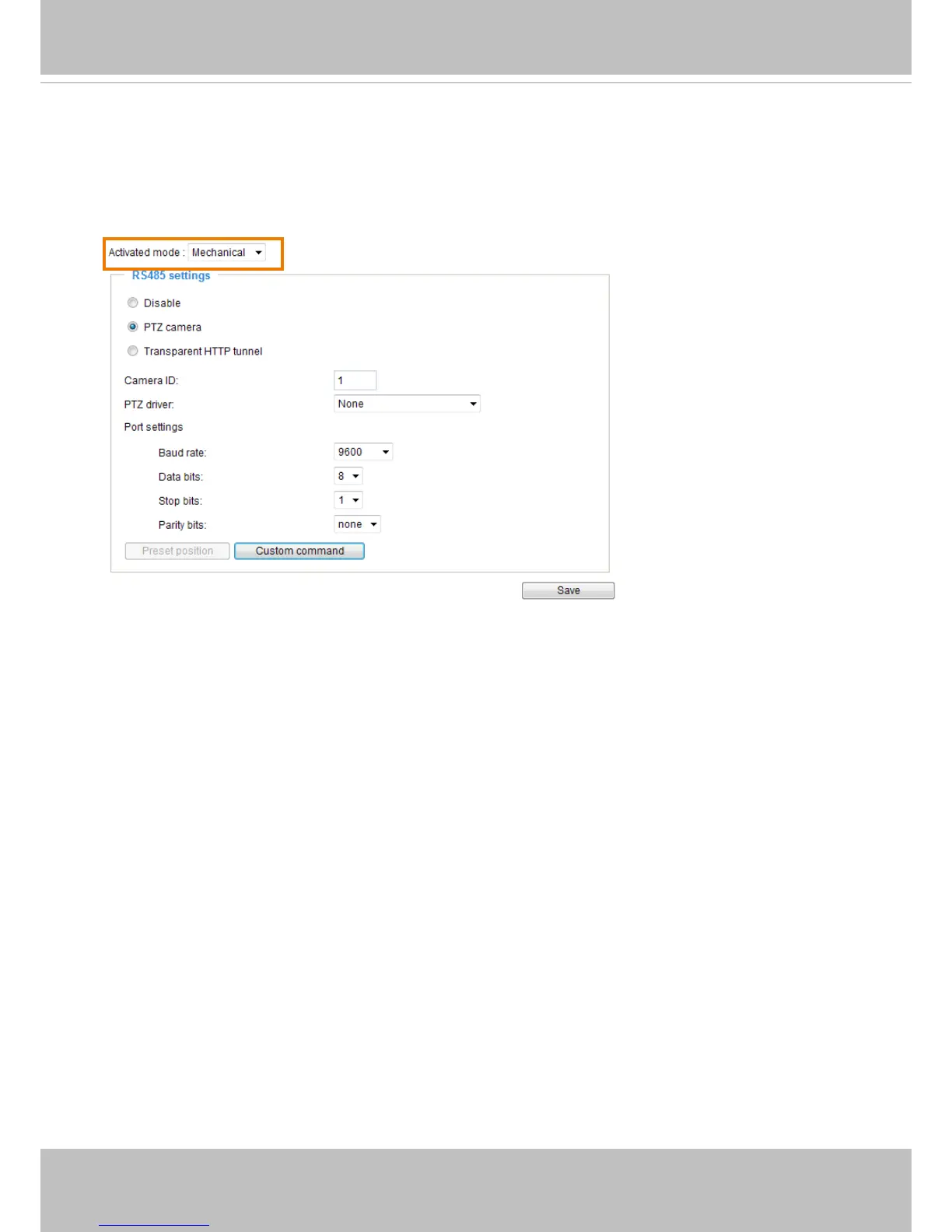
Mechanical PTZ Operation (When camera is mounted on an external pan/tilt scanner)
If you have your camera mounted and connected to an external pan/tilt head via the RS485
control lines, your can congure the Activated mode as “Mechanical.” You may then set identical
configuration both on your camera and the pan/tilt scanner� Refer to the terminal block pin
denitions on page 8 for RS485 connections.
Select the PTZ camera checkbox to open PTZ-related settings� The most widely used RS485
protocol is Pelco-D� The camera translates IP-based PTZ commands into RS485 commands
and sends them to an external pan/tilt scanner that then converts them to motor movements�
Doing so, the camera can pan or tilt to the desired view area�
As there are many pan/tilt heads or scanners on the market, you should test the conguration
with RS485 control connections when deploying the camera�
VIVOTEK provides ve PTZ drivers including, DynaDome/SmartDOME, Lilin PIH-7x00, Pelco
D, Pelco P, and Samsung scc643 protocols� If none of these is supported by your PTZ scanner,
please select Custom camera (scanner)� Please refer to the documentation of your PTZ
scanner to determine the Camera ID, PTZ driver, and port settings� The camera ID is required if
you connect multiple cameras on an RS485 data bus� After you enable the settings by clicking
on the Save button, the Mechanical PTZ panel will be available on the home page�



 To Next Page