VIVOTEK
User's Manual - 13
Congure the Wireless Connection (PT8133W)
1. Make sure your AP (Access Point) and Operating System support the WPS (Wi-Fi Protected Setup)
functions. WPS enables easy setup with compatible APs.
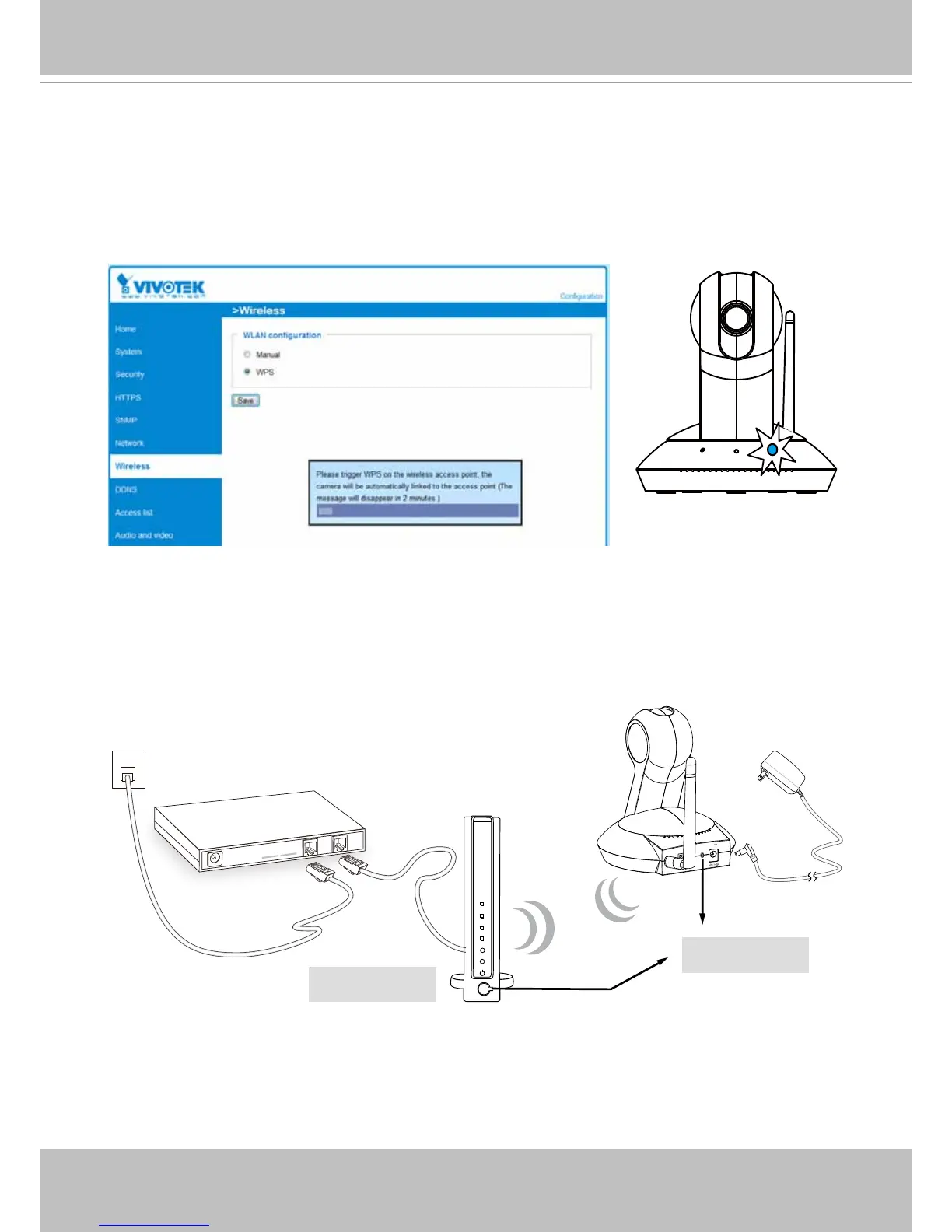
4. Wait for 2 minutes with the onscreen progress bar. The camera should then reboot.When the progress
bar disappears, disconnect your LAN cable. You can refresh or re-start your web console to see live
video.
When WPS conguration is done, wireless connectivity will be established and the security encryption,
such as WEP or WPA-PSK, will be synchronized with the AP. Use the IW2 utility to nd the camera. As
for IP setting, the camera's use of DHCP or static IP is determined by your conguration on the network
camera via the web console. The camera's default is DHCP.
2. Connect your camera using a LAN cable, open a web console, and enter the Conguration ->
Wireless page. Select the WPS checkbox, and click the Save button.
3. The camera's blue LED should start ashing. Press and hold down both of the WPS buttons on
your AP and your camera for at least 1 second. (Some router/AP will have a virtual button on their
management software instead.) Refer to your AP's documentation for details using its WPS function.
ADSL/Cab le/Hub
12V
1.5A
ETHERNET
WPS
Wireless AP
WPS Buttons
PT8133W



 To Next Page