VIVOTEK
User's Manual - 81
Patrol Settings
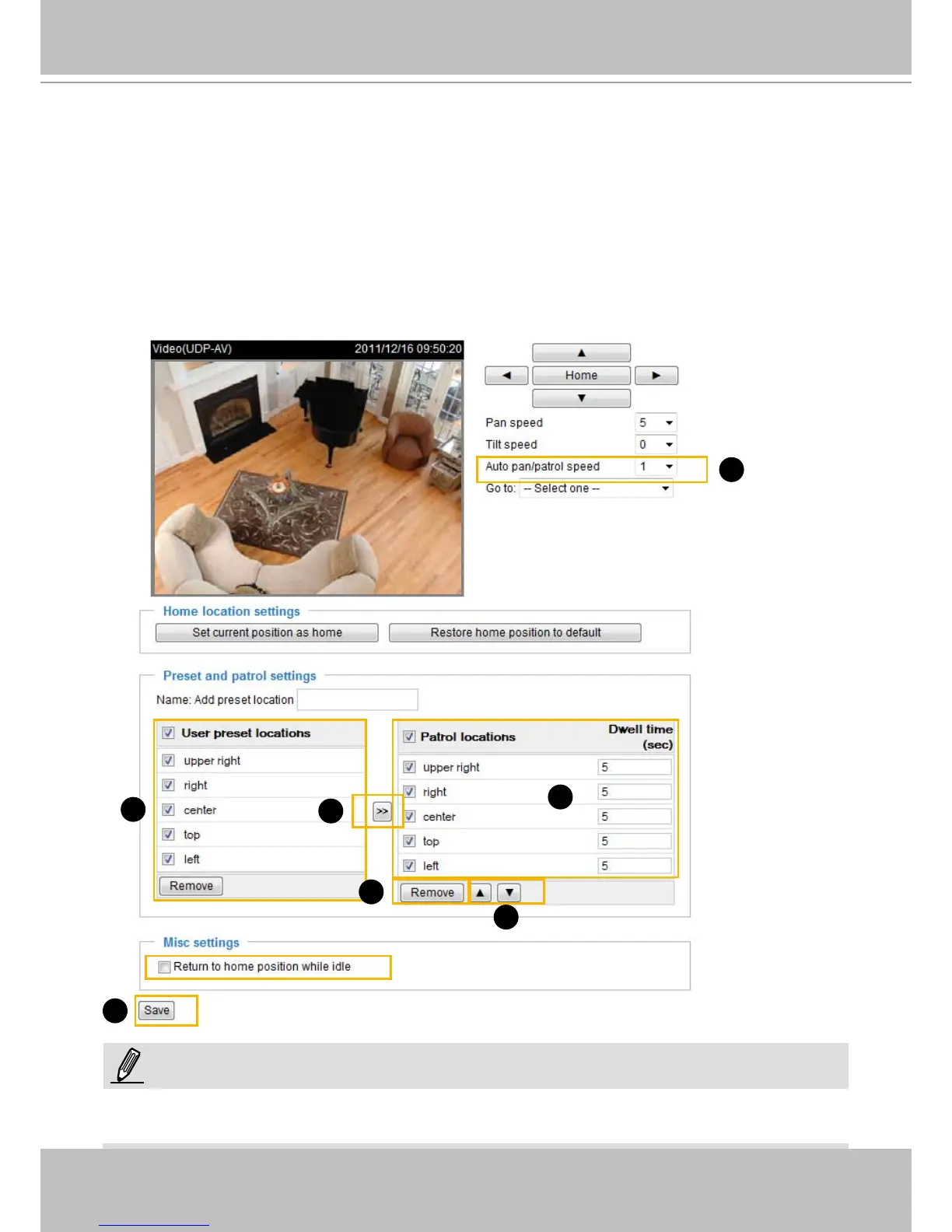
You can select preset locations to arange the patrolling tour for the Network Camera.
Please follow the steps below to set up a patrolling tour:
1. Click to select one or multiple preset locations by checking their checkboxes.
2. Click the >> (Move) button to move them to the Patrol locations column.
3. Click to select a position, and manually enter a Dwelling time for the camera to stay during an auto
patrol. The default value is 5 seconds.
4. Repeat step 1 and 3 to select and congure individual patrol locations.
5. If you want to delete a selected location, select it from the list and click Remove.
6. Select a location and click Up or Down to rearrange the patrolling order.
7. Adjust the Auto pan/patrol speed. (1~5 scale determining how fast moving to the next position)
8. Click Save to enable the settings.
1
3
7
2
5
8
6
NOTE:
A patrol takes place by clicking the Patrol button on the home page, and ends when the last position is
reached.



 To Next Page