ENG - 6
First-time Setup
1
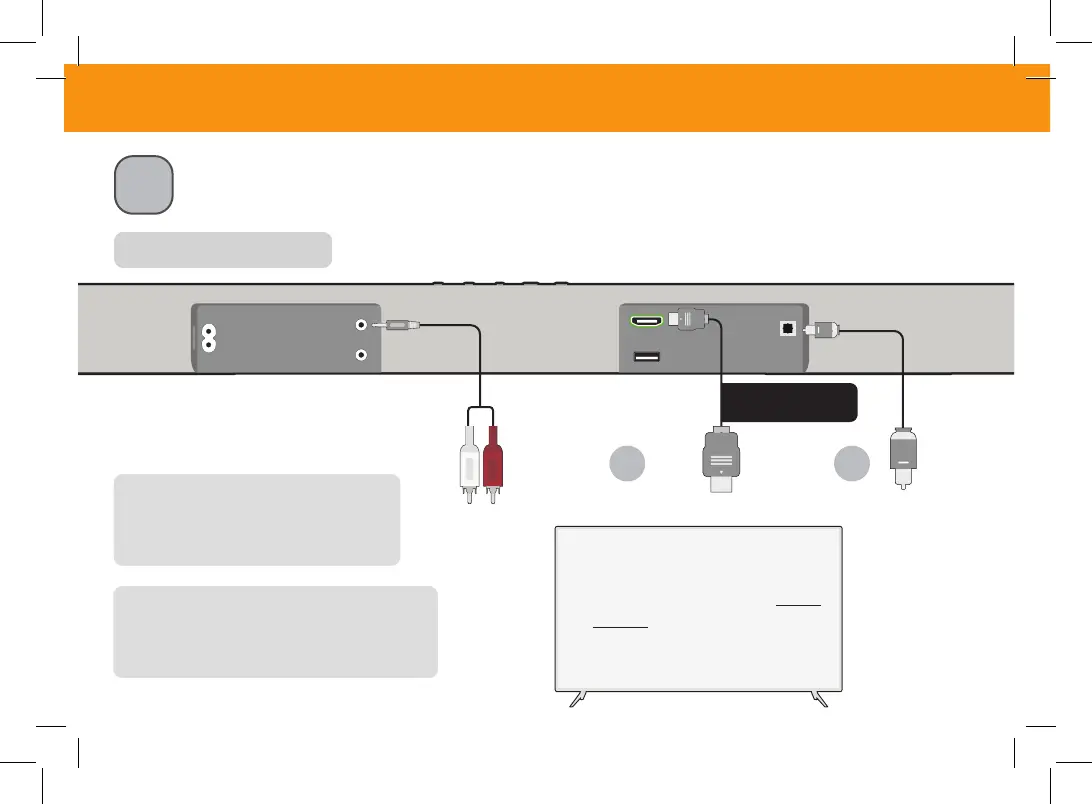
Choose the best possible connection cable type and connect it to your TV.
*
(Not all cables are included.)
HOME THEATER DISPLAY | QUICK START GUIDE
Installation Guide | Models:
Be sure the TV port is an audio
output, not an audio input.
Back of Sound Bar
**
Some TVs do not pass through digital audio:
When using the digital input, if there is no audio, try:
• setting the TV output to PCM, or
• connecting directly to your Blu-ray or other source.
*
Not all TVs have the audio outputs shown.
To connect the sound bar directly to your other
devices (Blu-ray player, game system, etc.) see
your device’s user manual.
HDMI ARC
Cable
BEST
3.5mm to
RCA cable
Digital
Optical
Cable
**
OR OR


 To Next Page