VIZIO VBR200W User Manual
20
www.VIZIO.com
You only have to perform this procedure once. The next time you turn on your player, it will
connect to the network automatically.
If you need additional help setting up your network, please refer to the user manual for your
router or contact the manufacturer of either your router or your Internet service provider if they
provided the router for you.
Using a wireless network with WPS (Wi-Fi Protected Setup – Button Method)
1. Turn on your player and your TV. If a DVD is not in the disc tray,
the Home menu will be displayed. If a DVD is in the disc tray, press
SETUP to display the Home menu.
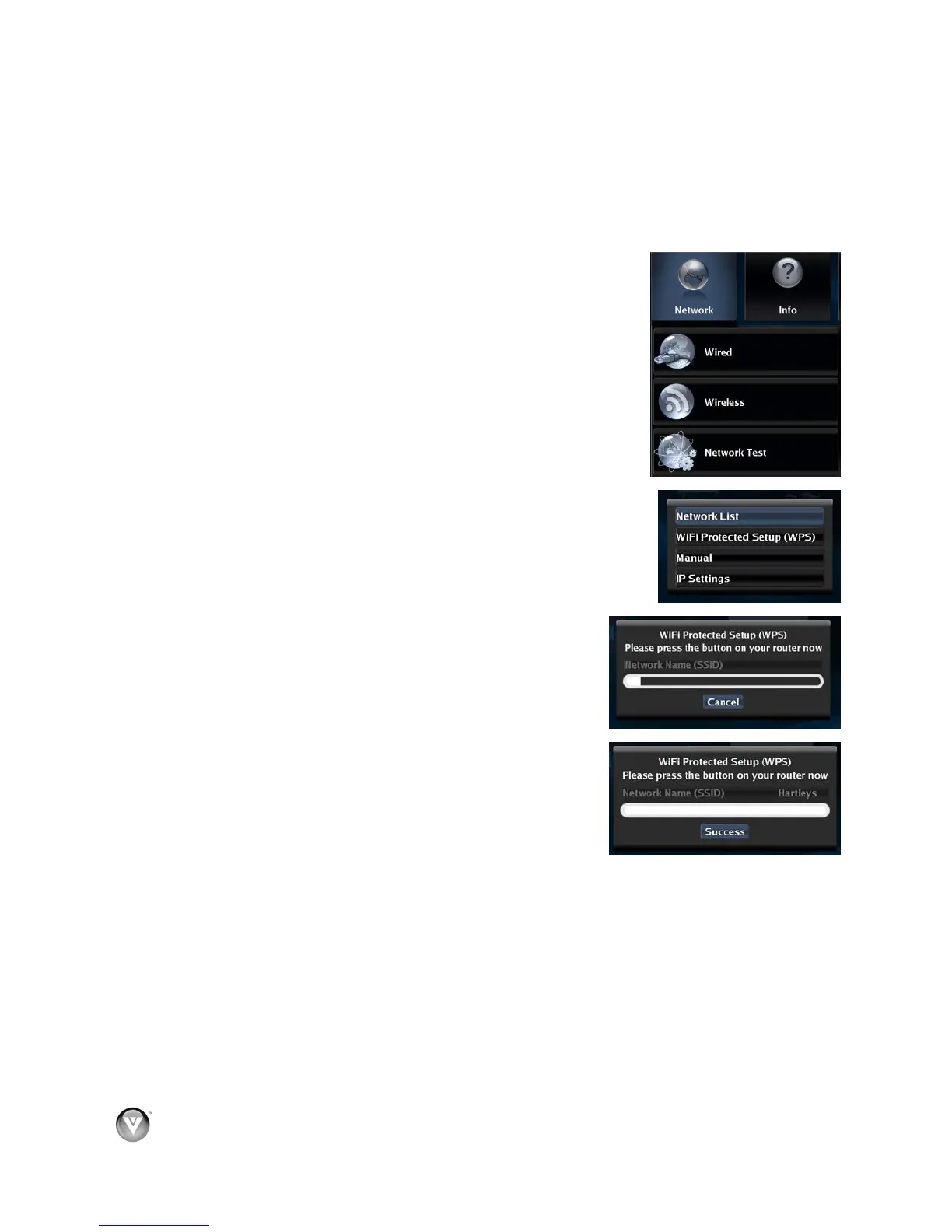
2. Press the B (green) button, if prompted. Otherwise:
a. Press ◄ or ► to select Settings, and then press SELECT.
b. Press ◄ or ► to select Network, and then press SELECT.
3. Press
▲ or ▼ to select Wireless and then press SELECT.
4. Press
▲ or ▼ to select WiFi Protected Setup (WPS) and then
press SELECT.
5. Press the button on your router. When you see Success on the
screen, your player is connected to your wireless network.
6. Press SELECT to close the message.
Notes:
You only have to perform this procedure once. The next time you
turn on your player, it will connect to the network
automatically.
If you need additional help setting up your network, please
refer to the user manual for your router or contact the
manufacturer of either your router or your Internet service
provider if they provided the router for you.



 To Next Page