VIZIO VBR200W User Manual
8
www.VIZIO.com
Chapter 2 Basic Controls and Connections
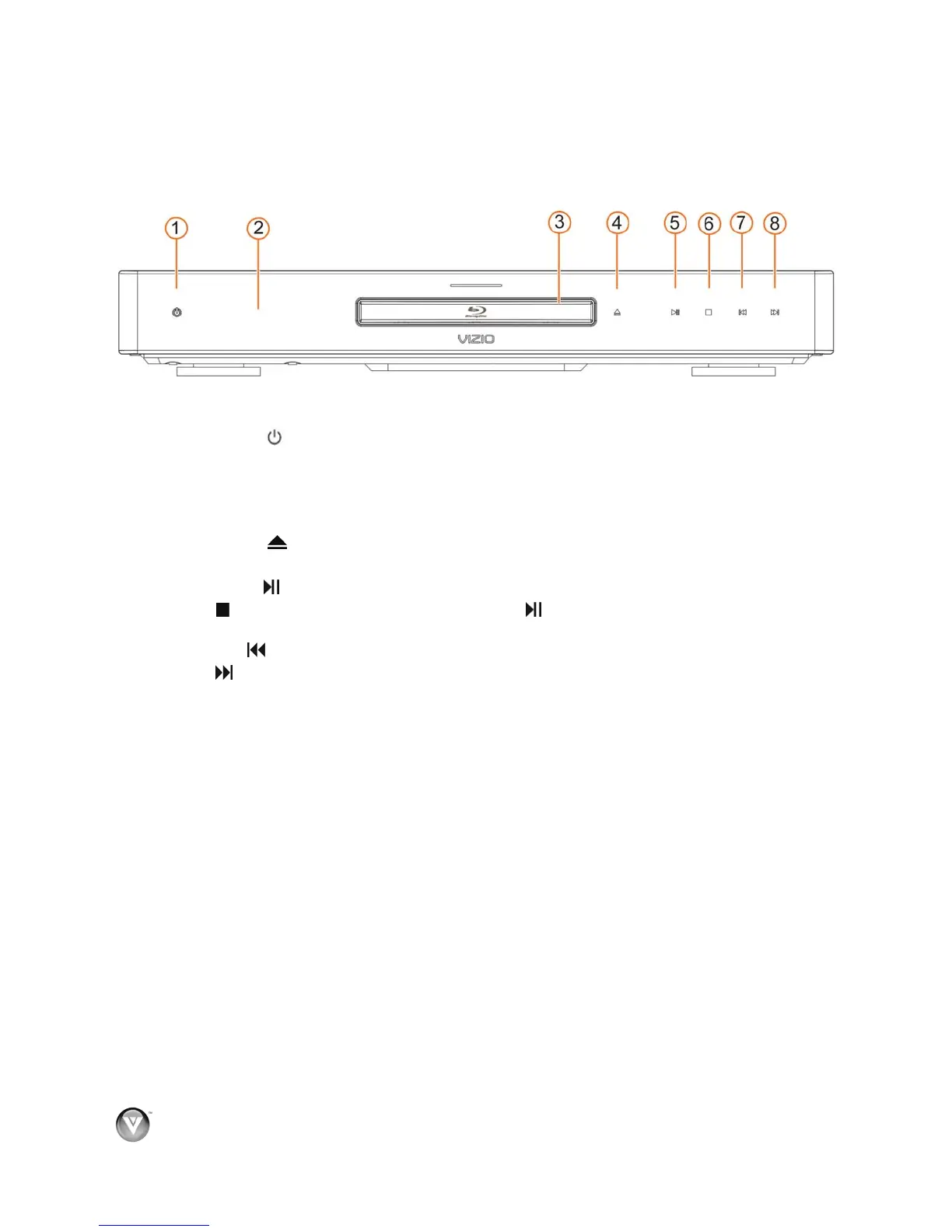
Front
The controls on the front of your player are touch-sensitive. Just touch a finger anywhere on the front
panel and the controls will light up.
1. Standby/On (
)—Press to turn your player on or off. When your player is off, power is still
entering your player. To disconnect all power, unplug the power cord.
2. Remote Control Sensor—Point the remote control directly at this sensor for the best response
to the remote signal.
3. Disc Tray—Insert a disc with the label side up into this tray.
4. Open/Close (
) —Press to open or close the disc tray.
Note: Due to the nature of Blu-ray discs, it may take a moment for the disc tray to respond.
5. Play/Pause (
)—Press to start or pause playback.
6. Stop (
)—Press to stop playback, and then press to begin playback at the beginning of the
disc.
7. Previous (
)—Press to go to the previous title, chapter, or track.
8. Next (
)—Press to go to the next title, chapter, or track.



 To Next Page