VIZIO VBR200W User Manual
32
www.VIZIO.com
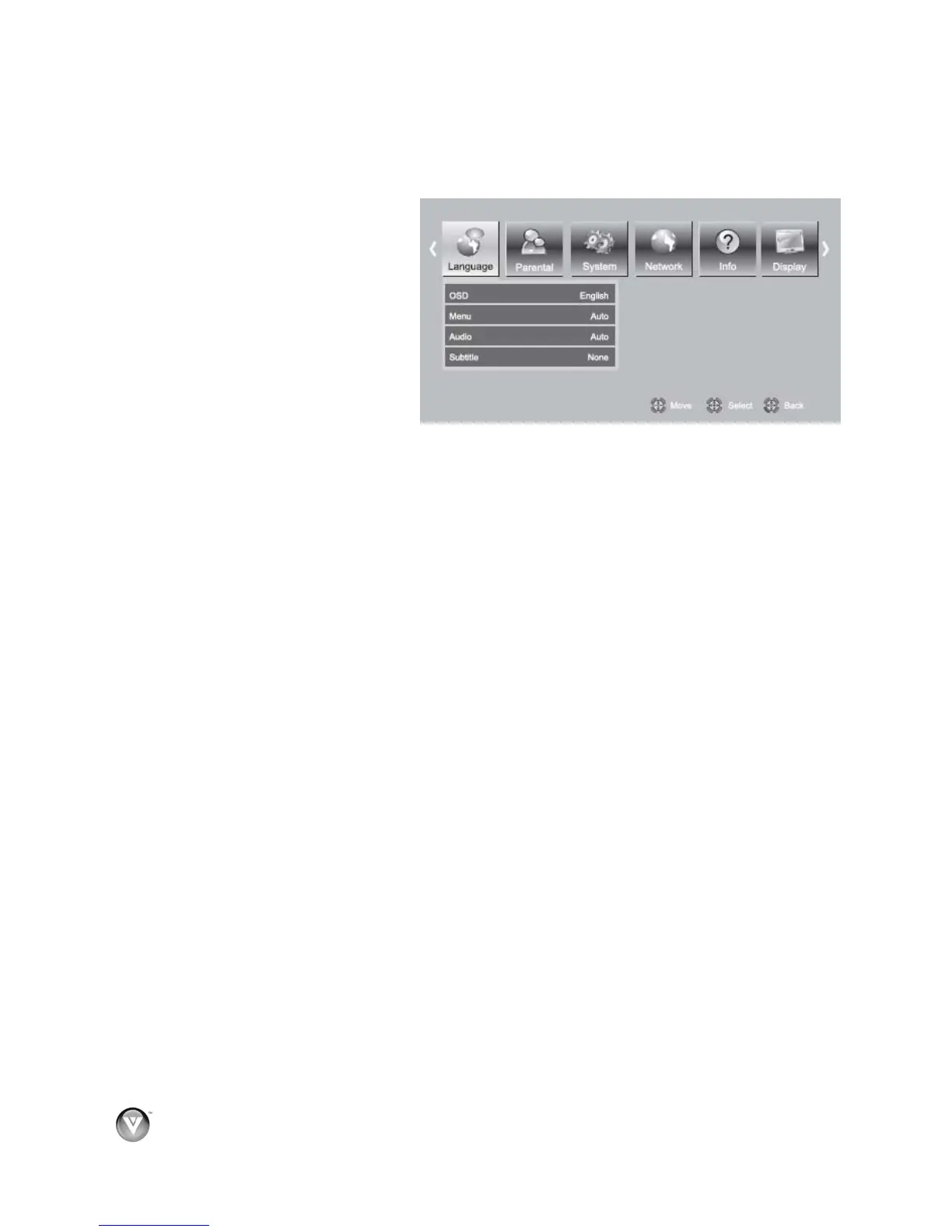
Language Menu
Change the default language (English) used to set up the player and the default language presented
when discs load and play. (Note: Many discs do not support multiple languages).
1. Turn on your player and your TV. If a DVD is not in the disc tray, the Home menu will be
displayed. If a DVD is in the disc
tray, press SETUP to display the
Home menu.
2. Press
◄ or ► to select Settings
and then press SELECT.
3. Press
◄ or ► to select Language.
The Language menu opens.
4. Press
▲ or ▼ to make your
selection.
5. Press
◄ or ► or SELECT to
change the setting.
6. Press RETURN once to return to the sub-menu.
OSD
Select the Settings menu language. Choose from English, French, or Spanish.
Menu
Select the disc menu language. The number of languages depends on the disc. Most discs have only one
language available.
Audio
Select the disc audio language. The number of languages depends on the disc. Some discs do not allow
you to select the audio language from the Settings menu. Instead, select the audio language from the
main disc menu.
Subtitle
Select the disc subtitle language. The number of languages depends on the disc. Some discs do not
allow you to select the subtitle language from the Settings menu. Instead, select the subtitle language
from the main disc menu.
Home Menu
Return to your player’s Home menu.



 To Next Page