53
b) Voltage measurement “V”
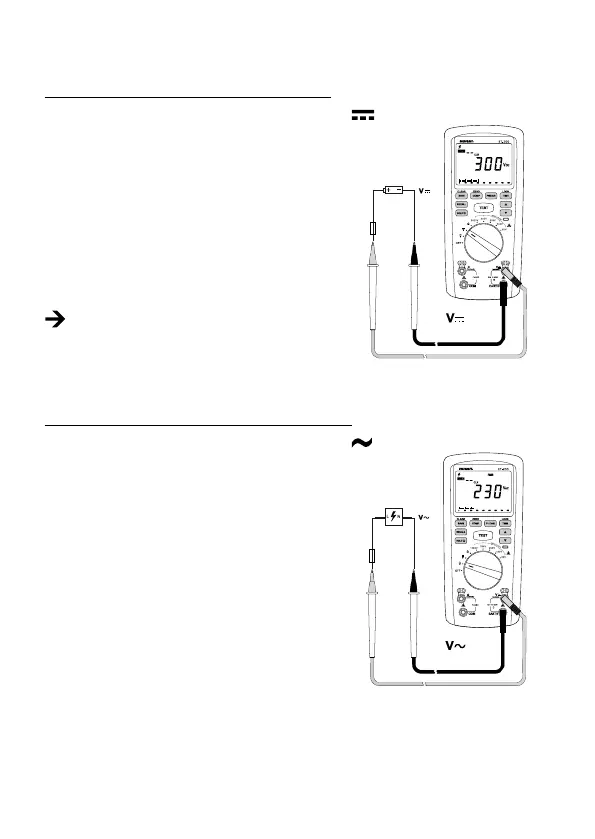
Proceed as follows to measure direct voltages “V/DC”:
- Turn the DMM on and select the measurement function “V
”.
- Plug the red measuring lead into the red measurement
socket “V” (8), the black measuring lead into the “EARTH”
measurement socket (7).
- Connect the two measuring probes to the object to be
measured (battery, switch, etc.). The red measuring tip
indicates the positive pole, the black measuring tip the
negative pole.
- The polarity of the respective measured value is indicated
on the display together with the current measured value.
If a minus “-” appears in front of the measured value
for the direct voltage, the measured voltage is nega-
tive (or the measuring tips have been mixed up).
- After ending the measurement, remove the measuring leads from the measured object and
turn the DMM off.
Proceed as follows to measure alternating voltages “V/AC”:
- Turn the DMM on and select the measurement function “V
”
- Plug the red measuring lead into the red measurement
socket “V” (8), the black measuring lead into the “EARTH”
measurement socket (7).
- Connect the two measuring probes to the object to be
measured (generator, switch, etc.).
- The measured value is shown on the display.
- After ending the measurement, remove the measuring
leads from the measured object and turn the DMM off.









 To Next Page