48
9. GETTING STARTED
After inserting the batteries, you can begin the desired measurement process.
a) Acoustic signals
The meter generates acknowledgment tones for checking purposes. A beep conrms the
entry; continual beeping indicates danger.
b) Rotary switch (3)
The rotary switch is used to switch the meter on and select the individual measurement
functions. The automatic range selection “AUTO” is active in all measurement functions. This
feature always sets the respective appropriate display range.
The multimeter is switched off in the “OFF” switch position. Always turn the meter off when it is
not in use. All activated functions are likewise switched off when the meter is switched off. The
memory contents are retained.
c) Automatic switch-off
The meter switches off automatically after approx. 3 minutes if no button entry occurs, the
rotary switch has not been turned or no long-term measurement is running. This protects the
lifetime of the batteries. Before the switch-off, an acoustic warning sounds and the display
ashes.
To turn the meter on again, turn the rotary switch to the “OFF” position and select the desired
measurement function again.
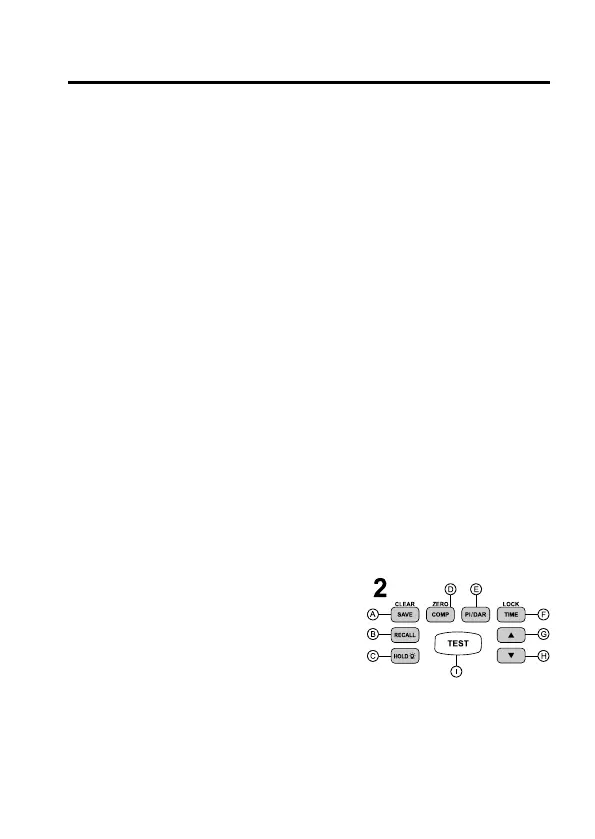
d) Function button eld (2)
All adjustments and special functions on the meter can
be carried out with the function buttons. The individual
buttons are described in brief:
2A SAVE/CLEAR
A brief press stores the current measured value in the next free memory cell. When the
read function “RECALL” is active, a long press (>2s) deletes the entire memory. The
memory cells are displayed from 01 to 99. If two dashes “- -” are displayed, no memory is
occupied.









 To Next Page