15
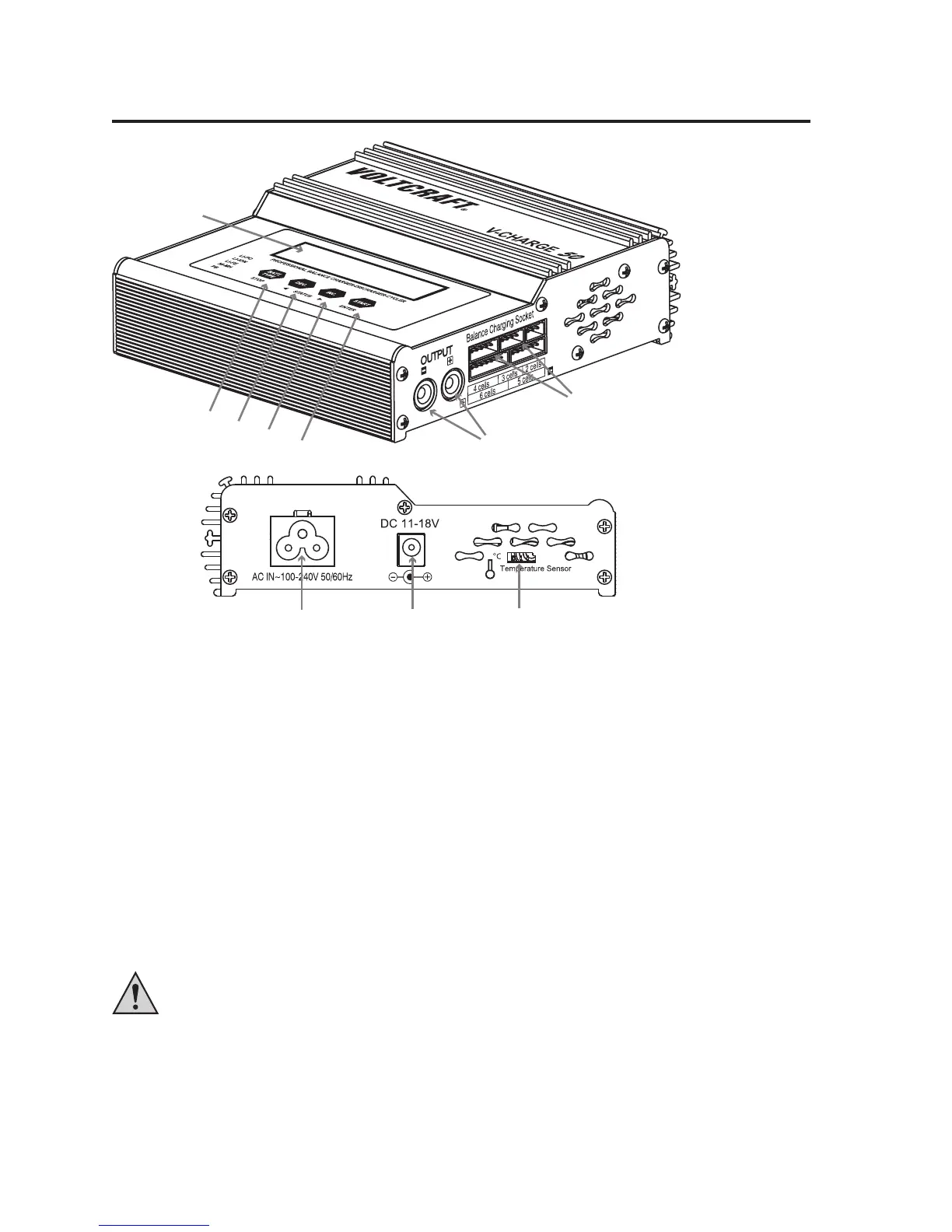
8. OPERATING ELEMENTS
1 Illuminated display
2 Button "BATT. TYPE/STOP" for returning from a menu or stopping the charging process
3 Button "DEC" for entering values (decreasing value), menu selection (backwards) and displaying various data
while charging/discharging
4 Button "INC" for entering values (increasing value), menu selection (forward) and displaying the voltage values
of the individual cells when charging lithium batteries with a balancer connection
5 Button "START/ENTER" for starting/continuing the charging process or conrming an adjustment/operating func-
tion
6 Round sockets (4 mm) for rechargeable battery connection (red = plus/+, black = minus/-)
7 Balancer connections (only one at a time can be used!)
8 Low-voltage device socket for connecting the charger to the mains voltage
9 Direct voltage input (11 - 18 V/DC, stabilised), e.g. to connect to an external vehicle lead battery
Either operate the charger via the mains voltage connection (8) or the direct voltage input (9). Never use
both inputs at the same time. This may damage the charger.
10 Socket for external temperature sensor (not enclosed, can be ordered separately)
1
2
3
4
5
6
7
8
910




 To Next Page