Controls
4 Move the parking brake to its forward
position.
NOTE
The parking brake cannot be released until
the blocking valve has been depressed.
CAUTION
Never drive if the symbol for parking brake
applied is lit. Stop immediately if it lights up
while driving.
Direction indicators
1 Pressure point position
Move the stalk slightly upwards or
downwards when turning with small
steering wheel movements, for
example when changing lanes or
overtaking. The direction indicator is
active as long as it is held in position
by the finger. The stalk will return to
neutral position immediately when it
is released.
2 Past the pressure point
Move the stalk past the pressure
point and the direction indicator will
stay on until the stalk is returned
manually, or the steering wheel
returns after turning.
3 Main beam flasher
Pull the stalk towards the steering
wheel until slight resistance is felt.
The main beam is lit until the stalk is
released.
Main and dipped beam
switching
Pull the stalk towards the steering
wheel, past the main beam flasher
position and release it. The
headlamps switch between main and
dipped beam.
Idling speed
Before manual adjustment of the idling
speed, make sure that the bus is
stationary and the engine is running at
idling speed. The accelerator pedal must
be released.
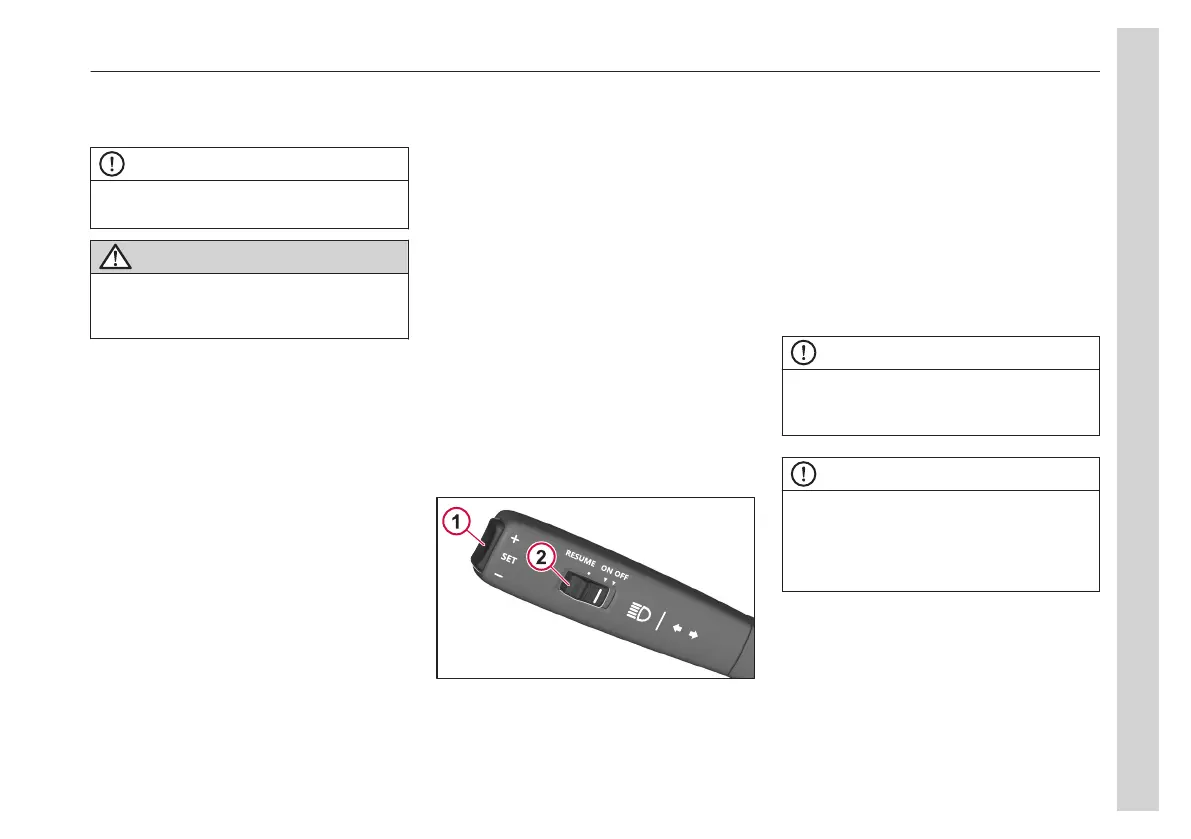
Move the sliding button (2) to ON and
then press + or - on the SET button (1)
to increase or decrease the idling speed.
Each press of the SET button increase
or reduce the idling speed by 10 rpm.
The idling speed should normally be
approx. 575–625 rpm. When the bus is
stationary, the engine speed can be
temporarily increased up to a maximum
of 1200 rpm.
The electronic control system ensures
that the normal engine idling speed is
maintained so that manual adjustment is
generally not required.
NOTE
If the engine does not work properly at the
speed programmed by the factory, the bus
must be taken to a Volvo workshop.
NOTE
A change in idling speed is only
temporary. After using a pedal, engaging a
gear, or releasing the parking brake, the
idling speed will return to the factory
setting.
Lighting control
The lighting control on the dashboard is
used to switch between the bus' different
exterior light settings.
04
Instruments and controls
23


 To Next Page