Display
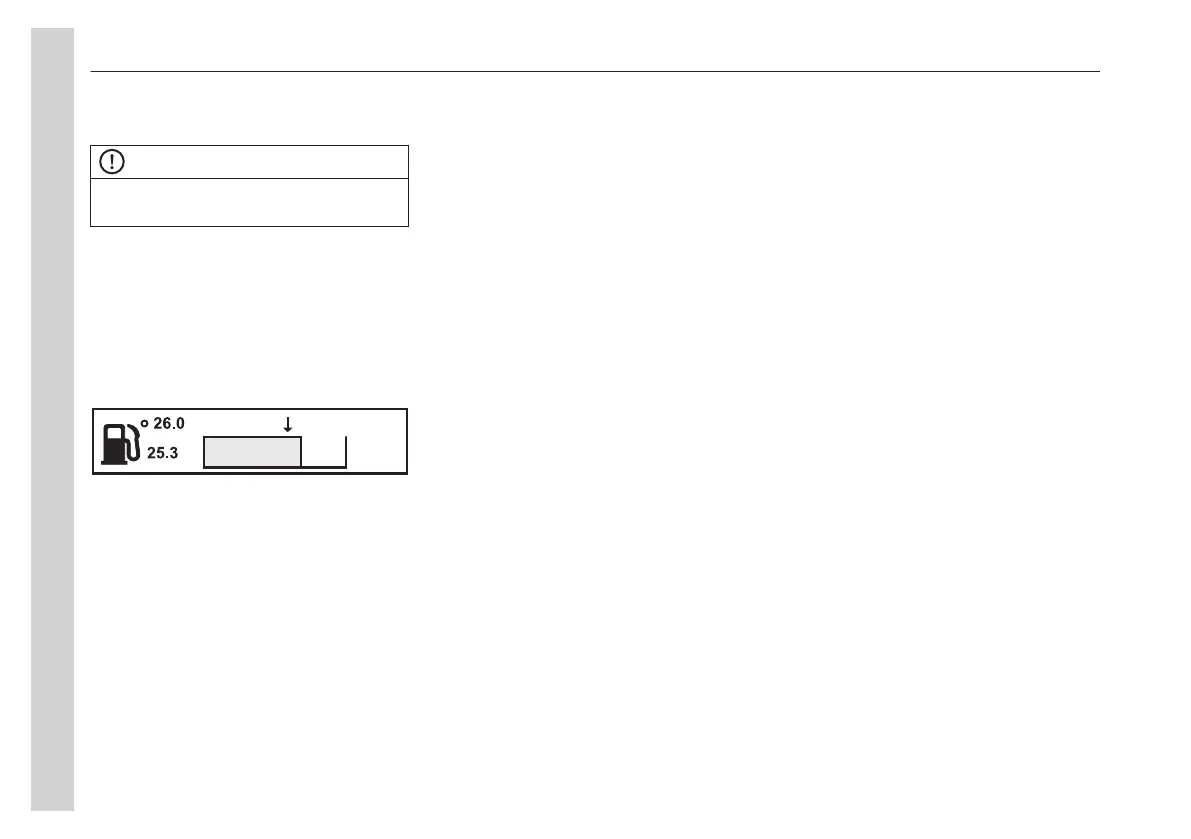
Menu fuel data
NOTE
At idle, no bar is shown and the fuel
consumption is displayed in litre/hr.
Fuel
1 Average fuel consumption: The value
is presented as a figure and an arrow
pointing down.
2 Instantaneous fuel consumption: The
value is presented numerically and in
the form of a bar.
To reset all fuel data, press and hold the
Menu button for 1 second.
Settings
Use the display control buttons to
choose if the fuel consumption is to be
shown as km/l, miles per gallon or as
miles per US gallons.
Fuel volume is displayed as litres or
gallons.
Menu climate
Floor fan, driver
Shows if the floor fan in the driver's place
is in automatic mode or turned off.
Climate system/Pause heating,
passenger
Shows if the passenger climate system
or the pause heating is turned off or on.
1 Select the desired menu option
Climate system/Short stop cab
heater with the navigation buttons
and press the Menu button.
2 Select the desired menu option
ON/OFF with the navigation buttons
and press the Menu button.
Temperature/Roof Fan, passenger
Shows desired temperature level and the
roof fan speed in the passenger
compartment.
1 Select the desired menu option
Temperature/Roof fan with
navigation buttons and press enter.
2 Set the desired temperature (15–
28 °C) with navigation buttons and
press enter. Set the desired roof fan
speed (MIN, -4, -1, AUTO, 1, 4,
MAX) with navigation buttons and
press enter.
Roof Heat/Floor Fan, passenger
Shows the selected level of the roof
heating and the status of the floor fan in
the passenger compartments.
1 Highlight the desired menu option
Roof heater/Floor fan with navigation
buttons and press enter.
2 Set the desired tank heater level
(OFF, -4, -1, AUTO, 1, 4, MAX) with
navigation buttons and press enter.
3 Activate/deactivate the floor fan
(AUTO, OFF) with navigation buttons
and press enter.
Extra heating, passengers
Shows if the extra heating in the
passenger compartments is switched on
or off.
Enable/disable (ON, OFF) the extra
heater with the display stalk buttons.
Floor fan, driver
Shows if the floor fan in the driver's place
is in automatic mode or switched off.
Enable/disable (AUTO, OFF) floor
heating with the display stalk buttons.
Menu time/distance
Clock and date
Displays the current time and date.
Settings
Time
04
Instruments and controls
40


 To Next Page