System
The system configuration page allows to set various
options for the operation of the unit:
- Demo: Switches the demo mode on/off. The unit is
in the normal operation mode when demo is off
- Restore defaults:
Allows the resetting of all information in the confi-
guration settings to a set of default values (imperial
or metric). Sends the request to change settings
message with a set of valid pre-determined values
for the configuration.
- Com viewer: Displays latest messages received
on communication ports
- Prog. tx: Transfers the contents of the application
program on flash memory to other CANtrak units
on the same CANbus link
- About: Displays the following information
ID no: Serial number of the display
Eeprom: Number of write on Eeprom
Vers: Software version number
Chk: Flash memory checksum
Part no: Volvo software part number
Source: Display the source of received data
Label: Allocated Label on the bus. Each unit on
the same bus should have a different label
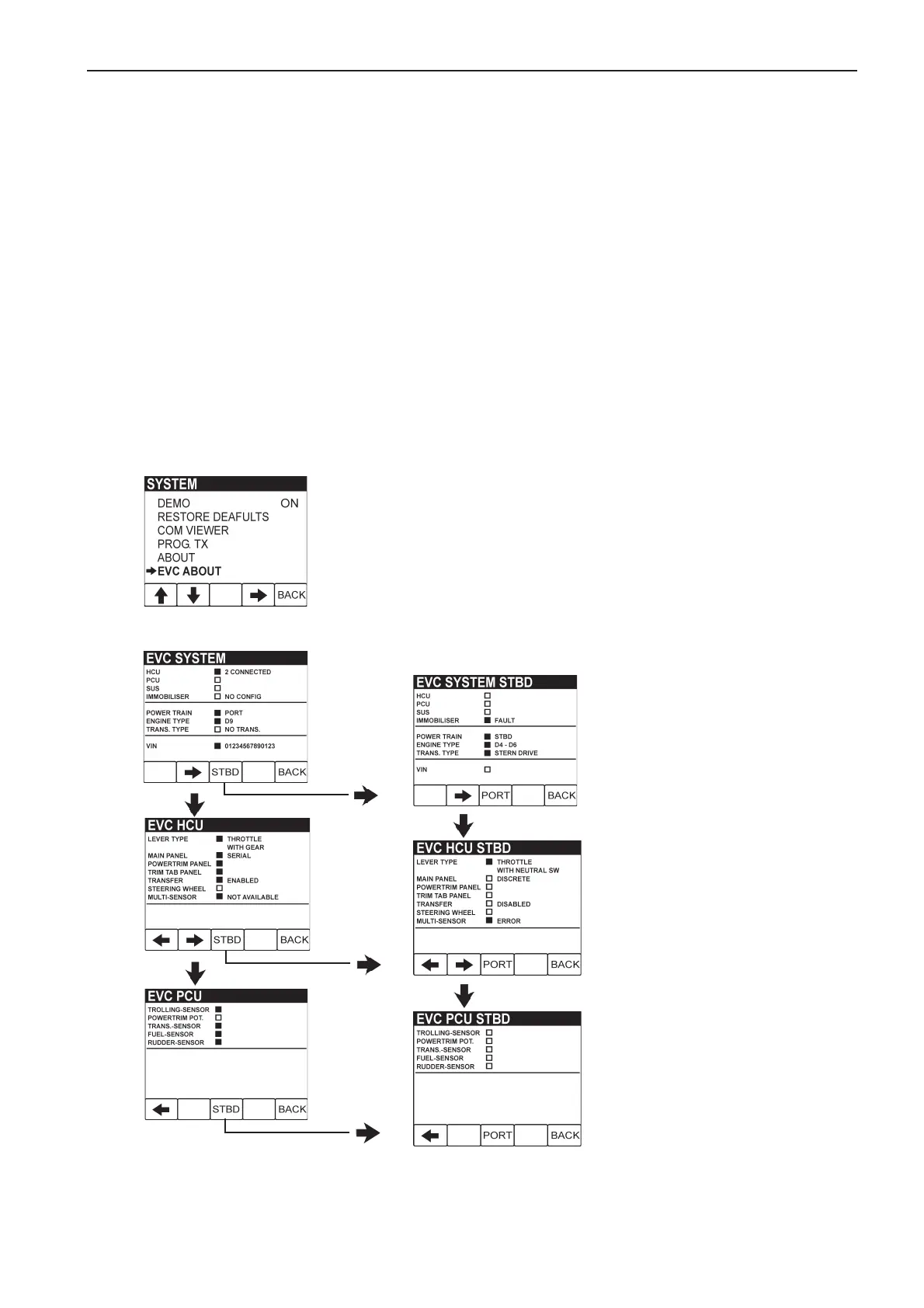
- EVC About: Shows information about the EVC-
system and the VIN (Vehicle Identification Number)
The system menu below showing access to “EVC About” screens.
Port configuration screens



 To Next Page