5 CCM (Climate Control Module)
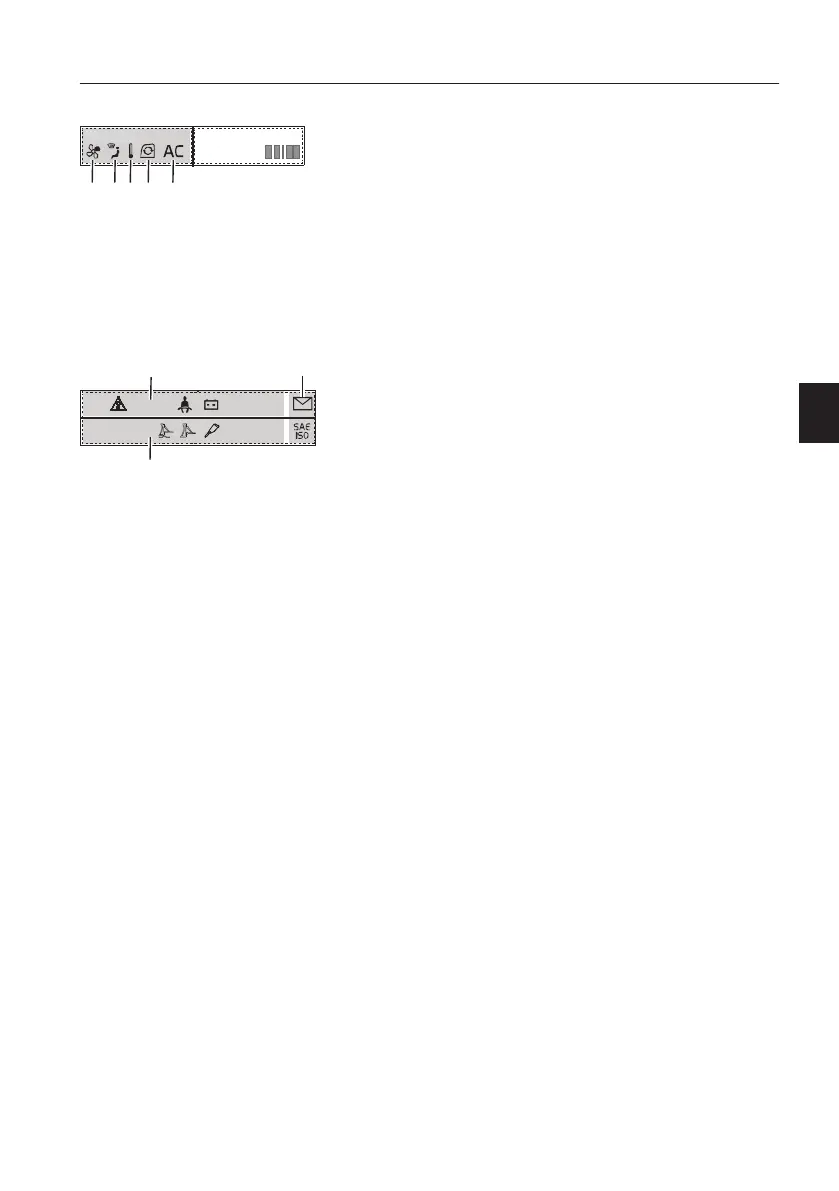
CCM segment displays the status of the CCM
(Climate Control Module). This includes
temperature setting, fan speed, air flow direction,
circulation, air conditioning status and automatic
temperature control function. Refer to page
118
for
more details.
6 Indicators
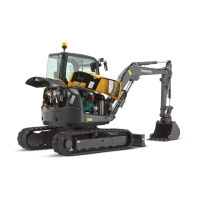
Indicator screen displays indicators as symbols that
show users important information easily and
quickly. Indicators are divided into three types;
function indicator, warning indicator, and fixed
indicator.
- An indicator that has higher priority is put on the
left side of the one that has lower priority.
- Indicators on both sides can extend their display
area to the other side if there is no indicator on
the other side.
- When the whole area is filled and there are more
indicators to display, indicators keep replacing
the others so that the user can see all indicators.
V1158194
1 2 3 4 5
FLOWCLIMATE
1 Fan speed
2 Air flow direction
3 Temperature
4 Air flow circulation
5 Air conditioning status
A Function indicators
B Warning indicators
C Fixed indicators
Instrument panels
Instrument panel, front
41


 To Next Page