Press this button to move the cursor to the right. Also press
the button in order to increase values.
10 E
C
u
t
t
o
Press this button to go back to the previous screen or to cancel
without saving.
The ESC button is also used to turn off the warning light and
sound.
11 S
l
e
c
t
o
n
Press this button to confirm the item or setup that the user
selects.
12 S
a
l
i
s
r
n
t
r
t
o
n
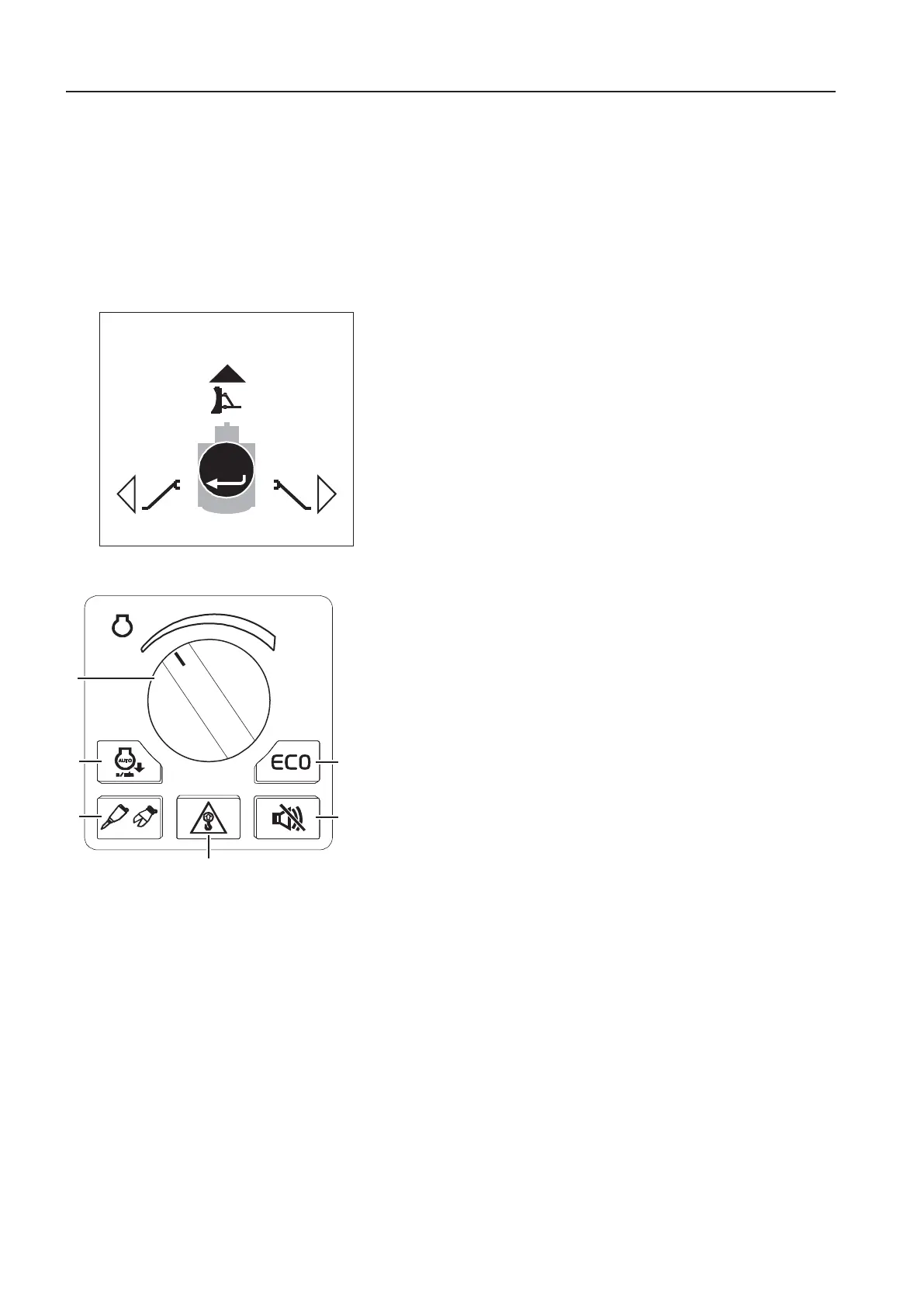
This button is used to select the stabiliser (blade or stabiliser
legs, depending on machine configuration) which the operator
wants to control with the additional hydraulic lever (position 4
on the left instrument panel) or the optional joystick controlled
support function (button 5 on the left control lever), see
34
.
A press on the stabiliser control button on the IC control
keypad opens the stabiliser control menu in the IC (Instrument
Cluster).
Use the arrow buttons to choose the appropriate symbol for
blade or stabiliser legs and press SELECT to activate/
deactivate the control.
Press ESC to save and close the menu in the IC (Instrument
Cluster).
1
3
.
a
c
i
n
e
n
t
r
o
l
y
a
d
1E
This control is used to change the engine speed.
The engine speeds in some positions are different in ECO
mode.
- Increase the engine speed by turning the control clockwise.
- Reduce the engine speed by control counter-clockwise.
2A
The Auto idle button activates or deactivates "Auto idle"
function.
The engine speed will be reduced automatically to idle in order
to reduce fuel consumption if any of control levers, pedals or
engine speed control switch are not operated for 5 seconds.
If any one of the above is operated, the engine speed returns
to the speed set with the engine speed control switch.
3H
This button is used to activate the hammer/shear function.
For further description of the hammer/shear operation see
page
228
.
4O
The overload warning button activates or deactivates the
“Overload warning” function.
If this function is activated, a symbol in the IC (Instrument
Cluster) and an alarm will be generated if the "overload signal"
is detected.
- First event of overloading: The pop-up message and the
warning indicator will be displayed and a warning alarm
sounds. The pop-up message will disappear only when the
ESC button is pressed.
- When the event occurs again when operating the machine:
A warning alarm sounds and the indicator is shown. When
reducing the load, the alarm and indicator will turn off.
5T
Travel alarm stop button (optional equipment)
OR/BLADE CONTROL
ALL
V1151937
Stabiliser control
1 Engine RPM control
2 Auto idle button
3 Hammer/Shear button
4 Overload warning button
5 Travel alarm stop button (optional
equipment)
6 ECO button
6
n
s
r
u
m
e
n
t
a
n
e
l
s
n
s
r
u
m
e
n
t
a
n
e
l
,
i
g
h
t


 To Next Page
 Loading...