1
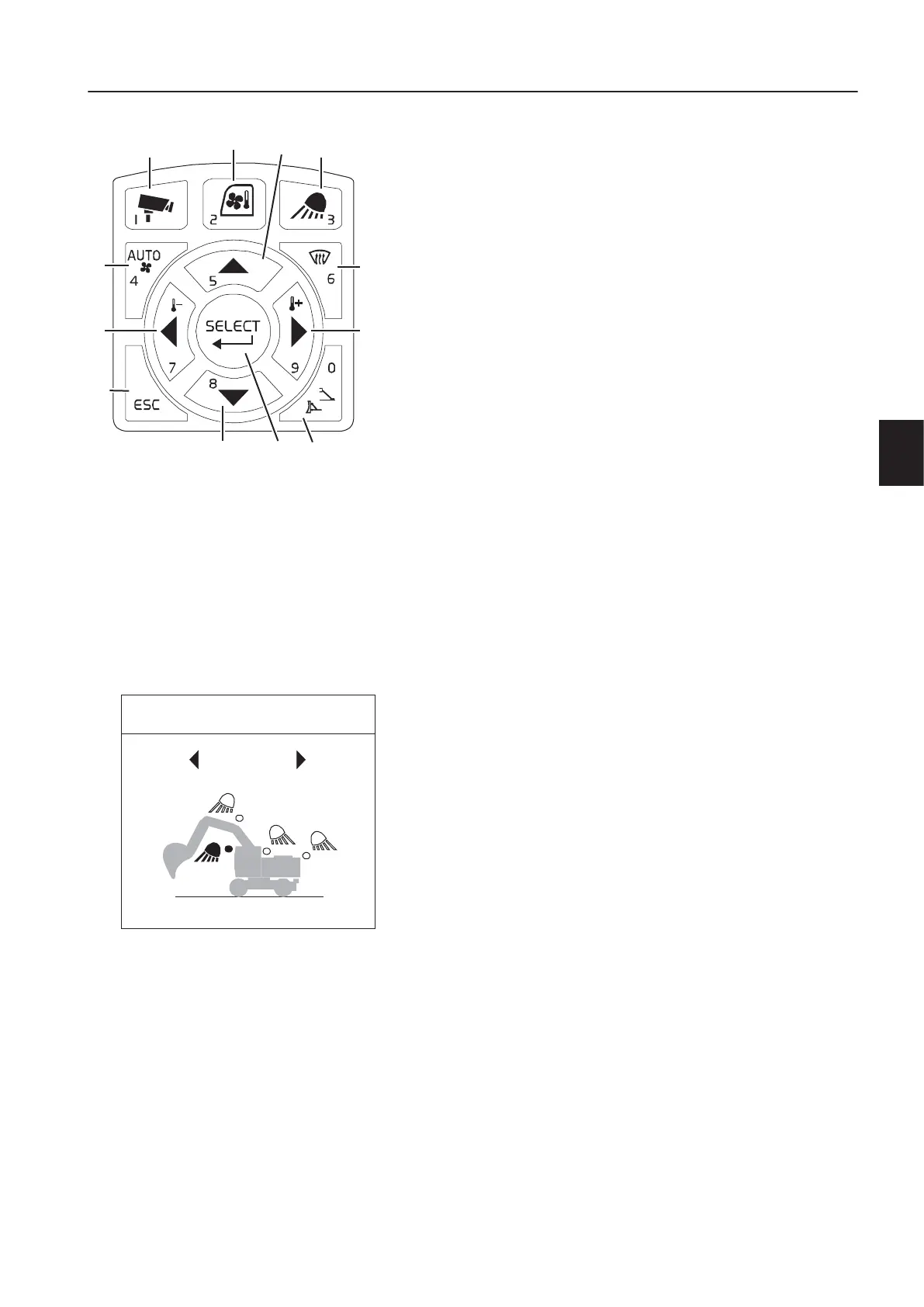
12. IC (Instrument Cluster) control keypad
1C
This button is used to control the camera screen in the IC
(Instrument Cluster).
A short press on the camera button shows the camera view
with the gauges on top of the screen.
A long press on the camera button will bring up the camera
configuration bar.
For detailed information about the camera control, see page
130
.
2H
This button is used to control the HVAC system.
For detailed information about this climate control system, see
page
119
.
3W
Work lights control button
This button is used to control the work lights on the boom,
counterweight, cab front and cab rear.
A short press on the work lights button switches on/off the work
lights with the latest configuration.
If one of the work lights is activated, this button is illuminated.
W
o
i
g
t
s
n
u
A long press on the work lights button opens the work lights
menu on the IC (Instrument Cluster).
Press the arrow right or arrow left button to select the work
lights on in clockwise / counter-clockwise order.
Press SELECT to turn the selected working light on/off. If the
light is on the icon is yellow.
The selection menu can be closed by pressing ESC on the
keypad.
The position where you escape the menu is saved.
4H
HVAC auto-mode select button
This button is used to control the HVAC system.
See page
119
.
5A
Press this button to scroll between items and adjust each
segment on the screen.
6D
This button is used to activate the defroster.
See page
119
.
7A
Press this button to move the cursor to the left. Also press the
button in order to decrease values.
8A
Press this button to scroll between items and adjust each
segment on the screen.
9A
1 Camera button
2 HVAC control button
3 Work lights control button
4 HVAC auto-mode select button
5 Arrow up button
6 Defroster select button
7 Arrow left button
8 Arrow down button
9 Arrow right button
10 ESC button
11 Select button
12 Stabiliser control button
V1151936
WORK LIGHTS
ALL
Work light control
n
s
r
u
m
e
n
t
a
n
e
l
s
n
s
r
u
m
e
n
t
a
n
e
l
,
i
g
h
t
5



 To Next Page