VA41620/VA41630 Evaluation Board User’s Manual
V1.0
13
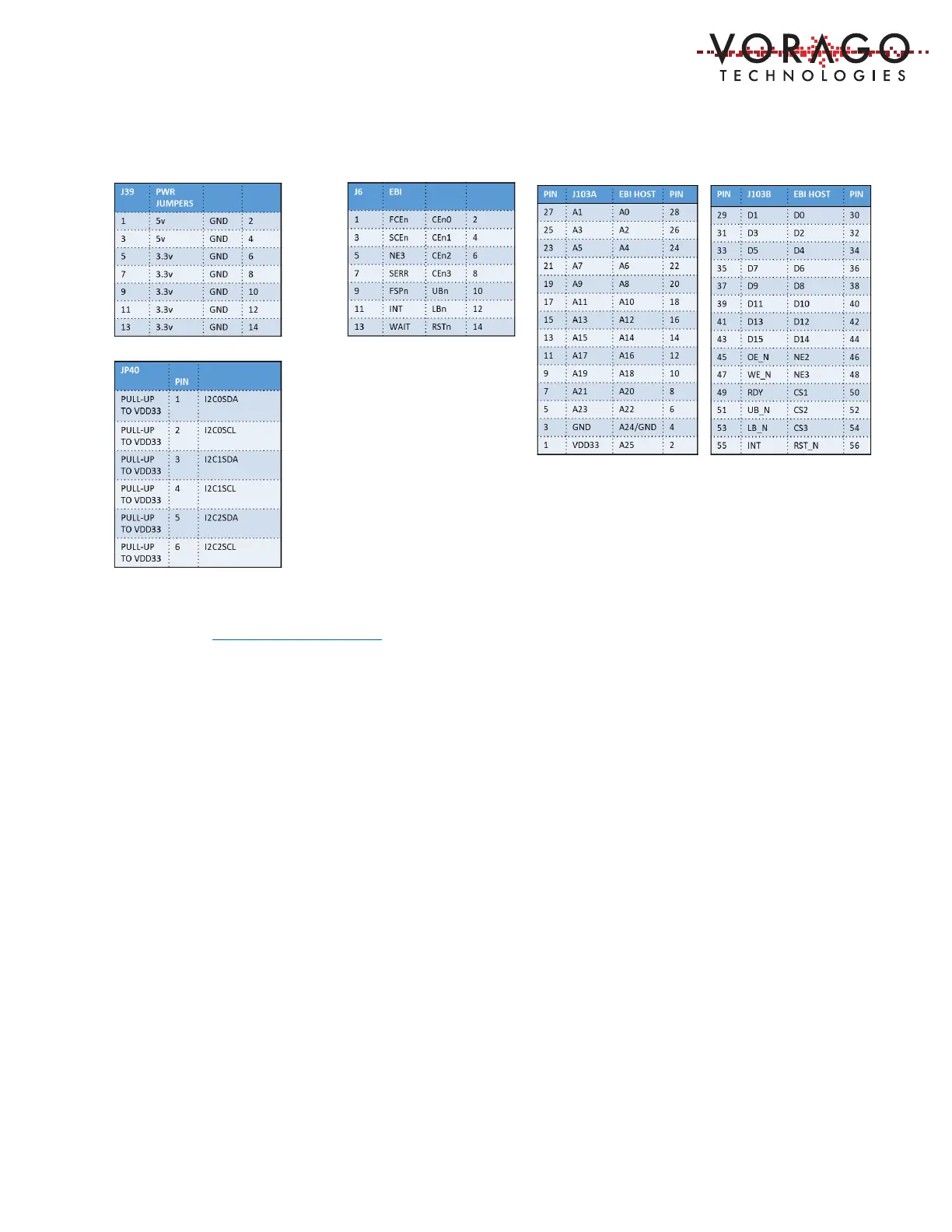
Table 6 - PEB1 EBI/Ethernet Board Connector designations
1.9 Support
Email: info@voragotech.com Reference PEB1 in the email title.
2 Software Setup
Three sets of software will be working in concert:
- Integrated Development Environment (IDE) {Either Keil, IAR or iSystem},
- Segger J-Link RTT viewer and
- Embedded code running on the VA416x0 processor.
The IDE allows code to be developed, compiled, debugged and programmed to an SPI FRAM on
the MCU board. The J-Link RTT Viewer allows terminal communication between the PC and the
VA416x0 MCU. Keys pressed on the keyboard can be routed to the VA416x0 MCU and printf
statements from the VA416x0 MCU can either be logged into a file or shown on a terminal
window. See Figure 3 - Software interaction for PEB1.


 To Next Page