12
SMARTSTREAM ANDROID
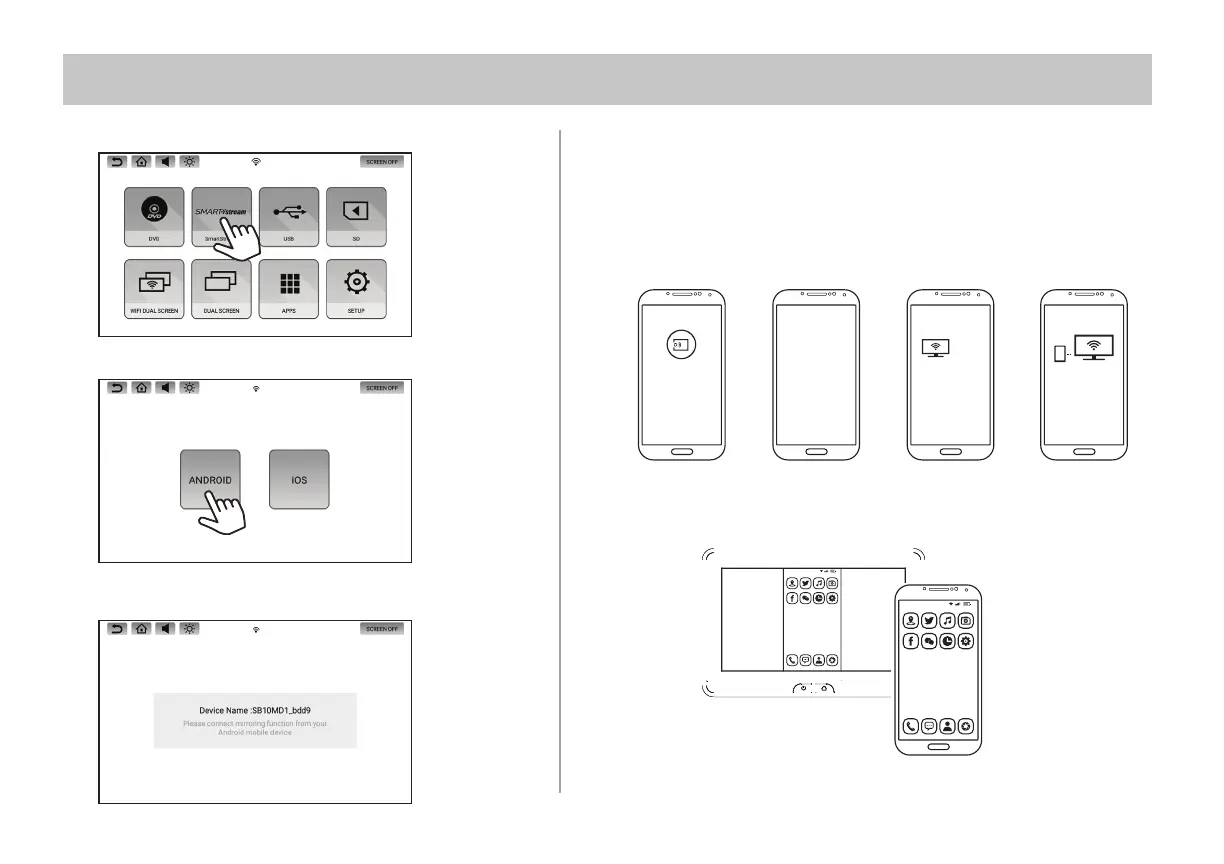
1. Select the SmartStream icon on the Main Menu.
2. Select the Android icon on the screen.
3. Device Name: SB10M1_xxxx or SB10MD1_xxxx
will appear on the screen.
4. Select the Mirroring function on your Smartphone. Your Smartphone will
start searching for devices. *See your Smartphone's Operation Manual
for details on how to operate screen mirroring.
5. After searching is completed, the monitor name will appear on your
Smartphone screen. Select the monitor name displayed on your
Smartphone.
SB10M1
Connecting to SB10M1...
Screen
Mirroring
Searching for devices...
18:00
80%
᱘᱘ ᱘
18:00
80%
6. Your Smartphone will now start connecting to the monitor.
7. Once connected, your Smartphone's screen will mirror to the monitor
and allow you to play back your desired content.


 To Next Page