19
WIFI SETUP
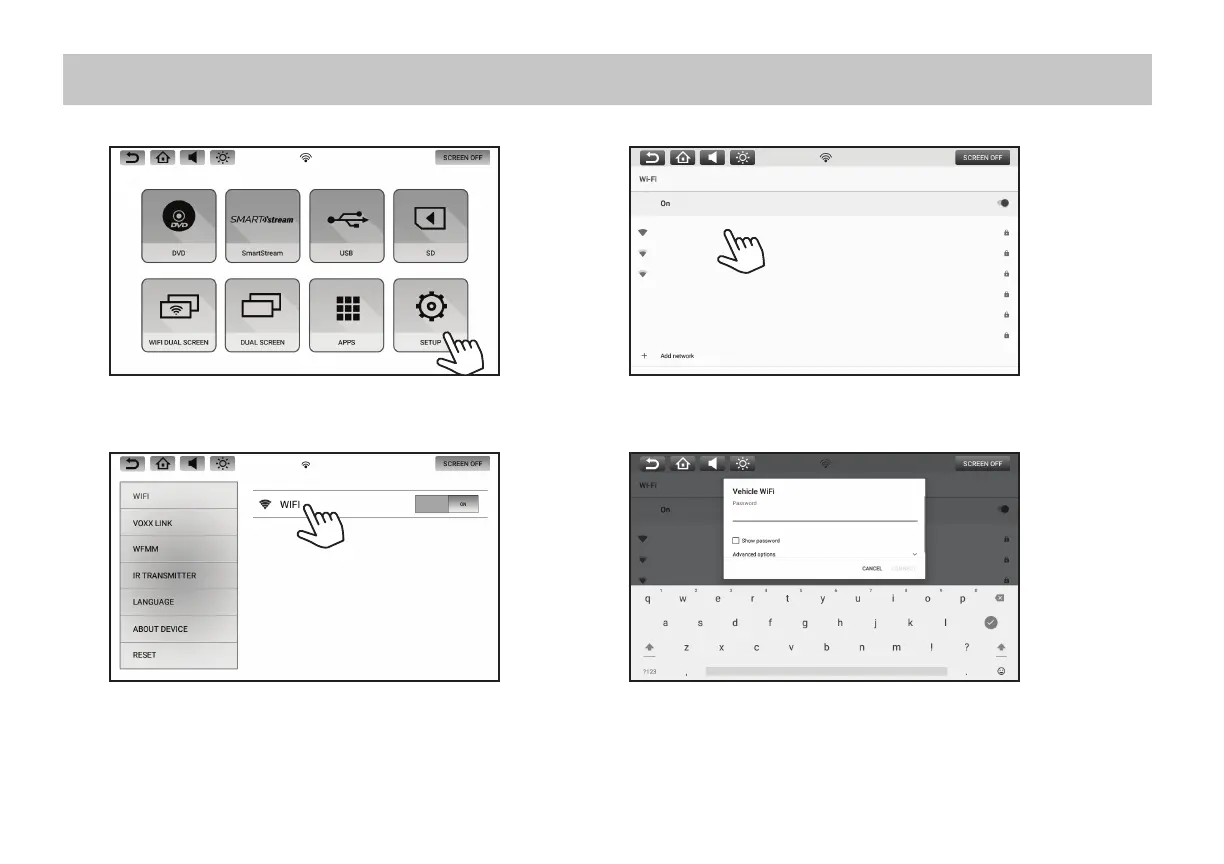
1. Select SETUP in the Main Menu.
2. Select WIFI from the setup menu. Turn ON the WIFI and then
touch the WIFI bar to see a listing of available Wi-Fi networks.
3. Select a Wi-Fi network from the available list.
4. Touch the line to enter the password, and the on-screen keyboard will
appear. Enter the Wi-Fi password, then press "CONNECT".
5. The monitor will now connect to the Wi-Fi network. Once a Wi-Fi network
is saved into memory, the monitors will automatically reconnect to that
network as long as the Wi-Fi setting is set to "ON".
NOTE: In order to enable full functionality of the system, each monitor will need to be connected to a Wi-Fi hotspot. Up to (10) Wi-Fi hotspots can be
saved in the memory of each monitor.
Vehicle Wi-Fi
Mom's Phone
Dad's Phone
Vehicle Wi-Fi
Mom's Phone
Dad's Phone


 To Next Page