EasyManua.ls Logo

VTech ES2310A - User Manual

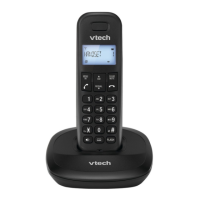
VTech ES2310A
51 pages
Print Icon
To Next Page IconTo Next Page
Loading...
1
Models:
ES2310A/ES2310-2A/
ES2310-3A

http://hkphones.v tech.com

Table of Contents

Questions and Answers

  • M
    Molly FowlerAug 10, 2025
    Why is my VTech ES2310A Cordless Telephone not working?
    • J
      jose89Aug 10, 2025
      If your VTech Cordless Telephone isn't working, ensure the batteries are correctly installed and charged, returning the handset to the base after use for optimal performance. Also, check that the power adapter is securely plugged into an outlet not controlled by a wall switch and that the telephone line cord is firmly connected to both the base and the wall jack. Try unplugging the base, waiting 15 seconds, and plugging it back in, allowing a minute for synchronization. If issues persist, remove and re-insert the batteries or replace them if necessary. As a final step, test the wall jack with another working telephone to rule out wiring or service problems; if the other phone also fails, contact your telephone service provider.
  • N
    Nicole RobertsonAug 17, 2025
    How to fix VTech ES2310A batteries that do not charge?
    • D
      Danny WernerAug 17, 2025
      If your VTech Cordless Telephone batteries aren't charging, ensure the handset is correctly placed in the telephone base. Try removing and reinstalling the batteries, then charge the handset for up to 14 hours. If the issue continues, you might need to purchase new batteries.
  • S
    summeryangAug 26, 2025
    What to do if there is interference during a VTech ES2310A conversation?
    • S
      sarawoodsAug 26, 2025
      If you experience interference or fading calls on your VTech Cordless Telephone, try moving the handset closer to the telephone base. If you have high-speed internet (DSL) through your phone line, ensure a DSL filter is installed between the base and the wall jack. Also, try moving the base or other appliances to a different outlet to avoid electrical interference.
  • J
    Jessica KingSep 2, 2025
    What to do if low battery shows on VTech ES2310A Cordless Telephone screen?
    • C
      Charles SawyerSep 2, 2025
      If your VTech Cordless Telephone displays a low battery warning, place the handset in the telephone base to recharge it. If the problem persists, remove and reinstall the batteries, use the handset until the batteries are fully depleted, and then recharge it in the base. If these steps don't resolve the issue, consider replacing the batteries.

Summary

IMPORTANT SAFETY INSTRUCTIONS

SET UP THE TELEPHONE

Connect the Base Station

Step-by-step instructions for connecting the base station to the power adapter and telephone line jack.

Connect the Charger

Instructions on how to properly connect the charger unit to a power outlet.

Install and Charge the Handset Battery

Detailed steps for inserting the handset battery and performing the initial charge for optimal battery life.

USE YOUR PHONE

Make a Call

Comprehensive guide on initiating calls via direct dial, phonebook, call list, and redial features.

Answer a Call

Procedures for responding to incoming calls, including manual answering and auto-answer functionality.

Redial the Last number

How to quickly redial previously called numbers from the stored redial list.

Make an Internal Call

Procedures for establishing calls between multiple registered handsets and transferring external calls.

Make a 3-way Conference Call

Steps to set up a conference call involving the external party and two internal handsets.

PRIVATE PHONEBOOK

Store a Number Entry in the Phonebook

Detailed process for adding new contacts with names, numbers, and custom melodies.

Edit a Phonebook Entry

Steps to modify existing phonebook entries, including name, number, and melody.

Delete a Phonebook Entry

Process for removing a single contact from the phonebook.

Delete the Entire Phonebook Entries

Instructions for clearing all stored contacts from the phonebook simultaneously.

PHONE SETTINGS

Date and Time Settings

Guide to configuring the phone's date and time display formats, date, and time.

Handset Settings

Configuration options for handset features like alarm, ringtones, volume, and display.

Alarm

Instructions on setting up, managing, and using the integrated alarm clock function.

Change the System PIN Code

Steps to modify the 4-digit PIN used for accessing system settings and security.

Register a Handset

Process for pairing additional handsets with the base station.

Deregister a Handset

Procedure for removing a handset from the base station's registration.

CALLER DISPLAY (NETWORK DEPENDENT)

TROUBLESHOOTING

TECHNICAL SPECIFICATIONS

VTech ES2310A Specifications

General IconGeneral
BrandVTech
ModelES2310A
TypeCordless Telephone
FrequencyDECT 6.0
Caller IDYes
Call WaitingYes
Handset SpeakerphoneYes
DisplayBacklit LCD
Battery LifeUp to 5 days standby
IntercomYes (Handset to Handset)
ExpandableUp to 5 handsets
Power SourceAC adapter

Related product manuals