EasyManua.ls Logo

VWR Homogeniser - General Operation

Default Icon
52 pages
Print Icon
To Next Page IconTo Next Page
To Previous Page IconTo Previous Page
Loading...
6
General Operation
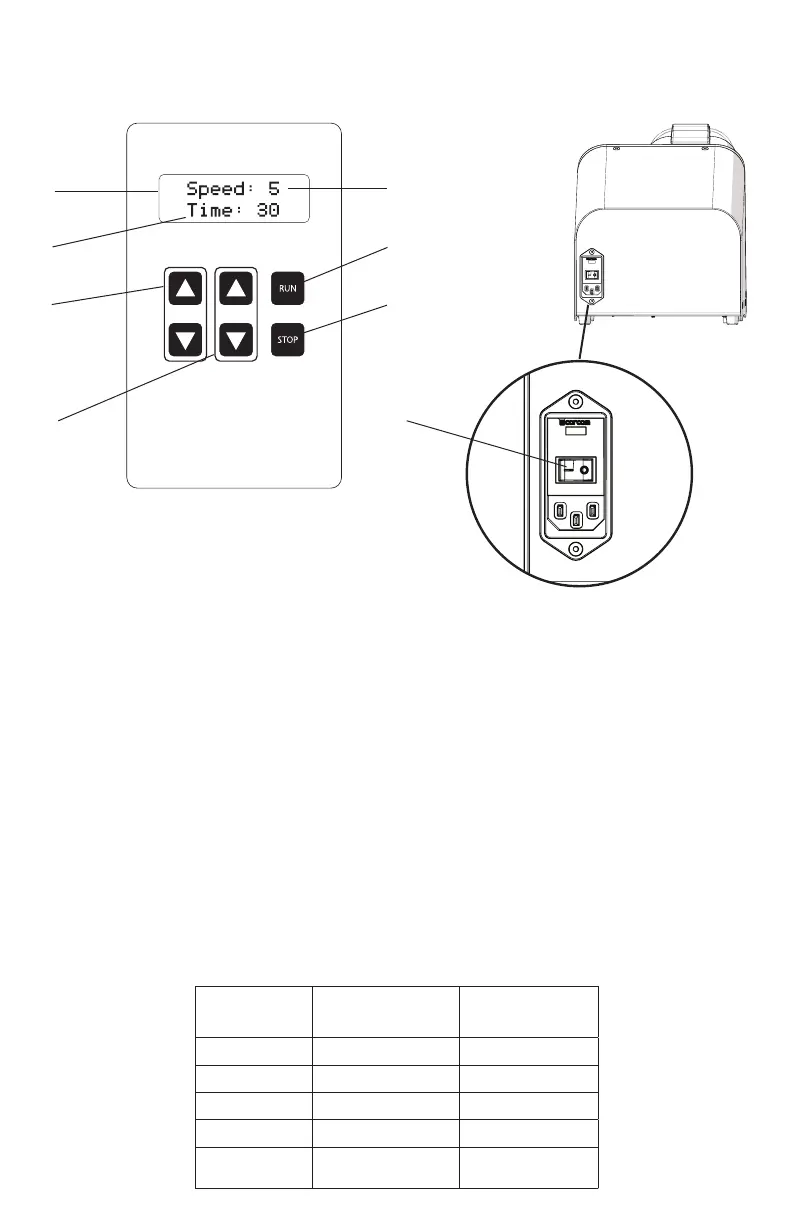
1. Power
- Plug in the power cord and move the On/Off switch on back of the unit to the On position.
2. Set Speed
- Adjust speed using up and down buttons.
3. Set Timer
- Adjust run time using up and down buttons from 1 sec. to 5 min.
4. Start
- Press Run button.
5. Pause/Stop
- Press Stop Button to Pause.
- Press Stop again to reset timer and cancel run
1. Digital Display
2. Timer
3. Speed Control
4. Timer Control
5. Speed Setting
6. Run Button
7. Stop Button
8. On/Off switch
(Back of Unit)
Speed
Setting
Processing
Power in G’s
Processing
Speed in m/s
1 30 1.5
2 60 2.5
3 90 3.7
4 120 4.4
5 150 5.0
5
6
7
8
1
2
3
4

Related product manuals