19 VWR MEGA STAR 3.0 / 3.0R ver b, rel 25.06.2020
Run time preselection
1. Press the key below the TIME display in order to open the runtime selection menu.
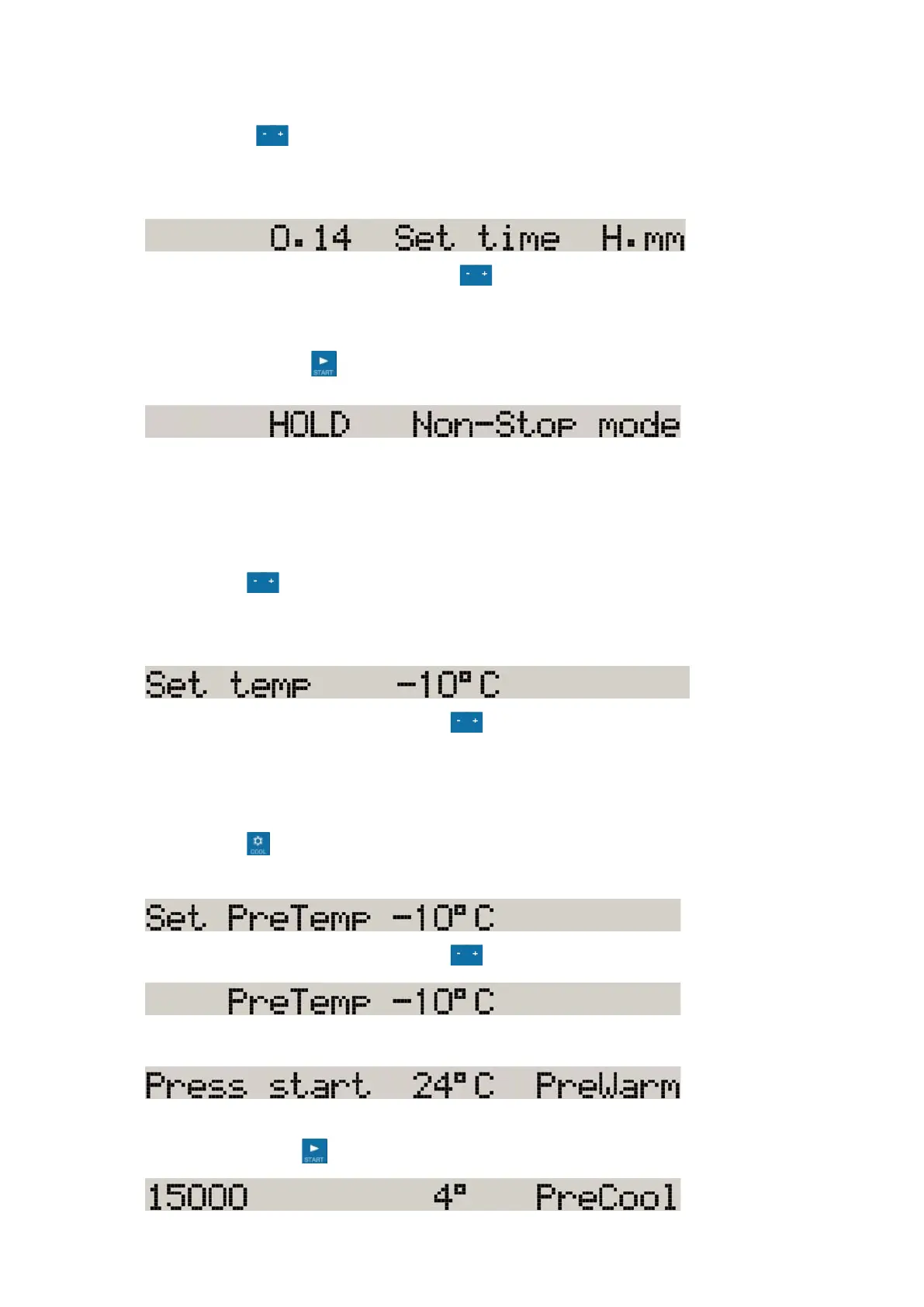
The display shows the message "Set Time".
Enter the desired runtime in H.mm.
2. Enter the desired value by pressing the key repeatedly, until the desired value shows.
Continuous operation
1. Press the START key .
Preselecting the temperature
You can preselect temperatures between -10 °C and +40 °C.
To set the temperature, proceed as follows:
1. Press the key below the TEMPERATURE display in order to open the temperature selection
menu.
The display shows "Set temp":
2. Enter the desired value by pressing the key repeatedly, until the desired value shows.
Prewarming or precooling the centrifuge
For setting the pretemp value for the centrifuge proceed as follows:
1. Press the key in order to open the temperature selection menu.
The display shows the message "Set PreTemp".
2. Enter the desired value by pressing the key repeatedly, until the desired value shows.
3. The display shows:
The display shows the current temperature inside the rotor chamber.
4. Press the START key .









 To Next Page