11 Appendix IV
110
WABCO Maintenance Manual MM-0112 (Revised 07-18)
11 Append ix IV
Aftermarket Programming
Aftermarket programming is a method of servicing most pneumatic
ABS ECUs. Instead of swapping one fully programmed ECU for
another, programmable ECUs can be stocked at the point of service
and programmed using a purchased configuration file. The process
can be completed in the following steps.
1. Acquire a programmable replacement ECU from Meritor’s
Commercial Vehicle Aftermarket.
2. Install the replacement ECU into the vehicle.
3. Acquire a configuration file from https://
wabco-na.snapon.com.
4. Load the configuration file into the ECU using WABCO’s
TOOLBOX™ Aftermarket Programming application.
NOTE: Aftermarket programming does not change the
functionality of the ABS-based safety system as installed in the
vehicle.
Minimum Requirements for Aftermarket
Programming
Before ordering a programmable ECU, ensure you meet all of the
requirements to program the ECU on the vehicle.
1. Aftermarket programming requires J1939 communications.
Any J1939 RP1210 diagnostic adapter such as the Nexiq
USB-Link™ 2 can be used for programming.
2. Aftermarket programming requires a minimum version of
TOOLBOX™ Software.
Table D: Minimum Requirements
3. Aftermarket programming requires a user account with https://
wabco-na.snapon.com to purchase configuration files.
4. Configuration files must be purchased using a credit card or
blanket PO with pre-approval.
NOTE: Vehicles equipped with a 6-pin diagnostic connector likely do
not have J1939 communication to the ABS ECU available, so
aftermarket programming will not be possible.
NOTE: If you do not have the required diagnostic adapter or
minimum version of TOOLBOX™ Software, these items can be
purchased at https://wabco-na.snapon.com.
If you do not meet any of the above requirements, a fully
programmed ECU can be purchased from Meritor Aftermarket by
contacting their customer care at 888-725-9355, Option #4.
If you meet all of the requirements, proceed with the following
Aftermarket Programming procedures.
Aftermarket Programming Procedures
Step 1: Acquire a programmable replacement ECU
from Meritor’s Commercial Vehicle Aftermarket by
calling 888-725-9355.
Meritor Aftermarket will provide the proper aftermarket
programmable replacement ECU for the vehicle being serviced.
Regardless of order method, Meritor Aftermarket will ship a
programmable ECU replacement if one is available. Programmable
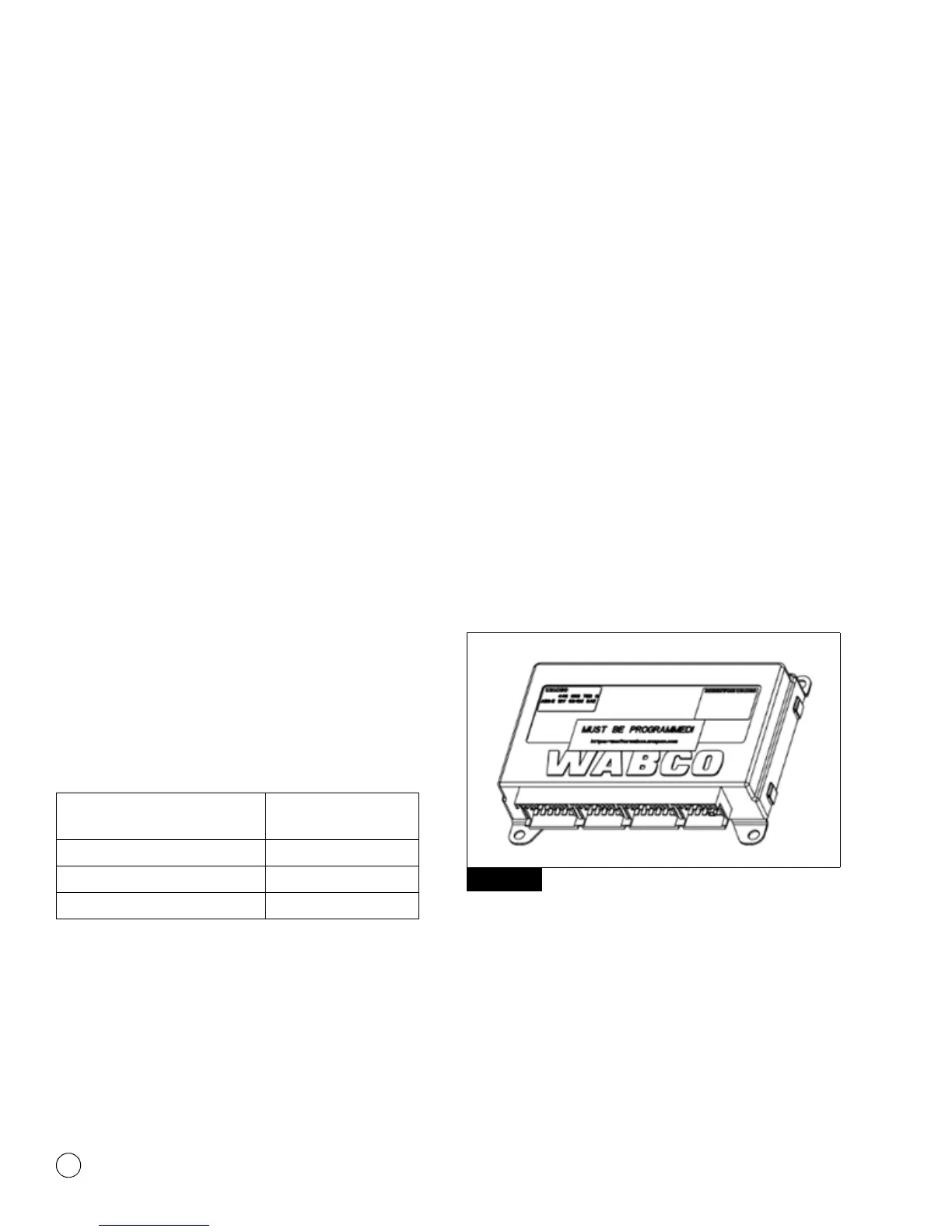
ECUs are clearly identified with a large orange sticker indicating it
must be programmed. Programmable ECUs are also shipped with
an instruction sheet explaining how to complete the service
operation. Figure 11.1.
Figure 11.1
Step 2: Install the replacement ECU into the vehicle.
The programmable ECU should be installed in the vehicle in the
same manner and location as the ECU being replaced. Connect all
electrical connectors.
NOTE: Aftermarket programmable ECUs are backwards compatible
with the ECUs they replace, so there should be no modifications
required to either the mounting or electrical connections.
ECU Type
Minimum TOOLBOX™
Software Version
E4 250 kbaud 11.5
E4 500 kbaud 12.2
E8 250 or 500 kbaud 12.2
Figure 11.1
4012074a


 To Next Page