13
13
Index
Contents
Index
Contents
CLICKING
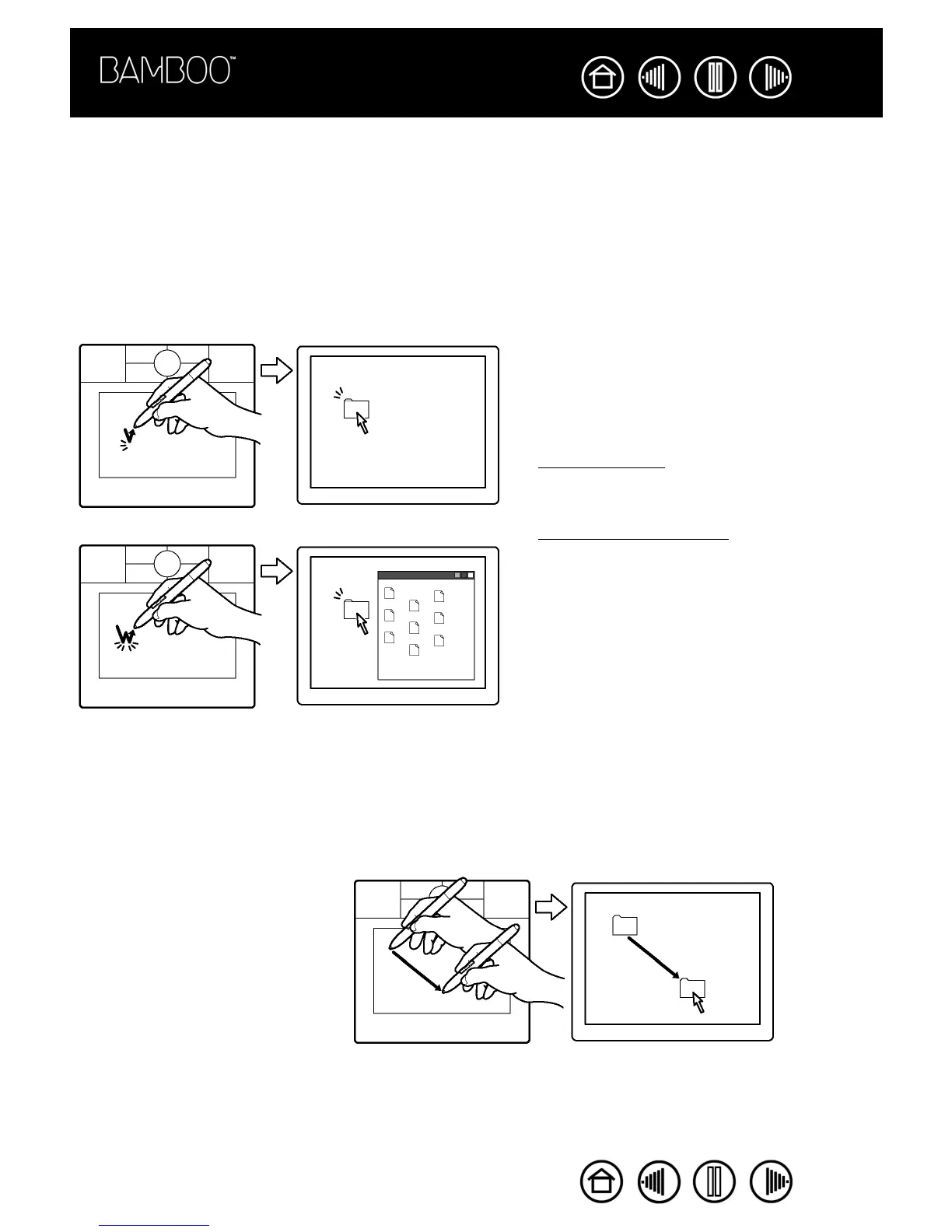
You typically click to highlight or select something on the screen, and double-click to open it.
Clicking.
To click, tap the pen tip once on the tablet, or press the pen tip on the tablet with enough force to
register a click. (If C
LICK
S
OUND
is selected in the Pen Tablet control panel and your computer speakers are
on, then you will hear a “click” sound when the pen tip is pressed hard enough to generate a mouse click.
Adjust your speaker volume as necessary.) Try clicking on a folder icon by moving the screen cursor over
the icon and pressing down on the pen tip. The folder should highlight when you press.
Double-clicking.
To double-click, quickly tap the tablet twice in the same place with the pen tip. This is like
clicking twice with a mouse button. Try double-clicking on a folder icon to open it.
DRAGGING
Dragging is used to select and move objects on the screen. To drag, first point to an object. Then press the
pen tip to the tablet and slide it across the tablet surface. The selected object will move across the screen.
To select text, move the screen cursor to the beginning of a text line, then drag the pen across the tablet until
the text is highlighted.
Hints:
• Windows: You can make navigating with the pen
easier by configuring Windows to select when
the pen is over an icon and to launch the icon
with a single click. To turn on this feature, first
open a folder.
For Windows Vista, from the ORGANIZE pull-down
menu choose FOLDER AND SEARCH OPTIONS....
From the GENERAL tab select SINGLE-CLICK TO
OPEN AN ITEM (POINT TO SELECT).
For other Windows versions, from the TOOLS pull-
down menu choose FOLDER OPTIONS.... From
the GENERAL tab select SINGLE-CLICK TO OPEN AN
ITEM (POINT TO SELECT).
• Set a pen button to DOUBLE CLICK. This is easier
than tapping twice with the pen tip, and is the
preferred method of double-clicking with a pen.
First, try moving an icon on the
screen. Then, within a document,
select some text by pressing and
dragging the pen tip across the text.










 To Next Page