31
31
Index
Contents
Index
Contents
PORTION OF SCREEN AREA
The tracking options in the PEN MODE DETAILS dialog box allow you to define which portion of the display
screen your tablet will map to:
• A
LL SCREENS. When selected, the entire monitor(s) area is mapped. This is the default setting.
See mapping to m
ultiple monitors for more information.
• MONITOR. When selected, the entire area of a single monitor that you choose is mapped.
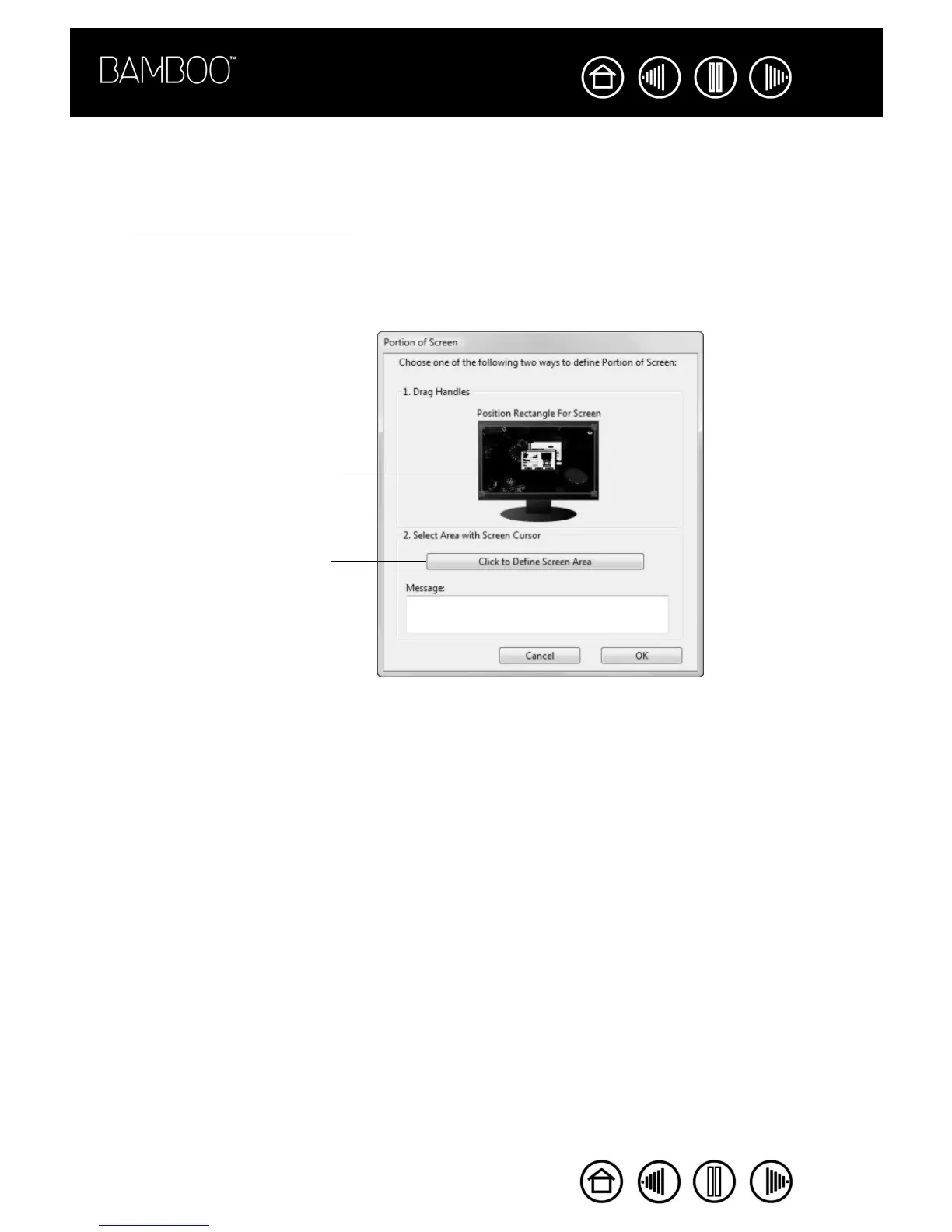
• PORTION. When selected, this option allows you to select a portion of the display for tablet to screen
mapping. Click
SET... to open the PORTION OF SCREEN dialog box.
Choose a method for defining a
portion of the display:
• Drag corners of the foreground
graphic to select the screen area.
The background graphic
represents the entire screen area.
• Move the screen cursor to select
the screen area. Select the CLICK
TO DEFINE SCREEN AREA button.
As you define PORTION OF
SCREEN, follow any MESSAGE
prompts to set the portion of your
display screen that will be used for
mapping.
After defining a portion of the screen,
you may need to use a different input
device to access other portions of the
screen area.










 To Next Page